
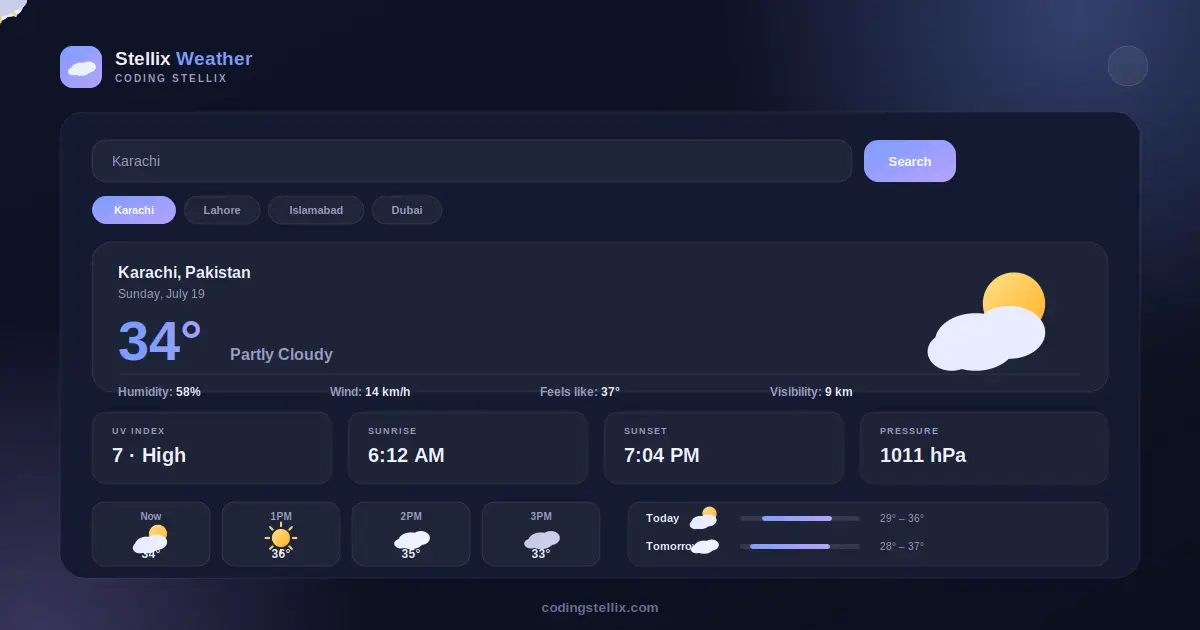
Open almost any weather website today and you will notice the same thing: a wall of numbers, a dozen tiny widgets fighting for attention, and an ad banner sitting right where the forecast should be. Somewhere between checking if you need an umbrella and closing eleven pop-ups, the actual point of the page gets lost. I wanted to build something calmer — a weather dashboard that feels like glancing out a window, not filing a report. That idea became Stellix Weather, the newest free tool from Coding Stellix.
Starting With a Different Feeling
Almost everything I build under the Coding Stellix name leans on the same visual identity — dark backgrounds, a bold orange accent, sharp glowing edges. It works well for developer tools and utilities, but weather is not really that kind of subject. Weather is soft. It shifts through the day, it has moods, and the apps that show it best tend to feel airy rather than intense.
So for this project I stepped away from the usual palette entirely. Stellix Weather uses a sky-blue and lavender color scheme instead, with a deep midnight background in dark mode and a soft periwinkle background in light mode. The accent color is a gentle sunset yellow that only shows up in small touches, like the forecast bars. It is a small decision, but it changes how the whole tool feels the moment it loads — less like a control panel, more like a calm sky.
What the Dashboard Actually Shows
The core of Stellix Weather is a single hero card: the city name, the date, a large temperature reading, a short description of the sky, and a matching icon that changes with conditions — sun, clouds, rain, or storm. Underneath that sits a row of secondary details that most people actually check before stepping outside: humidity, wind speed, how the temperature actually feels, and visibility.
Below the hero card are four smaller stat cards for UV index, sunrise, sunset, and air pressure. These are the numbers that do not need constant attention but are genuinely useful when you do need them, for example checking sunrise time before an early trip or noticing a high UV index before spending the afternoon outside.
Scroll a little further and you get an hourly forecast, laid out as a horizontally scrolling strip covering the next twelve hours, so you can see roughly when a cloudy morning turns into a clear afternoon. Below that is a seven-day forecast, where each day gets a simple horizontal bar showing the low-to-high temperature range for that day, stacked against the week’s overall range. It is a small design choice, but seeing the bars grow and shrink relative to each other makes it much faster to spot the hottest or coolest day at a glance, compared to just reading a list of numbers.
A City Search That Actually Feels Instant
Typing a city name and pressing search should not feel like waiting for a page reload, so Stellix Weather is built to respond immediately. There are also quick-access chips for a handful of cities pre-loaded — Karachi, Lahore, Islamabad, Sanghar, and Dubai — since those are the places most relevant to the people who are likely to use this tool. Clicking any of them swaps the entire dashboard instantly, with a different temperature, condition, and forecast pattern for each city.
One detail worth mentioning: the data in Stellix Weather is generated by a deterministic simulation rather than pulled from a live weather API. Each city produces a consistent forecast pattern that stays the same throughout the day, so refreshing the page does not give you random new numbers, but the results are illustrative rather than meteorologically live. This makes the tool ideal as a design template, a teaching example, or a demo dashboard — and it also means the entire page loads and runs instantly with zero API keys, zero rate limits, and zero dependency on an external service being online.
Built for Every Screen
Just like the rest of the Coding Stellix toolkit, Stellix Weather is a single self-contained file — no build process, no installation, no external libraries beyond the Jost font from Google Fonts. Open it in any browser and it works immediately, on a phone, a tablet, or a desktop monitor. The hero card reflows into a centered, stacked layout on smaller screens, the hourly strip becomes horizontally swipeable with your thumb, and every card keeps its spacing and readability regardless of screen width.
There is also a dark mode and light mode toggle in the top corner, switching instantly between the deep midnight sky theme and a soft daylight theme, both built around the same blue-lavender palette so the tool feels cohesive either way.
Why I Keep Building Tools Like This
Coding Stellix started as a place to share coding tutorials, but it has slowly grown into something closer to a small toolbox — free, practical, single-file web tools that solve one problem well and then get out of the way. Stellix QR turned into a genuinely offline QR generator after the first API-based version had reliability issues. Stellix Certify became a certificate maker useful for an actual classroom. Stellix Weather continues that pattern: pick something people check constantly, strip away the friction, and make it look like it was actually designed rather than assembled.
If you are a developer, Stellix Weather is also useful as a reference for building forecast-style dashboards — the card layout, the hourly scroll strip, and the min-max forecast bars are patterns you will find reused across almost every serious weather product. Feel free to open the file, read through the code, and adapt the color system or layout for your own project.
Stellix Weather is free to use, requires no signup, and runs entirely in your browser — part of the growing library of tools from Coding Stellix, built with the same idea behind everything else in the collection: useful first, polished always, and never in the way of the person actually trying to get something done.
<!DOCTYPE html>
<html lang="en" data-theme="dark">
<head>
<meta charset="UTF-8">
<meta name="viewport" content="width=device-width, initial-scale=1.0">
<title>Stellix Weather — Sky Dashboard | Coding Stellix</title>
<link rel="preconnect" href="https://fonts.googleapis.com">
<link rel="preconnect" href="https://fonts.gstatic.com" crossorigin>
<link href="https://fonts.googleapis.com/css2?family=Jost:wght@300;400;500;600;700;800&display=swap" rel="stylesheet">
<style>
  :root{
    --bg:#0c0f1f;
    --bg-soft:#141a30;
    --card:rgba(255,255,255,.055);
    --card-border:rgba(255,255,255,.1);
    --text:#f0f1fb;
    --muted:#9b9fc2;
    --brand:#7c9dff;
    --brand-soft:#b8a3ff;
    --accent:#ffd166;
    --glow:rgba(124,157,255,.32);
    --shadow:0 24px 70px rgba(4,6,20,.55);
  }
  [data-theme="light"]{
    --bg:#eef1fc;
    --bg-soft:#ffffff;
    --card:rgba(255,255,255,.75);
    --card-border:rgba(40,45,90,.1);
    --text:#20243c;
    --muted:#6a6f95;
    --glow:rgba(124,157,255,.22);
    --shadow:0 20px 55px rgba(90,100,180,.14);
  }
  *{margin:0;padding:0;box-sizing:border-box;-webkit-tap-highlight-color:transparent}
  body{
    font-family:'Jost',sans-serif;
    background:var(--bg);color:var(--text);
    min-height:100vh;overflow-x:hidden;
    transition:background .45s,color .45s;
  }
  body::before{
    content:"";position:fixed;inset:0;pointer-events:none;z-index:0;
    background:
      radial-gradient(650px 480px at 90% -12%,var(--glow),transparent 65%),
      radial-gradient(600px 460px at -14% 108%,rgba(184,163,255,.24),transparent 60%);
  }
  .wrap{position:relative;z-index:1;max-width:980px;margin:0 auto;padding:0 18px}

  header{display:flex;align-items:center;justify-content:space-between;padding:20px 0}
  .logo{display:flex;align-items:center;gap:11px;user-select:none}
  .logo-mark{
    width:42px;height:42px;border-radius:13px;
    background:linear-gradient(135deg,var(--brand),var(--brand-soft));
    display:grid;place-items:center;color:#fff;font-size:1.2rem;
    box-shadow:0 6px 22px var(--glow);
  }
  .logo-name{font-weight:700;font-size:1.22rem}
  .logo-name span{color:var(--brand)}
  .logo small{display:block;font-size:.6rem;letter-spacing:2.6px;text-transform:uppercase;color:var(--muted);font-weight:500}
  #themeBtn{
    width:44px;height:44px;border-radius:50%;cursor:pointer;
    border:1px solid var(--card-border);background:var(--card);color:var(--text);
    font-size:1.12rem;backdrop-filter:blur(10px);
    display:grid;place-items:center;transition:transform .3s,box-shadow .3s;
  }
  #themeBtn:hover{transform:rotate(18deg) scale(1.08);box-shadow:0 0 20px var(--glow)}
  #themeBtn:focus-visible{outline:2px solid var(--brand);outline-offset:3px}

  .search{
    display:flex;gap:10px;margin:22px 0 26px;animation:rise .7s ease both;
  }
  .search input{
    flex:1;font-family:inherit;font-size:1rem;font-weight:500;
    padding:15px 20px;border-radius:16px;color:var(--text);
    background:var(--card);border:1px solid var(--card-border);
    outline:none;backdrop-filter:blur(12px);
    transition:border-color .25s,box-shadow .25s;
  }
  .search input:focus{border-color:var(--brand);box-shadow:0 0 0 3px var(--glow)}
  .search button{
    font-family:inherit;font-weight:700;font-size:.95rem;
    padding:0 26px;border-radius:16px;border:none;cursor:pointer;
    background:linear-gradient(135deg,var(--brand),var(--brand-soft));
    color:#fff;box-shadow:0 8px 22px var(--glow);
    transition:transform .25s;
  }
  .search button:hover{transform:translateY(-2px)}
  .search button:focus-visible{outline:2px solid var(--text);outline-offset:2px}

  .chips{display:flex;gap:8px;flex-wrap:wrap;margin-bottom:26px;animation:rise .7s .06s ease both}
  .chip{
    font-family:inherit;font-weight:600;font-size:.82rem;
    padding:8px 16px;border-radius:999px;cursor:pointer;
    border:1px solid var(--card-border);background:var(--card);color:var(--muted);
    transition:all .25s;
  }
  .chip:hover{color:var(--text);border-color:var(--brand)}
  .chip.active{background:linear-gradient(135deg,var(--brand),var(--brand-soft));color:#fff;border-color:transparent}

  .hero-card{
    background:var(--card);border:1px solid var(--card-border);
    border-radius:28px;padding:36px;backdrop-filter:blur(16px);box-shadow:var(--shadow);
    display:grid;grid-template-columns:1fr auto;align-items:center;gap:20px;
    position:relative;overflow:hidden;animation:rise .7s .12s ease both;
    min-height:210px;
  }
  .hero-card .sky{
    position:absolute;inset:0;opacity:.5;pointer-events:none;
  }
  .hero-info{position:relative;z-index:1}
  .hero-info .place{font-size:1.3rem;font-weight:700}
  .hero-info .date{color:var(--muted);font-size:.9rem;margin-top:2px}
  .hero-info .temp{
    font-size:5.2rem;font-weight:800;line-height:1;margin-top:14px;
    background:linear-gradient(120deg,var(--brand),var(--brand-soft));
    -webkit-background-clip:text;background-clip:text;color:transparent;
  }
  .hero-info .desc{font-size:1.05rem;font-weight:500;color:var(--muted);margin-top:6px}
  .hero-icon{position:relative;z-index:1;font-size:6.5rem;filter:drop-shadow(0 10px 24px var(--glow))}
  .hero-meta{
    position:relative;z-index:1;grid-column:1/-1;
    display:flex;gap:26px;flex-wrap:wrap;margin-top:10px;
    padding-top:20px;border-top:1px solid var(--card-border);
  }
  .hero-meta div{display:flex;align-items:center;gap:8px;color:var(--muted);font-size:.88rem;font-weight:500}
  .hero-meta b{color:var(--text);font-weight:700}

  .grid{
    display:grid;grid-template-columns:repeat(auto-fit,minmax(200px,1fr));
    gap:14px;margin:22px 0;animation:rise .7s .18s ease both;
  }
  .stat-card{
    background:var(--card);border:1px solid var(--card-border);
    border-radius:18px;padding:18px 20px;backdrop-filter:blur(12px);
    transition:transform .3s;
  }
  .stat-card:hover{transform:translateY(-3px)}
  .stat-card .label{font-size:.72rem;font-weight:700;letter-spacing:1.4px;text-transform:uppercase;color:var(--muted)}
  .stat-card .value{font-size:1.6rem;font-weight:800;margin-top:8px}
  .stat-card .sub{font-size:.8rem;color:var(--muted);margin-top:3px}

  .section-title{
    font-size:.78rem;font-weight:700;letter-spacing:2px;text-transform:uppercase;
    color:var(--muted);margin:30px 0 12px;
  }
  .hourly{
    display:flex;gap:10px;overflow-x:auto;padding-bottom:8px;
    animation:rise .7s .22s ease both;
    scrollbar-width:thin;
  }
  .hour-card{
    flex:0 0 auto;width:88px;background:var(--card);border:1px solid var(--card-border);
    border-radius:16px;padding:14px 10px;text-align:center;backdrop-filter:blur(10px);
  }
  .hour-card .t{font-size:.76rem;color:var(--muted);font-weight:600}
  .hour-card .ic{font-size:1.6rem;margin:8px 0}
  .hour-card .temp{font-size:1rem;font-weight:700}

  .daily{
    background:var(--card);border:1px solid var(--card-border);border-radius:20px;
    backdrop-filter:blur(12px);overflow:hidden;animation:rise .7s .26s ease both;
    margin-bottom:30px;
  }
  .day-row{
    display:flex;align-items:center;justify-content:space-between;
    padding:14px 20px;border-bottom:1px solid var(--card-border);
    font-size:.92rem;font-weight:600;
  }
  .day-row:last-child{border-bottom:none}
  .day-row .day{width:90px;color:var(--text)}
  .day-row .ic{font-size:1.3rem;width:40px;text-align:center}
  .day-row .rng{display:flex;align-items:center;gap:10px;color:var(--muted);font-weight:500;flex:1;justify-content:flex-end}
  .bar-track{width:90px;height:5px;border-radius:99px;background:var(--card-border);position:relative;overflow:hidden}
  .bar-fill{position:absolute;top:0;bottom:0;border-radius:99px;background:linear-gradient(90deg,var(--brand),var(--accent))}

  footer{text-align:center;padding:20px 0 36px;color:var(--muted);font-size:.86rem}
  footer b{color:var(--brand)}

  @keyframes rise{from{opacity:0;transform:translateY(20px)}to{opacity:1;transform:none}}

  @media(max-width:640px){
    .hero-card{grid-template-columns:1fr;text-align:center;padding:26px}
    .hero-icon{font-size:5rem;justify-self:center}
    .hero-info .temp{font-size:4rem}
    .hero-meta{justify-content:center}
    .day-row .rng{gap:6px}
    .bar-track{width:60px}
  }
  @media (prefers-reduced-motion: reduce){
    *,*::before,*::after{animation-duration:.01ms!important;transition-duration:.01ms!important}
  }
</style>
</head>
<body>
<div class="wrap">

  <header>
    <div class="logo">
      <div class="logo-mark">☁</div>
      <div>
        <div class="logo-name">Stellix <span>Weather</span></div>
        <small>by Coding Stellix</small>
      </div>
    </div>
    <button id="themeBtn" aria-label="Toggle light and dark mode" title="Toggle theme">🌙</button>
  </header>

  <div class="search">
    <input type="text" id="cityInput" placeholder="Search a city…" value="Karachi">
    <button id="searchBtn">Search</button>
  </div>
  <div class="chips" id="chips">
    <button class="chip active" data-city="Karachi">Karachi</button>
    <button class="chip" data-city="Lahore">Lahore</button>
    <button class="chip" data-city="Islamabad">Islamabad</button>
    <button class="chip" data-city="Sanghar">Sanghar</button>
    <button class="chip" data-city="Dubai">Dubai</button>
  </div>

  <div class="hero-card" id="heroCard">
    <div class="hero-info">
      <div class="place" id="place">Karachi, Pakistan</div>
      <div class="date" id="dateNow"></div>
      <div class="temp" id="temp">34°</div>
      <div class="desc" id="desc">Partly Cloudy</div>
    </div>
    <div class="hero-icon" id="heroIcon">⛅</div>
    <div class="hero-meta">
      <div>💧 Humidity: <b id="humidity">58%</b></div>
      <div>💨 Wind: <b id="wind">14 km/h</b></div>
      <div>🌡 Feels like: <b id="feels">37°</b></div>
      <div>👁 Visibility: <b id="vis">9 km</b></div>
    </div>
  </div>

  <div class="grid">
    <div class="stat-card"><div class="label">UV Index</div><div class="value" id="uv">7</div><div class="sub">High</div></div>
    <div class="stat-card"><div class="label">Sunrise</div><div class="value" id="sunrise">6:12 AM</div><div class="sub">↑ Morning</div></div>
    <div class="stat-card"><div class="label">Sunset</div><div class="value" id="sunset">7:04 PM</div><div class="sub">↓ Evening</div></div>
    <div class="stat-card"><div class="label">Pressure</div><div class="value" id="pressure">1011 hPa</div><div class="sub">Stable</div></div>
  </div>

  <div class="section-title">Hourly Forecast</div>
  <div class="hourly" id="hourly"></div>

  <div class="section-title">7-Day Forecast</div>
  <div class="daily" id="daily"></div>

  <footer>Crafted with 🧡 by <b>Coding Stellix</b> — Stellix Weather v1.0</footer>
</div>

<script>
// ============================================================
//  Stellix Weather v1.0 — Sky Dashboard
//  Simulated forecast engine (deterministic per city) — no API key required.
//  Crafted by Coding Stellix (coding_stellix)
// ============================================================
(function(){
  "use strict";
  var $ = function(id){ return document.getElementById(id); };

  var ICONS = ["☀️","🌤","⛅","🌥","☁️","🌦","🌧","⛈"];
  var DESCS = ["Clear Sky","Sunny","Partly Cloudy","Mostly Cloudy","Overcast","Light Showers","Rainy","Thunderstorms"];

  var CITY_BASE = {
    Karachi:{temp:34,country:"Pakistan"}, Lahore:{temp:38,country:"Pakistan"},
    Islamabad:{temp:31,country:"Pakistan"}, Sanghar:{temp:37,country:"Pakistan"},
    Dubai:{temp:41,country:"UAE"}
  };

  function hashSeed(str){
    var h = 0;
    for(var i = 0; i < str.length; i++){ h = (h * 31 + str.charCodeAt(i)) >>> 0; }
    return h;
  }
  function seededRand(seed){
    var s = seed;
    return function(){
      s = (s * 1103515245 + 12345) >>> 0;
      return (s % 10000) / 10000;
    };
  }

  function renderCity(city){
    var base = CITY_BASE[city] || { temp: 30 + Math.round(Math.random()*10), country: "" };
    var rand = seededRand(hashSeed(city + new Date().toDateString()));
    var condIdx = Math.floor(rand() * ICONS.length);
    var temp = base.temp + Math.round((rand() - 0.5) * 4);

    $("place").textContent = city + (base.country ? ", " + base.country : "");
    $("temp").textContent = temp + "°";
    $("desc").textContent = DESCS[condIdx];
    $("heroIcon").textContent = ICONS[condIdx];
    $("humidity").textContent = (40 + Math.floor(rand()*40)) + "%";
    $("wind").textContent = (6 + Math.floor(rand()*22)) + " km/h";
    $("feels").textContent = (temp + Math.floor(rand()*4)) + "°";
    $("vis").textContent = (6 + Math.floor(rand()*8)) + " km";
    $("uv").textContent = 1 + Math.floor(rand()*10);
    $("pressure").textContent = (1005 + Math.floor(rand()*18)) + " hPa";
    $("sunrise").textContent = "6:" + (10 + Math.floor(rand()*20)) + " AM";
    $("sunset").textContent = "7:" + (String(Math.floor(rand()*50)).padStart(2,"0")) + " PM";

    // hourly
    var hourly = $("hourly");
    hourly.innerHTML = "";
    var now = new Date().getHours();
    for(var i = 0; i < 12; i++){
      var h = (now + i) % 24;
      var label = h === 0 ? "12AM" : h < 12 ? h + "AM" : h === 12 ? "12PM" : (h-12) + "PM";
      var ic = ICONS[Math.floor(rand() * ICONS.length)];
      var t = temp + Math.round(Math.sin(i/2) * 3 - i*0.15);
      var card = document.createElement("div");
      card.className = "hour-card";
      card.innerHTML = '<div class="t">' + (i === 0 ? "Now" : label) + '</div><div class="ic">' + ic + '</div><div class="temp">' + t + '°</div>';
      hourly.appendChild(card);
    }

    // 7-day
    var daily = $("daily");
    daily.innerHTML = "";
    var days = ["Today","Tomorrow","Wed","Thu","Fri","Sat","Sun"];
    var minGlobal = 99, maxGlobal = -99;
    var forecasts = [];
    for(var d = 0; d < 7; d++){
      var hi = temp + Math.round((rand()-0.3)*6);
      var lo = hi - (4 + Math.floor(rand()*6));
      forecasts.push({ hi:hi, lo:lo, ic: ICONS[Math.floor(rand()*ICONS.length)] });
      minGlobal = Math.min(minGlobal, lo); maxGlobal = Math.max(maxGlobal, hi);
    }
    forecasts.forEach(function(f, idx){
      var leftPct = ((f.lo - minGlobal) / (maxGlobal - minGlobal)) * 100;
      var widthPct = ((f.hi - f.lo) / (maxGlobal - minGlobal)) * 100;
      var row = document.createElement("div");
      row.className = "day-row";
      row.innerHTML =
        '<div class="day">' + days[idx] + '</div>' +
        '<div class="ic">' + f.ic + '</div>' +
        '<div class="rng">' +
          '<span>' + f.lo + '°</span>' +
          '<div class="bar-track"><div class="bar-fill" style="left:' + leftPct + '%;width:' + widthPct + '%"></div></div>' +
          '<span>' + f.hi + '°</span>' +
        '</div>';
      daily.appendChild(row);
    });
  }

  function setCity(city){
    $("cityInput").value = city;
    document.querySelectorAll(".chip").forEach(function(c){
      c.classList.toggle("active", c.dataset.city === city);
    });
    renderCity(city);
  }

  $("searchBtn").addEventListener("click", function(){
    var val = $("cityInput").value.trim();
    if(val) setCity(val);
  });
  $("cityInput").addEventListener("keydown", function(e){
    if(e.key === "Enter"){ var v = e.target.value.trim(); if(v) setCity(v); }
  });
  $("chips").addEventListener("click", function(e){
    var btn = e.target.closest(".chip");
    if(btn) setCity(btn.dataset.city);
  });

  // date
  var now = new Date();
  $("dateNow").textContent = now.toLocaleDateString(undefined, { weekday:"long", month:"long", day:"numeric" });

  // theme
  var themeBtn = $("themeBtn");
  themeBtn.addEventListener("click", function(){
    var html = document.documentElement;
    var next = html.getAttribute("data-theme") === "dark" ? "light" : "dark";
    html.setAttribute("data-theme", next);
    themeBtn.textContent = next === "dark" ? "🌙" : "☀️";
  });

  // init
  renderCity("Karachi");
})();
</script>
</body>
</html>