
Almost everyone who has ever built a website, sent a photo over WhatsApp, or uploaded an image to a form has hit the same small annoyance: the file is too big. Maybe the upload form rejects it outright, maybe the page just loads painfully slowly because of it, or maybe you’re on a slow connection and watching a 6MB photo crawl its way onto a server feels like it takes forever. The usual fix is to open some random “image compressor” website, upload the file, wait for it to process on someone else’s server, and download it back. It works, but it also means your photo — personal, client work, whatever it is — briefly leaves your device and sits on a server you know nothing about.
Stellix Compress skips that step entirely. It compresses and resizes images directly inside your browser, using nothing but the Canvas API that’s already built into every modern browser. Nothing you drop into the tool is ever sent anywhere. Open the file, load your images, and everything from decoding to compressing to generating the final download happens locally, on your own machine.
What It Actually Does
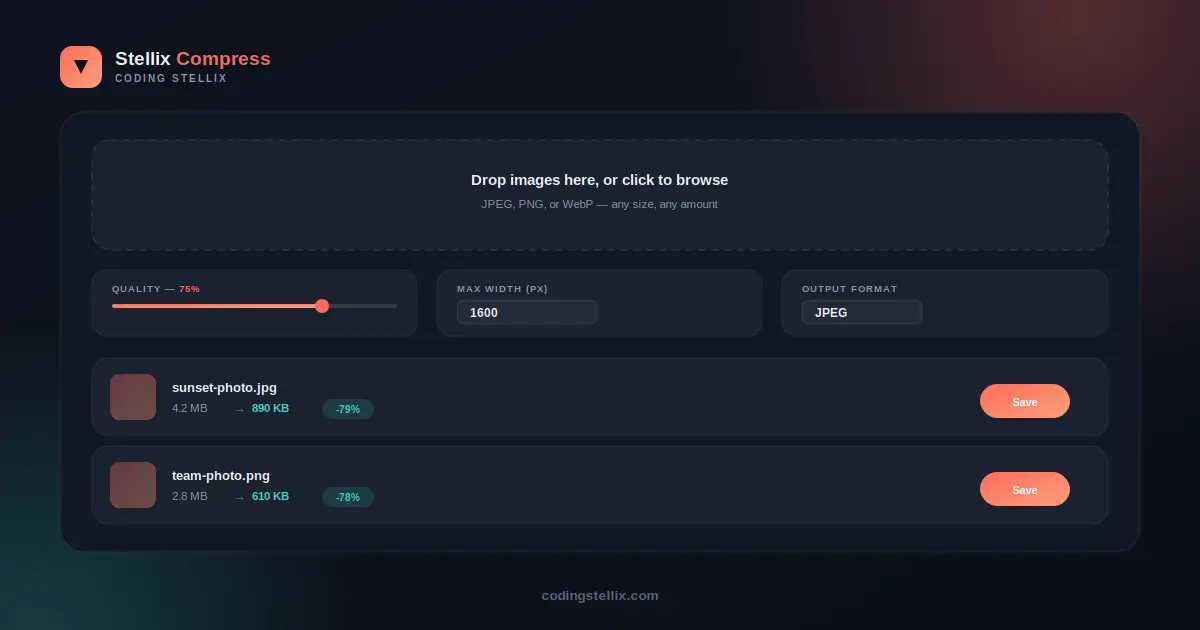
The idea behind image compression is simple even if the math underneath isn’t: most photos carry far more visual data than is actually needed for how they’ll be viewed. A photo taken on a modern phone camera can easily be 4000 pixels wide and several megabytes in size — useful for printing a poster, wildly excessive for a blog post or a WhatsApp message. Stellix Compress lets you control exactly how much of that excess gets trimmed, through three simple settings.
The first is quality, controlled with a single slider from 10 to 100 percent. Lower quality means a smaller file but a bit more visible compression in fine detail; higher quality keeps more of the original sharpness at the cost of file size. Most photos hold up remarkably well anywhere between 65 and 80 percent, which is why the tool defaults to 75.
The second is maximum width, a plain number field. If you set it to 1600 pixels, any image wider than that gets scaled down to fit, while anything already smaller stays untouched. This one setting alone often does more to shrink file size than the quality slider does, since resolution and file size scale together.
The third is output format — JPEG, WebP, or PNG. JPEG remains the safest default for photos and is supported everywhere. WebP is a newer format that, for photographic images, produces noticeably smaller files at the same visual quality, and is well supported by current browsers. PNG stays available for images that need it, like screenshots with sharp text or graphics with transparency, though it will generally produce larger files for photographs.
Built for Batches, Not Just One File at a Time
A single-image tool is only useful up to a point. Real work usually involves a folder of photos, not one. Stellix Compress accepts multiple files at once, either through a normal file picker or by dragging a whole batch of images straight onto the page. Each image gets its own row showing a thumbnail, its original file size, and — once compression finishes — its new size and the percentage saved, calculated live for every single image rather than shown as a rough average.
From there, each image can be downloaded individually, or the whole batch can be saved in one click. Changing the quality, width, or format settings and clicking “Re-compress All” reprocesses every loaded image against the new settings without needing to re-upload anything, since the original files stay in memory in the browser the entire time.
Why This Matters Beyond Just Convenience
There’s a genuine privacy angle here that’s easy to overlook. Most free online compressors work by literally uploading your file to their server, processing it there, and sending it back. For a random meme, that’s harmless. For a screenshot of a client contract, a photo with someone’s face in it, or content under an NDA, it’s a real question of where that file just went and who might have a copy of it now, even briefly.
Because Stellix Compress runs entirely through client-side JavaScript and the Canvas API, there’s no upload step to worry about at all. The image is decoded in memory, redrawn onto a canvas at the new dimensions, and re-encoded straight back into a downloadable file — all inside the same browser tab, without a network request involved anywhere in that chain. It also means the tool works just as fast on a slow connection as a fast one, since there’s no upload or download to wait on beyond saving the final file to disk.
A Practical Tool for a Very Common Problem
This is the kind of tool that quietly earns its place in a bookmark bar. Anyone maintaining a website eventually runs into page-speed complaints traced back to oversized images. Anyone submitting a resume, a portfolio, or a form attachment eventually hits a file-size limit. Teachers preparing slides or handouts often need to shrink a batch of photos before they’ll fit in a document without stalling it. None of these situations call for a heavyweight photo editor — they call for something fast that does exactly one job well.
Stellix Compress is built to be that tool: no installation, no account, no file size collected anywhere, and no limit on how many images can be processed in a session beyond what the device itself can comfortably hold in memory. It runs as a single self-contained HTML file, styled with the same Jost typeface used across the rest of the Coding Stellix toolkit, with a navy-and-coral color scheme chosen specifically for this tool rather than reused from anything else in the collection — a deliberate signal that visual compression and color compression are, in their own way, related crafts.
Where It Fits in the Bigger Picture
Coding Stellix has slowly built up a small library of these single-purpose, offline-first tools — a QR generator that doesn’t depend on an external API, a certificate maker for classroom use, a corkboard-style task manager, and now an image compressor that respects the fact that not every photo needs to touch a server to get smaller. The pattern across all of them is the same: solve one real, specific problem, make it fast, and don’t ask for anything in return.
Stellix Compress is free, works entirely offline once loaded, and never uploads a single file — open it, drop in a photo, and watch the size drop in real time.
<!DOCTYPE html>
<html lang="en" data-theme="dark">
<head>
<meta charset="UTF-8">
<meta name="viewport" content="width=device-width, initial-scale=1.0">
<title>Stellix Compress — Image Size Reducer | Coding Stellix</title>
<link rel="preconnect" href="https://fonts.googleapis.com">
<link rel="preconnect" href="https://fonts.gstatic.com" crossorigin>
<link href="https://fonts.googleapis.com/css2?family=Jost:wght@300;400;500;600;700;800&display=swap" rel="stylesheet">
<style>
  :root{
    --bg:#0a0f1a;
    --bg-soft:#101826;
    --card:rgba(255,255,255,.05);
    --card-border:rgba(255,255,255,.1);
    --text:#eef2f8;
    --muted:#8b96ab;
    --brand:#ff6b5b;
    --brand-soft:#ffa07a;
    --accent2:#3fd6c7;
    --glow:rgba(255,107,91,.28);
    --input-bg:rgba(255,255,255,.06);
    --shadow:0 24px 70px rgba(0,0,0,.55);
  }
  [data-theme="light"]{
    --bg:#f4f6fb;
    --bg-soft:#ffffff;
    --card:rgba(255,255,255,.8);
    --card-border:rgba(10,20,40,.1);
    --text:#0e1420;
    --muted:#5c6779;
    --glow:rgba(255,107,91,.18);
    --input-bg:rgba(10,20,40,.05);
    --shadow:0 20px 55px rgba(20,30,60,.14);
  }
  *{margin:0;padding:0;box-sizing:border-box;-webkit-tap-highlight-color:transparent}
  body{
    font-family:'Jost',sans-serif;
    background:var(--bg);color:var(--text);
    min-height:100vh;overflow-x:hidden;
    transition:background .45s,color .45s;
  }
  body::before{
    content:"";position:fixed;inset:0;pointer-events:none;z-index:0;
    background:
      radial-gradient(650px 450px at 92% -10%,var(--glow),transparent 65%),
      radial-gradient(550px 420px at -12% 108%,rgba(63,214,199,.18),transparent 60%);
  }
  .wrap{position:relative;z-index:1;max-width:1000px;margin:0 auto;padding:0 18px}

  header{display:flex;align-items:center;justify-content:space-between;padding:20px 0}
  .logo{display:flex;align-items:center;gap:11px;user-select:none}
  .logo-mark{
    width:42px;height:42px;border-radius:13px;
    background:linear-gradient(135deg,var(--brand),var(--brand-soft));
    display:grid;place-items:center;color:#fff;font-size:1.2rem;font-weight:800;
    box-shadow:0 6px 22px var(--glow);
  }
  .logo-name{font-weight:700;font-size:1.22rem}
  .logo-name span{color:var(--brand)}
  .logo small{display:block;font-size:.6rem;letter-spacing:2.6px;text-transform:uppercase;color:var(--muted);font-weight:500}
  #themeBtn{
    width:44px;height:44px;border-radius:50%;cursor:pointer;
    border:1px solid var(--card-border);background:var(--card);color:var(--text);
    font-size:1.12rem;backdrop-filter:blur(10px);
    display:grid;place-items:center;transition:transform .3s,box-shadow .3s;
  }
  #themeBtn:hover{transform:rotate(18deg) scale(1.08);box-shadow:0 0 20px var(--glow)}
  #themeBtn:focus-visible{outline:2px solid var(--brand);outline-offset:3px}

  .hero{text-align:center;padding:14px 0 6px;animation:rise .7s ease both}
  .hero h1{font-size:clamp(1.9rem,5.2vw,3rem);font-weight:800;letter-spacing:-.5px;line-height:1.15}
  .hero h1 em{
    font-style:normal;background:linear-gradient(120deg,var(--brand),var(--accent2));
    -webkit-background-clip:text;background-clip:text;color:transparent;
  }
  .hero p{color:var(--muted);margin-top:8px;font-size:1rem}

  .dropzone{
    margin-top:24px;border-radius:24px;padding:44px 20px;text-align:center;
    background:var(--card);border:2px dashed var(--card-border);
    backdrop-filter:blur(14px);cursor:pointer;transition:border-color .25s,background .25s;
    animation:rise .7s .08s ease both;
  }
  .dropzone.drag-active{border-color:var(--brand);background:rgba(255,107,91,.06)}
  .dropzone .dz-icon{font-size:2.6rem;margin-bottom:10px}
  .dropzone h3{font-size:1.1rem;font-weight:700}
  .dropzone p{color:var(--muted);font-size:.86rem;margin-top:5px}
  .dropzone input{display:none}

  .controls{
    display:grid;grid-template-columns:repeat(auto-fit,minmax(180px,1fr));gap:14px;
    margin-top:20px;animation:rise .7s .14s ease both;
  }
  .ctrl-card{
    background:var(--card);border:1px solid var(--card-border);border-radius:16px;
    padding:14px 16px;backdrop-filter:blur(12px);
  }
  .ctrl-card label{display:block;font-size:.72rem;font-weight:700;letter-spacing:1.2px;text-transform:uppercase;color:var(--muted);margin-bottom:8px}
  .ctrl-card .val{color:var(--brand);font-weight:700}
  input[type=range]{width:100%;accent-color:var(--brand);cursor:pointer}
  select{
    width:100%;font-family:inherit;font-weight:600;font-size:.9rem;
    padding:9px 10px;border-radius:10px;color:var(--text);
    background:var(--input-bg);border:1px solid var(--card-border);cursor:pointer;
  }
  [data-theme="dark"] select option{background:#141b2b;color:#fff}
  .num-input{
    width:100%;font-family:inherit;font-weight:600;font-size:.9rem;
    padding:9px 10px;border-radius:10px;color:var(--text);
    background:var(--input-bg);border:1px solid var(--card-border);outline:none;
  }
  .num-input:focus{border-color:var(--brand)}

  .bulk-actions{display:flex;gap:10px;margin-top:16px;flex-wrap:wrap;justify-content:center}
  .btn{
    font-family:inherit;font-weight:700;font-size:.9rem;
    padding:12px 24px;border-radius:999px;cursor:pointer;border:none;
    transition:transform .25s;
  }
  .btn.primary{background:linear-gradient(135deg,var(--brand),var(--brand-soft));color:#fff;box-shadow:0 8px 24px var(--glow)}
  .btn.ghost{background:var(--card);color:var(--text);border:1px solid var(--card-border)}
  .btn:hover{transform:translateY(-2px)}
  .btn:disabled{opacity:.4;cursor:not-allowed;transform:none}
  .btn:focus-visible{outline:2px solid var(--brand);outline-offset:2px}

  .img-list{display:flex;flex-direction:column;gap:14px;margin-top:22px}
  .img-row{
    display:grid;grid-template-columns:80px 1fr auto;gap:16px;align-items:center;
    background:var(--card);border:1px solid var(--card-border);border-radius:18px;
    padding:14px;backdrop-filter:blur(12px);
    animation:rise .5s ease both;
  }
  .img-thumb{
    width:80px;height:80px;border-radius:12px;overflow:hidden;background:var(--input-bg);
    display:grid;place-items:center;flex-shrink:0;
  }
  .img-thumb img{width:100%;height:100%;object-fit:cover;display:block}
  .img-info{min-width:0}
  .img-info .name{font-weight:600;font-size:.92rem;overflow:hidden;text-overflow:ellipsis;white-space:nowrap}
  .size-compare{display:flex;align-items:center;gap:8px;margin-top:6px;font-size:.82rem;flex-wrap:wrap}
  .size-compare .orig{color:var(--muted);text-decoration:line-through}
  .size-compare .arrow{color:var(--muted)}
  .size-compare .newsize{color:var(--accent2);font-weight:700}
  .size-compare .pct{
    background:rgba(63,214,199,.15);color:var(--accent2);font-weight:700;
    padding:2px 9px;border-radius:999px;font-size:.74rem;
  }
  .row-actions{display:flex;gap:8px;align-items:center}
  .row-actions .dl{
    font-family:inherit;font-weight:700;font-size:.8rem;
    padding:9px 16px;border-radius:999px;border:none;cursor:pointer;
    background:linear-gradient(135deg,var(--brand),var(--brand-soft));color:#fff;
    white-space:nowrap;
  }
  .row-actions .dl:disabled{opacity:.4;cursor:not-allowed}
  .row-actions .remove{
    background:none;border:none;color:var(--muted);font-size:1rem;padding:6px 8px;cursor:pointer;
  }
  .row-actions .remove:hover{color:#ff6b6b}
  .processing{font-size:.78rem;color:var(--muted)}

  .empty-hint{text-align:center;color:var(--muted);font-size:.85rem;padding:20px 0}

  footer{text-align:center;padding:26px 0 36px;color:var(--muted);font-size:.86rem}
  footer b{color:var(--brand)}

  @keyframes rise{from{opacity:0;transform:translateY(20px)}to{opacity:1;transform:none}}
  @media(max-width:560px){
    .img-row{grid-template-columns:60px 1fr;grid-template-areas:"thumb info" "actions actions"}
    .img-thumb{grid-area:thumb;width:60px;height:60px}
    .img-info{grid-area:info}
    .row-actions{grid-area:actions;margin-top:10px;justify-content:flex-end}
  }
  @media (prefers-reduced-motion: reduce){
    *,*::before,*::after{animation-duration:.01ms!important;transition-duration:.01ms!important}
  }
</style>
</head>
<body>
<div class="wrap">

  <header>
    <div class="logo">
      <div class="logo-mark">▼</div>
      <div>
        <div class="logo-name">Stellix <span>Compress</span></div>
        <small>by Coding Stellix</small>
      </div>
    </div>
    <button id="themeBtn" aria-label="Toggle light and dark mode" title="Toggle theme">🌙</button>
  </header>

  <section class="hero">
    <h1>Shrink images without the <em>upload wait</em></h1>
    <p>Compress and resize photos entirely in your browser — nothing ever leaves your device.</p>
  </section>

  <div class="dropzone" id="dropzone">
    <div class="dz-icon">📥</div>
    <h3>Drop images here, or click to browse</h3>
    <p>JPEG, PNG, or WebP — any size, any amount</p>
    <input type="file" id="fileInput" accept="image/*" multiple>
  </div>

  <div class="controls">
    <div class="ctrl-card">
      <label>Quality — <span class="val" id="qualityVal">75%</span></label>
      <input type="range" id="qualitySlider" min="10" max="100" value="75">
    </div>
    <div class="ctrl-card">
      <label>Max Width (px)</label>
      <input type="number" class="num-input" id="maxWidth" value="1600" min="100" step="50">
    </div>
    <div class="ctrl-card">
      <label>Output Format</label>
      <select id="formatSelect">
        <option value="image/jpeg">JPEG</option>
        <option value="image/webp">WebP</option>
        <option value="image/png">PNG</option>
      </select>
    </div>
  </div>

  <div class="bulk-actions">
    <button class="btn primary" id="recompressBtn" disabled>↻ Re-compress All</button>
    <button class="btn ghost" id="downloadAllBtn" disabled>⬇ Download All</button>
    <button class="btn ghost" id="clearAllBtn" disabled>Clear All</button>
  </div>

  <div class="img-list" id="imgList">
    <div class="empty-hint" id="emptyHint">No images yet — drop some above to get started 📸</div>
  </div>

  <footer>Crafted with 🧡 by <b>Coding Stellix</b> — Stellix Compress v1.0</footer>
</div>

<script>
// ============================================================
//  Stellix Compress v1.0 — Client-Side Image Compressor
//  Everything happens in-browser via Canvas — no uploads, no server.
//  Crafted by Coding Stellix (coding_stellix)
// ============================================================
(function(){
  "use strict";
  var $ = function(id){ return document.getElementById(id); };

  var dropzone = $("dropzone"), fileInput = $("fileInput");
  var qualitySlider = $("qualitySlider"), qualityVal = $("qualityVal");
  var maxWidthInput = $("maxWidth"), formatSelect = $("formatSelect");
  var imgList = $("imgList"), emptyHint = $("emptyHint");
  var recompressBtn = $("recompressBtn"), downloadAllBtn = $("downloadAllBtn"), clearAllBtn = $("clearAllBtn");

  var items = [];
  var itemCounter = 0;

  function fmtSize(bytes){
    if(bytes < 1024) return bytes + " B";
    if(bytes < 1024*1024) return (bytes/1024).toFixed(1) + " KB";
    return (bytes/(1024*1024)).toFixed(2) + " MB";
  }

  dropzone.addEventListener("click", function(){ fileInput.click(); });
  dropzone.addEventListener("dragover", function(e){ e.preventDefault(); dropzone.classList.add("drag-active"); });
  dropzone.addEventListener("dragleave", function(){ dropzone.classList.remove("drag-active"); });
  dropzone.addEventListener("drop", function(e){
    e.preventDefault();
    dropzone.classList.remove("drag-active");
    handleFiles(e.dataTransfer.files);
  });
  fileInput.addEventListener("change", function(){
    handleFiles(fileInput.files);
    fileInput.value = "";
  });

  function handleFiles(fileList){
    var files = Array.prototype.filter.call(fileList, function(f){ return f.type.indexOf("image/") === 0; });
    if(files.length === 0) return;
    files.forEach(addItem);
    updateBulkButtons();
  }

  function addItem(file){
    itemCounter++;
    var item = {
      id: "img" + itemCounter,
      file: file,
      origSize: file.size,
      url: URL.createObjectURL(file),
      compressedBlob: null,
      compressedSize: null
    };
    items.push(item);
    emptyHint.style.display = "none";
    renderRow(item);
    compressItem(item);
  }

  function renderRow(item){
    var row = document.createElement("div");
    row.className = "img-row";
    row.id = "row-" + item.id;
    row.innerHTML =
      '<div class="img-thumb"><img src="' + item.url + '" alt=""></div>' +
      '<div class="img-info">' +
        '<div class="name">' + escapeHtml(item.file.name) + '</div>' +
        '<div class="size-compare" id="compare-' + item.id + '">' +
          '<span class="orig">' + fmtSize(item.origSize) + '</span>' +
          '<span class="processing">compressing…</span>' +
        '</div>' +
      '</div>' +
      '<div class="row-actions">' +
        '<button class="dl" id="dl-' + item.id + '" disabled>⬇ Save</button>' +
        '<button class="remove" aria-label="Remove image">✕</button>' +
      '</div>';
    row.querySelector(".remove").addEventListener("click", function(){ removeItem(item.id); });
    imgList.appendChild(row);
    item.rowEl = row;
  }

  function escapeHtml(s){
    var d = document.createElement("div");
    d.textContent = s;
    return d.innerHTML;
  }

  function compressItem(item){
    var img = new Image();
    img.onload = function(){
      var maxW = parseInt(maxWidthInput.value, 10) || img.width;
      var scale = Math.min(1, maxW / img.width);
      var w = Math.round(img.width * scale), h = Math.round(img.height * scale);

      var canvas = document.createElement("canvas");
      canvas.width = w; canvas.height = h;
      var ctx = canvas.getContext("2d");
      ctx.fillStyle = "#ffffff";
      ctx.fillRect(0, 0, w, h);
      ctx.drawImage(img, 0, 0, w, h);

      var quality = parseInt(qualitySlider.value, 10) / 100;
      var format = formatSelect.value;

      canvas.toBlob(function(blob){
        if(!blob) return;
        item.compressedBlob = blob;
        item.compressedSize = blob.size;
        updateRow(item);
      }, format, quality);
    };
    img.onerror = function(){
      var compare = $("compare-" + item.id);
      if(compare) compare.innerHTML = '<span style="color:#ff6b6b">Could not read this image</span>';
    };
    img.src = item.url;
  }

  function updateRow(item){
    var compare = $("compare-" + item.id);
    if(!compare) return;
    var reduction = Math.round((1 - item.compressedSize / item.origSize) * 100);
    var reductionLabel = reduction > 0 ? "-" + reduction + "%" : (reduction < 0 ? "+" + Math.abs(reduction) + "%" : "0%");
    compare.innerHTML =
      '<span class="orig">' + fmtSize(item.origSize) + '</span>' +
      '<span class="arrow">→</span>' +
      '<span class="newsize">' + fmtSize(item.compressedSize) + '</span>' +
      '<span class="pct">' + reductionLabel + '</span>';
    var dlBtn = $("dl-" + item.id);
    if(dlBtn){
      dlBtn.disabled = false;
      dlBtn.onclick = function(){ downloadItem(item); };
    }
    updateBulkButtons();
  }

  function extFor(format){
    if(format === "image/png") return "png";
    if(format === "image/webp") return "webp";
    return "jpg";
  }

  function downloadItem(item){
    if(!item.compressedBlob) return;
    var a = document.createElement("a");
    a.href = URL.createObjectURL(item.compressedBlob);
    var base = item.file.name.replace(/\.[^.]+$/, "");
    a.download = "stellix-" + base + "." + extFor(formatSelect.value);
    document.body.appendChild(a); a.click(); a.remove();
    setTimeout(function(){ URL.revokeObjectURL(a.href); }, 4000);
  }

  function removeItem(id){
    var item = items.find(function(i){ return i.id === id; });
    if(item){
      URL.revokeObjectURL(item.url);
      if(item.rowEl) item.rowEl.remove();
    }
    items = items.filter(function(i){ return i.id !== id; });
    if(items.length === 0) emptyHint.style.display = "block";
    updateBulkButtons();
  }

  function updateBulkButtons(){
    var hasItems = items.length > 0;
    var hasReady = items.some(function(i){ return i.compressedBlob; });
    recompressBtn.disabled = !hasItems;
    downloadAllBtn.disabled = !hasReady;
    clearAllBtn.disabled = !hasItems;
  }

  recompressBtn.addEventListener("click", function(){
    items.forEach(function(item){
      var compare = $("compare-" + item.id);
      if(compare) compare.innerHTML = '<span class="orig">' + fmtSize(item.origSize) + '</span><span class="processing">compressing…</span>';
      var dlBtn = $("dl-" + item.id);
      if(dlBtn) dlBtn.disabled = true;
      compressItem(item);
    });
  });

  downloadAllBtn.addEventListener("click", function(){
    items.forEach(function(item, idx){
      if(item.compressedBlob){
        setTimeout(function(){ downloadItem(item); }, idx * 250);
      }
    });
  });

  clearAllBtn.addEventListener("click", function(){
    items.forEach(function(item){ URL.revokeObjectURL(item.url); });
    items = [];
    imgList.innerHTML = "";
    imgList.appendChild(emptyHint);
    emptyHint.style.display = "block";
    updateBulkButtons();
  });

  qualitySlider.addEventListener("input", function(){
    qualityVal.textContent = qualitySlider.value + "%";
  });

  var themeBtn = $("themeBtn");
  themeBtn.addEventListener("click", function(){
    var html = document.documentElement;
    var next = html.getAttribute("data-theme") === "dark" ? "light" : "dark";
    html.setAttribute("data-theme", next);
    themeBtn.textContent = next === "dark" ? "🌙" : "☀️";
  });

})();
</script>
</body>
</html>