
The Invoice Problem Every Freelancer Knows
You finish a project. The client is happy. And then comes the awkward part: they ask for an invoice, and you realize you don’t actually have a proper way to make one.
So you do what most of us have done at some point. You open WhatsApp and type out a message: “website design 45000, logo 12000, total 57000, please transfer.” Or you dig up someone’s old Word template, fight with the table borders for twenty minutes, get the math wrong once, fix it, and send a document that still looks like it was made in 2009. Or worse — you try one of those online invoice websites, fill in everything carefully, hit download, and discover the PDF has their giant watermark across it unless you pay for a subscription.
For something as basic as billing, none of this should be necessary. An invoice is just organized information: who you are, who the client is, what you did, what it costs, and when payment is due. So I built Stellix Invoice — a free tool that turns that information into a genuinely professional invoice in about two minutes, with a live preview and clean PDF download, and absolutely no account, watermark, or catch.
How It Works: Fill Left, Watch Right
The screen is split into two halves, and this layout is the heart of the tool. On the left is a simple form. On the right is a live, full-size A4 preview of your actual invoice. Type a client’s name on the left, and it appears on the invoice on the right instantly. Change a price, and every total recalculates in front of your eyes. There’s no “generate” button, no waiting, no guessing what the final document will look like — you’re watching it being built in real time.
The form walks you through everything an invoice needs. Your business details — name, address, email, phone. Bill To — your client’s information. Invoice details — the invoice number, the date (filled in automatically with today), and the due date (which the tool helpfully pre-sets to one week from today, since “payment due within 7 days” is the most common term anyway — you can change it to anything).
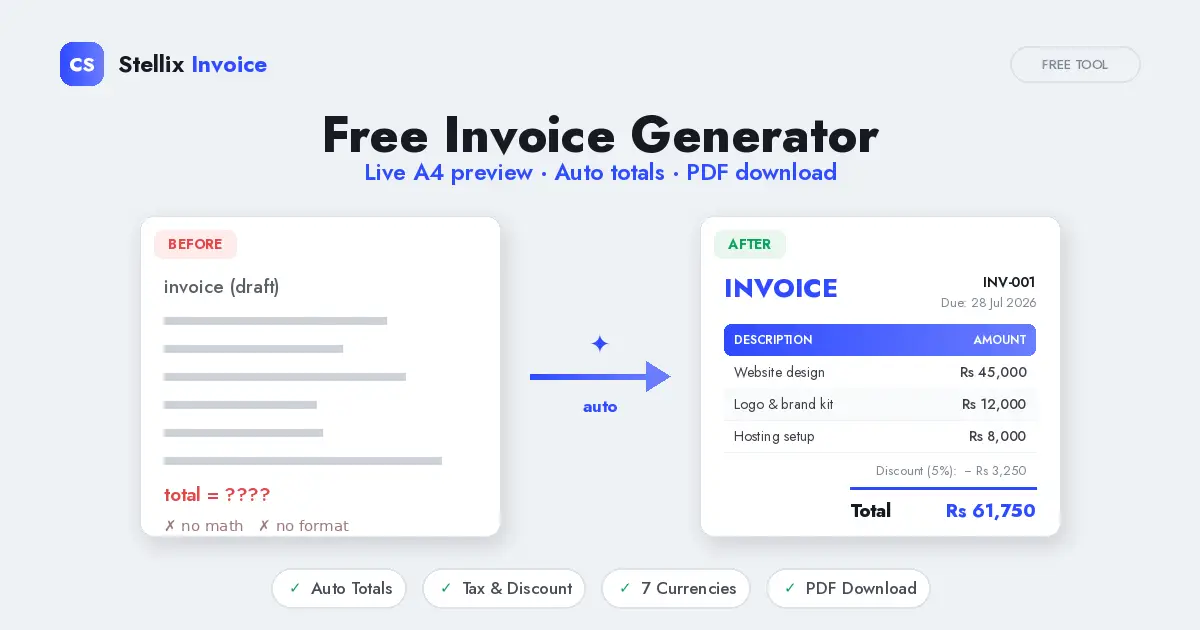
Then come the items. Each item has a description, a quantity, and a rate, and the amount is calculated for you. Add as many lines as your project needs — a website, a logo, hosting setup, extra revisions, whatever — with the plus button, and remove any line with a single tap. The items appear in a clean table on the invoice with a colored header and subtle alternating row shading, exactly the way professionally designed invoices look.
The Math Does Itself (This Is the Best Part)
If you’ve ever sent an invoice with a wrong total, you know the special embarrassment of the client pointing it out. That can’t happen here, because you never do arithmetic at all.
As you enter items, the subtotal updates live. Enter a discount percentage — say you’re giving a loyal client 5% off — and the discount amount is calculated and subtracted automatically, clearly shown as its own line. Enter a tax percentage if you need to charge one, and it’s calculated on the discounted amount (which is the correct order, and yes, plenty of hand-made invoices get this wrong). At the bottom, the grand total sits in bold with an accent-colored underline — impossible to miss, impossible to miscalculate.
Numbers are also formatted properly with thousand separators, so the invoice says “Rs 61,750” rather than “Rs61750”. Small detail, big difference in how professional the document feels.
Made for Here, Ready for Anywhere
Most invoice tools assume everyone bills in dollars. This one starts with Pakistani Rupees (Rs) as the default — but if you work with international clients, switch the currency dropdown to USD, EUR, GBP, INR, AED or SAR and every amount on the invoice updates its symbol instantly. If you’re a freelancer in Pakistan billing a client in Dubai or the UK, that’s a two-second change.
You can also make the invoice feel like yours. Six accent colors — cobalt blue, teal, black, red, purple, and gold — recolor the whole document with one tap: the INVOICE title, the table header, the total underline, all of it. Pick the one that matches your brand, or just the one that looks best to you.
There’s a notes section at the bottom for payment terms, bank details, or a thank-you message, and the invoice closes with a “Thank you for your business” line — because a little warmth at the end of a bill never hurt anyone’s chances of getting paid quickly.
From Screen to PDF in One Click
When everything looks right, hit Download PDF. The tool opens your device’s print dialog with a special print layout — the form, the buttons, and everything else on the page disappears, leaving only the invoice itself, perfectly fitted to an A4 page. Choose “Save as PDF” and you have a clean, professional document ready to email or WhatsApp to your client.
Because it uses your browser’s own printing engine, this works identically on Windows, Mac, Android, and iPhone. And speaking of phones — the whole tool is fully responsive. On mobile, the form and preview become two tabs (Edit and Preview) so you can comfortably build an invoice from your phone while sitting in the client’s office, if it comes to that.
Private, Free, and Honest About Both
Like every tool I build, this one runs entirely in your browser. Your business details, your client’s information, your prices — none of it is sent anywhere, because there’s no server to send it to. Financial information is exactly the kind of data you shouldn’t be typing into random websites, and with this tool, you aren’t. Everything stays on your device, and the PDF is generated locally.
And it’s actually free. Not free-with-watermark, not free-for-three-invoices-a-month, not free-until-you-want-your-own-currency. Every feature, unlimited invoices, forever.
Who I Built This For
Freelancers, obviously — designers, developers, writers, editors sending project invoices. But also small shop owners who need a proper bill for a bulk order. Tutors and academies invoicing monthly fees. Tailors, photographers, repair services — anyone who does work and needs to ask for money in a way that looks organized and trustworthy. A clean invoice quietly tells the client “this person is professional,” and that perception is worth far more than the two minutes it takes to make one.
Stellix Invoice is part of my ongoing series of free single-file web tools at Coding Stellix, where I also teach how these projects are built — the live-preview pattern, the automatic calculations, the print-to-PDF trick, all of it, step by step on YouTube and Instagram at @coding_stellix.
Go make your first invoice — load the sample to see how a finished one looks, then replace it with your own details. And if there’s a feature you need — recurring invoices, a second tax line, your logo on the invoice — tell me in the comments. That’s usually where the next version begins.
— Coding Stellix
<!DOCTYPE html>
<html lang="en">
<head>
<meta charset="UTF-8">
<meta name="viewport" content="width=device-width, initial-scale=1.0">
<title>Stellix Invoice — Free Invoice Generator by Coding Stellix</title>
<meta name="description" content="Free online invoice generator by Coding Stellix. Add your details and line items, watch the invoice build live in A4 preview with automatic totals, tax and discount, then download as PDF. No sign-up, 100% private.">
<link rel="preconnect" href="https://fonts.googleapis.com">
<link rel="preconnect" href="https://fonts.gstatic.com" crossorigin>
<link href="https://fonts.googleapis.com/css2?family=Jost:wght@300;400;500;600;700;800&family=JetBrains+Mono:wght@500;700&display=swap" rel="stylesheet">
<style>
:root{
--bg:#eef1f5;
--panel:#ffffff;
--panel2:#f4f6fa;
--line:#dde3ec;
--ink:#161a22;
--muted:#7b8494;
--cobalt:#2f4bff;
--cobalt2:#6a7dff;
--radius:16px;
}
*{margin:0;padding:0;box-sizing:border-box}
body{font-family:'Jost',sans-serif;background:var(--bg);color:var(--ink);min-height:100vh}
.topbar{
display:flex;align-items:center;justify-content:space-between;gap:14px;
padding:14px 22px;border-bottom:1px solid var(--line);
background:rgba(238,241,245,.88);backdrop-filter:blur(10px);
position:sticky;top:0;z-index:50
}
.logo{display:flex;align-items:center;gap:10px;font-weight:700;font-size:1.05rem}
.logo .dot{
width:34px;height:34px;border-radius:10px;display:grid;place-items:center;
background:linear-gradient(135deg,var(--cobalt),var(--cobalt2));color:#fff;font-weight:800;font-size:.9rem;
box-shadow:0 6px 18px rgba(47,75,255,.35)
}
.logo b{color:var(--cobalt)}
.btn{
border:none;border-radius:11px;padding:11px 20px;font-family:'Jost';font-size:.9rem;
font-weight:700;cursor:pointer;transition:.2s;letter-spacing:.3px
}
.btn-main{background:linear-gradient(135deg,var(--cobalt),var(--cobalt2));color:#fff;box-shadow:0 8px 24px rgba(47,75,255,.3)}
.btn-main:hover{transform:translateY(-2px);box-shadow:0 12px 30px rgba(47,75,255,.42)}
.btn-ghost{background:transparent;color:var(--muted);border:1px solid var(--line)}
.btn-ghost:hover{color:var(--cobalt);border-color:var(--cobalt)}
.layout{display:grid;grid-template-columns:440px 1fr;min-height:calc(100vh - 65px)}
/* ============ FORM ============ */
.form-side{border-right:1px solid var(--line);padding:22px;overflow-y:auto;max-height:calc(100vh - 65px)}
.form-side::-webkit-scrollbar{width:8px}
.form-side::-webkit-scrollbar-thumb{background:var(--line);border-radius:8px}
.section{background:var(--panel);border:1px solid var(--line);border-radius:var(--radius);margin-bottom:14px;overflow:hidden;box-shadow:0 1px 3px rgba(22,26,34,.04)}
.sec-head{display:flex;align-items:center;justify-content:space-between;padding:15px 18px;cursor:pointer;user-select:none}
.sec-head h3{font-size:.95rem;font-weight:600;display:flex;align-items:center;gap:10px}
.sec-head .chev{color:var(--muted);transition:.25s;font-size:.8rem}
.section.open .chev{transform:rotate(180deg)}
.sec-body{display:none;padding:4px 18px 18px}
.section.open .sec-body{display:block}
label{display:block;font-size:.78rem;color:var(--muted);margin:12px 0 5px;letter-spacing:.4px}
input[type=text],input[type=number],input[type=date],textarea,select{
width:100%;background:var(--panel2);border:1px solid var(--line);border-radius:10px;
padding:11px 13px;color:var(--ink);font-family:'Jost';font-size:.92rem;outline:none;transition:.2s
}
input:focus,textarea:focus,select:focus{border-color:var(--cobalt);box-shadow:0 0 0 3px rgba(47,75,255,.12)}
textarea{resize:vertical;min-height:60px}
.grid2{display:grid;grid-template-columns:1fr 1fr;gap:0 12px}
.grid3{display:grid;grid-template-columns:1fr 1fr 1fr;gap:0 12px}
.item{background:var(--panel2);border:1px solid var(--line);border-radius:12px;padding:4px 14px 14px;margin-top:12px;position:relative}
.item .del{position:absolute;top:10px;right:10px;background:none;border:none;color:var(--muted);cursor:pointer;font-size:.95rem;padding:4px}
.item .del:hover{color:#e11d48}
.add-btn{
width:100%;margin-top:12px;padding:11px;border:1.5px dashed var(--line);border-radius:11px;
background:none;color:var(--muted);font-family:'Jost';font-weight:600;font-size:.86rem;cursor:pointer;transition:.2s
}
.add-btn:hover{border-color:var(--cobalt);color:var(--cobalt)}
.swatches{display:flex;gap:10px;margin-top:12px;flex-wrap:wrap}
.sw{width:32px;height:32px;border-radius:50%;cursor:pointer;border:2.5px solid transparent;transition:.2s}
.sw.active{border-color:#161a22;transform:scale(1.12)}
/* ============ PREVIEW ============ */
.preview-side{
padding:28px;display:flex;justify-content:center;align-items:flex-start;
overflow-y:auto;max-height:calc(100vh - 65px);
background:
radial-gradient(circle at 85% 10%,rgba(47,75,255,.05),transparent 45%),
repeating-linear-gradient(0deg,transparent 0 30px,rgba(22,26,34,.02) 30px 31px)
}
.paper-wrap{width:100%;max-width:640px}
.paper{
background:#fff;color:#222;width:100%;aspect-ratio:210/297;overflow:hidden;
border-radius:6px;box-shadow:0 24px 60px rgba(22,26,34,.14),0 4px 16px rgba(22,26,34,.07)
}
.paper-inner{padding:7% 7.5%;height:100%;font-size:clamp(7px,1.35vw,12.5px);display:flex;flex-direction:column}
@media(min-width:1150px){.paper-inner{font-size:12.5px}}
/* invoice typography */
.inv-top{display:flex;justify-content:space-between;align-items:flex-start;gap:2em}
.inv-title{font-size:2.1em;font-weight:800;letter-spacing:3px;color:var(--ac)}
.inv-meta{text-align:right;font-size:.9em;color:#555;line-height:1.7}
.inv-meta b{color:#1b1b1b}
.biz-name{font-size:1.25em;font-weight:700;color:#1b1b1b;margin-top:.2em}
.biz-line{font-size:.88em;color:#666;line-height:1.6}
.parties{display:flex;justify-content:space-between;gap:2em;margin-top:2em}
.party h4{font-size:.72em;letter-spacing:2px;text-transform:uppercase;color:var(--ac);font-weight:700;margin-bottom:.5em}
.party .p-name{font-weight:600;font-size:1em;color:#1b1b1b}
.party .p-line{font-size:.86em;color:#666;line-height:1.6}
table.items{width:100%;border-collapse:collapse;margin-top:2em}
table.items th{
font-size:.72em;letter-spacing:1.6px;text-transform:uppercase;text-align:left;
color:#fff;background:var(--ac);padding:.9em 1em;font-weight:600
}
table.items th:nth-child(2),table.items td:nth-child(2){text-align:center;width:12%}
table.items th:nth-child(3),table.items td:nth-child(3),
table.items th:nth-child(4),table.items td:nth-child(4){text-align:right;width:18%}
table.items td{font-size:.9em;color:#333;padding:.85em 1em;border-bottom:1px solid #eee}
table.items tr:nth-child(even) td{background:#fafbfd}
.totals{margin-left:auto;margin-top:1.4em;width:46%;font-size:.92em}
.totals .row{display:flex;justify-content:space-between;padding:.4em 0;color:#555}
.totals .row.grand{
border-top:2px solid var(--ac);margin-top:.5em;padding-top:.7em;
font-weight:800;font-size:1.15em;color:#1b1b1b
}
.totals .row.grand span:last-child{color:var(--ac)}
.inv-notes{margin-top:auto;padding-top:1.6em}
.inv-notes h4{font-size:.72em;letter-spacing:2px;text-transform:uppercase;color:var(--ac);font-weight:700;margin-bottom:.4em}
.inv-notes p{font-size:.86em;color:#666;line-height:1.55}
.inv-thanks{text-align:center;margin-top:1.4em;font-size:.9em;color:#999;border-top:1px solid #eee;padding-top:1em}
.inv-thanks b{color:var(--ac)}
.mob-tabs{display:none}
/* ============ PRINT ============ */
@media print{
body{background:#fff}
.topbar,.form-side,.mob-tabs{display:none!important}
.layout{display:block}
.preview-side{padding:0;max-height:none;background:#fff}
.paper-wrap{max-width:none}
.paper{box-shadow:none;border-radius:0;aspect-ratio:auto;min-height:100vh}
.paper-inner{font-size:12.5pt;padding:14mm 15mm}
}
/* ============ RESPONSIVE ============ */
@media(max-width:980px){
.layout{grid-template-columns:1fr}
.form-side{border-right:none;max-height:none;display:none}
.preview-side{max-height:none;display:none;padding:16px}
.layout.show-form .form-side{display:block}
.layout.show-preview .preview-side{display:flex}
.mob-tabs{
display:flex;gap:8px;padding:12px 18px;border-bottom:1px solid var(--line);
position:sticky;top:65px;background:var(--bg);z-index:40
}
.mob-tab{
flex:1;text-align:center;padding:10px;border-radius:10px;font-weight:600;font-size:.88rem;
border:1px solid var(--line);color:var(--muted);cursor:pointer;transition:.2s;background:var(--panel)
}
.mob-tab.active{border-color:var(--cobalt);color:var(--cobalt);background:rgba(47,75,255,.06)}
.top-actions .btn-ghost{display:none}
}
</style>
</head>
<body>
<div class="topbar">
<div class="logo">
<div class="dot">CS</div>
<span>Stellix <b>Invoice</b></span>
</div>
<div class="top-actions" style="display:flex;gap:10px">
<button class="btn btn-ghost" id="sampleBtn">Load Sample</button>
<button class="btn btn-main" id="pdfBtn">⬇ Download PDF</button>
</div>
</div>
<div class="mob-tabs">
<div class="mob-tab active" data-view="form">✏️ Edit</div>
<div class="mob-tab" data-view="preview">👁 Preview</div>
</div>
<div class="layout show-form" id="layout">
<aside class="form-side">
<div class="section open">
<div class="sec-head"><h3>🎨 Design & Currency</h3><span class="chev">▼</span></div>
<div class="sec-body">
<label>Accent color</label>
<div class="swatches" id="swatches">
<div class="sw active" style="background:#2f4bff" data-c="#2f4bff"></div>
<div class="sw" style="background:#0f766e" data-c="#0f766e"></div>
<div class="sw" style="background:#111827" data-c="#111827"></div>
<div class="sw" style="background:#b91c1c" data-c="#b91c1c"></div>
<div class="sw" style="background:#9333ea" data-c="#9333ea"></div>
<div class="sw" style="background:#b8860b" data-c="#b8860b"></div>
</div>
<label>Currency</label>
<select id="fCur">
<option value="Rs " selected>PKR — Pakistani Rupee (Rs)</option>
<option value="$">USD — US Dollar ($)</option>
<option value="€">EUR — Euro (€)</option>
<option value="£">GBP — British Pound (£)</option>
<option value="₹">INR — Indian Rupee (₹)</option>
<option value="AED ">AED — UAE Dirham</option>
<option value="SAR ">SAR — Saudi Riyal</option>
</select>
</div>
</div>
<div class="section open">
<div class="sec-head"><h3>🏢 Your Business (From)</h3><span class="chev">▼</span></div>
<div class="sec-body">
<label>Business / your name</label><input type="text" id="bName" placeholder="Your Business Name">
<label>Address / details</label><input type="text" id="bAddr" placeholder="City, Country">
<div class="grid2">
<div><label>Email</label><input type="text" id="bEmail" placeholder="you@email.com"></div>
<div><label>Phone</label><input type="text" id="bPhone" placeholder="0300 0000000"></div>
</div>
</div>
</div>
<div class="section open">
<div class="sec-head"><h3>👤 Bill To (Client)</h3><span class="chev">▼</span></div>
<div class="sec-body">
<label>Client name</label><input type="text" id="cName" placeholder="Client Name">
<label>Address / details</label><input type="text" id="cAddr" placeholder="Client address">
<label>Email / phone</label><input type="text" id="cContact" placeholder="client@email.com">
</div>
</div>
<div class="section open">
<div class="sec-head"><h3>📄 Invoice Details</h3><span class="chev">▼</span></div>
<div class="sec-body">
<div class="grid3">
<div><label>Invoice #</label><input type="text" id="iNum" value="INV-001"></div>
<div><label>Date</label><input type="date" id="iDate"></div>
<div><label>Due date</label><input type="date" id="iDue"></div>
</div>
</div>
</div>
<div class="section open">
<div class="sec-head"><h3>🧾 Items</h3><span class="chev">▼</span></div>
<div class="sec-body">
<div id="itemList"></div>
<button class="add-btn" id="addItem">+ Add item</button>
</div>
</div>
<div class="section open">
<div class="sec-head"><h3>💰 Tax, Discount & Notes</h3><span class="chev">▼</span></div>
<div class="sec-body">
<div class="grid2">
<div><label>Discount %</label><input type="number" id="iDisc" value="0" min="0" max="100"></div>
<div><label>Tax %</label><input type="number" id="iTax" value="0" min="0" max="100"></div>
</div>
<label>Notes / payment terms</label>
<textarea id="iNotes" placeholder="Payment due within 7 days. Bank details…"></textarea>
</div>
</div>
<div style="text-align:center;color:var(--muted);font-size:.8rem;padding:10px 0 20px">
Made with 💙 by <span style="color:var(--cobalt);font-weight:600">Coding Stellix</span> — @coding_stellix
</div>
</aside>
<main class="preview-side">
<div class="paper-wrap">
<div class="paper" id="paper" style="--ac:#2f4bff">
<div class="paper-inner" id="paperInner"></div>
</div>
</div>
</main>
</div>
<script>
(function(){
const $=id=>document.getElementById(id);
const paper=$('paper'), inner=$('paperInner');
const state={
accent:'#2f4bff', cur:'Rs ',
bName:'',bAddr:'',bEmail:'',bPhone:'',
cName:'',cAddr:'',cContact:'',
num:'INV-001',date:'',due:'',
disc:0,tax:0,notes:'',
items:[]
};
const today=new Date();
const iso=d=>d.toISOString().slice(0,10);
$('iDate').value=iso(today);
const due=new Date(today);due.setDate(due.getDate()+7);
$('iDue').value=iso(due);
const SAMPLE={
bName:'Stellix Web Studio', bAddr:'Sindh, Pakistan',
bEmail:'hello@studio.com', bPhone:'0300 1234567',
cName:'Blue Horizon Traders', cAddr:'Clifton, Karachi',
cContact:'accounts@bluehorizon.pk',
notes:'Payment due within 7 days of invoice date. Please transfer to the bank account shared separately. Thank you for your business!',
disc:5, tax:0,
items:[
{desc:'Business website design (5 pages)', qty:1, rate:45000},
{desc:'Logo & brand kit', qty:1, rate:12000},
{desc:'1 year hosting & domain setup', qty:1, rate:8000},
{desc:'Extra revisions', qty:2, rate:1500}
]
};
/* ---------- items ---------- */
function itemRow(data={}){
const div=document.createElement('div');div.className='item';
div.innerHTML=`<button class="del" title="Remove">✕</button>
<label>Description</label><input type="text" class="i-desc" placeholder="Service or product">
<div class="grid2">
<div><label>Quantity</label><input type="number" class="i-qty" value="1" min="0" step="any"></div>
<div><label>Rate (per unit)</label><input type="number" class="i-rate" value="0" min="0" step="any"></div>
</div>`;
div.querySelector('.i-desc').value=data.desc||'';
div.querySelector('.i-qty').value=data.qty??1;
div.querySelector('.i-rate').value=data.rate??0;
div.querySelector('.del').addEventListener('click',()=>{div.remove();sync();});
div.querySelectorAll('input').forEach(el=>el.addEventListener('input',sync));
return div;
}
$('addItem').addEventListener('click',()=>{$('itemList').appendChild(itemRow());sync();});
/* ---------- sync ---------- */
function sync(){
state.cur=$('fCur').value;
state.bName=$('bName').value;state.bAddr=$('bAddr').value;
state.bEmail=$('bEmail').value;state.bPhone=$('bPhone').value;
state.cName=$('cName').value;state.cAddr=$('cAddr').value;state.cContact=$('cContact').value;
state.num=$('iNum').value;state.date=$('iDate').value;state.due=$('iDue').value;
state.disc=parseFloat($('iDisc').value)||0;
state.tax=parseFloat($('iTax').value)||0;
state.notes=$('iNotes').value;
state.items=[...document.querySelectorAll('#itemList .item')].map(it=>({
desc:it.querySelector('.i-desc').value,
qty:parseFloat(it.querySelector('.i-qty').value)||0,
rate:parseFloat(it.querySelector('.i-rate').value)||0
}));
render();
}
const esc=s=>String(s).replace(/[&<>"]/g,c=>({'&':'&','<':'<','>':'>','"':'"'}[c]));
const money=n=>state.cur+n.toLocaleString('en-US',{minimumFractionDigits:(n%1?2:0),maximumFractionDigits:2});
const fmtDate=s=>{
if(!s)return'';
const d=new Date(s+'T00:00:00');
return d.toLocaleDateString('en-GB',{day:'numeric',month:'short',year:'numeric'});
};
function render(){
paper.style.setProperty('--ac',state.accent);
const sub=state.items.reduce((t,i)=>t+i.qty*i.rate,0);
const discAmt=sub*state.disc/100;
const taxAmt=(sub-discAmt)*state.tax/100;
const grand=sub-discAmt+taxAmt;
let h=`<div class="inv-top">
<div>
<div class="inv-title">INVOICE</div>
<div class="biz-name">${esc(state.bName)||'Your Business'}</div>
<div class="biz-line">${esc(state.bAddr)}</div>
<div class="biz-line">${[state.bEmail,state.bPhone].filter(Boolean).map(esc).join(' · ')}</div>
</div>
<div class="inv-meta">
<div><b>${esc(state.num)}</b></div>
<div>Date: <b>${fmtDate(state.date)}</b></div>
${state.due?`<div>Due: <b>${fmtDate(state.due)}</b></div>`:''}
</div>
</div>`;
h+=`<div class="parties">
<div class="party">
<h4>Bill To</h4>
<div class="p-name">${esc(state.cName)||'Client Name'}</div>
<div class="p-line">${esc(state.cAddr)}</div>
<div class="p-line">${esc(state.cContact)}</div>
</div>
</div>`;
h+=`<table class="items"><thead><tr>
<th>Description</th><th>Qty</th><th>Rate</th><th>Amount</th>
</tr></thead><tbody>`;
if(state.items.length===0){
h+=`<tr><td colspan="4" style="text-align:center;color:#aaa">Add items on the left…</td></tr>`;
}
state.items.forEach(it=>{
h+=`<tr>
<td>${esc(it.desc)||'—'}</td>
<td>${it.qty}</td>
<td>${money(it.rate)}</td>
<td>${money(it.qty*it.rate)}</td>
</tr>`;
});
h+=`</tbody></table>`;
h+=`<div class="totals">
<div class="row"><span>Subtotal</span><span>${money(sub)}</span></div>
${state.disc>0?`<div class="row"><span>Discount (${state.disc}%)</span><span>− ${money(discAmt)}</span></div>`:''}
${state.tax>0?`<div class="row"><span>Tax (${state.tax}%)</span><span>+ ${money(taxAmt)}</span></div>`:''}
<div class="row grand"><span>Total</span><span>${money(grand)}</span></div>
</div>`;
h+=`<div class="inv-notes">
${state.notes?`<h4>Notes</h4><p>${esc(state.notes)}</p>`:''}
<div class="inv-thanks">Thank you for your business! · <b>${esc(state.bName)||'Your Business'}</b></div>
</div>`;
inner.innerHTML=h;
}
/* ---------- controls ---------- */
document.querySelectorAll('.sw').forEach(s=>s.addEventListener('click',()=>{
document.querySelectorAll('.sw').forEach(x=>x.classList.remove('active'));
s.classList.add('active');state.accent=s.dataset.c;render();
}));
document.querySelectorAll('.sec-head').forEach(hd=>hd.addEventListener('click',()=>hd.parentElement.classList.toggle('open')));
['fCur','bName','bAddr','bEmail','bPhone','cName','cAddr','cContact','iNum','iDate','iDue','iDisc','iTax','iNotes']
.forEach(id=>$(id).addEventListener('input',sync));
function loadSample(){
$('bName').value=SAMPLE.bName;$('bAddr').value=SAMPLE.bAddr;
$('bEmail').value=SAMPLE.bEmail;$('bPhone').value=SAMPLE.bPhone;
$('cName').value=SAMPLE.cName;$('cAddr').value=SAMPLE.cAddr;$('cContact').value=SAMPLE.cContact;
$('iDisc').value=SAMPLE.disc;$('iTax').value=SAMPLE.tax;$('iNotes').value=SAMPLE.notes;
$('itemList').innerHTML='';
SAMPLE.items.forEach(i=>$('itemList').appendChild(itemRow(i)));
sync();
}
$('sampleBtn').addEventListener('click',loadSample);
$('pdfBtn').addEventListener('click',()=>{
$('layout').classList.add('show-preview');
setTimeout(()=>window.print(),60);
});
document.querySelectorAll('.mob-tab').forEach(t=>t.addEventListener('click',()=>{
document.querySelectorAll('.mob-tab').forEach(x=>x.classList.remove('active'));
t.classList.add('active');
const lay=$('layout');
lay.classList.remove('show-form','show-preview');
lay.classList.add(t.dataset.view==='form'?'show-form':'show-preview');
}));
loadSample();
})();
</script>
</body>
</html>