
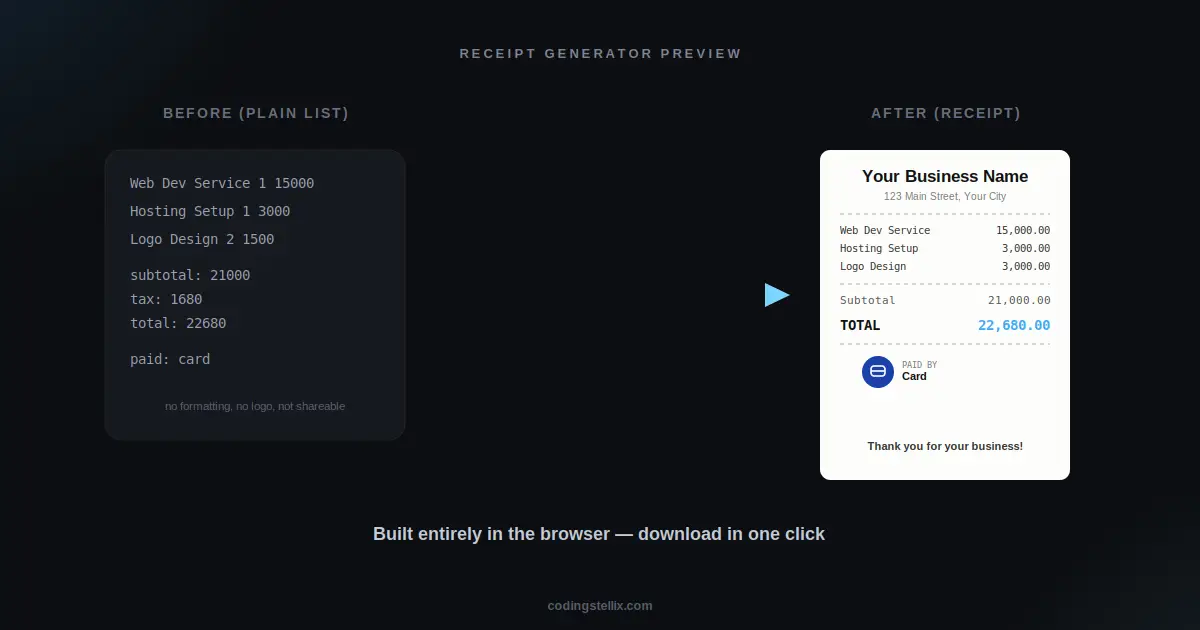
A receipt looks like one of the simplest documents in the world — a name at the top, a list of items, a total at the bottom. But building one that actually looks convincing, resizes correctly as items are added or removed, and can be downloaded as a real image turns out to involve a surprising number of small decisions. This walkthrough covers how to build a working receipt generator using nothing but HTML, CSS, and JavaScript, rendered entirely with the Canvas API.
Why Canvas Instead of Just Styled HTML
The first instinct for a receipt is usually to build it as a styled HTML block — a div with some text inside, made to look paper-like with CSS. That works fine for viewing it on screen, but it falls apart the moment someone wants to actually save or share the result. Turning a styled HTML block into a real downloadable image requires extra libraries and often produces inconsistent results depending on fonts and browser rendering quirks.
Drawing the receipt directly onto an HTML canvas element sidesteps that problem entirely. Everything — text, lines, shapes, an uploaded logo — gets painted pixel by pixel onto a single surface that can be converted straight into a PNG file with one line of code. The tradeoff is that positioning everything by hand takes more care than letting a browser lay out HTML automatically, but that tradeoff is exactly what makes the final output reliable and portable.
Making the Receipt Grow With Its Content
A real receipt isn’t a fixed size — it grows taller as more items get added. The canvas needs to do the same thing, which means the total height can’t be a fixed number decided in advance. Instead, the height gets calculated from two pieces: a base amount that covers the header, totals section, and footer, plus a fixed amount of extra height multiplied by however many line items currently exist. Every time an item is added or removed, the canvas resizes to exactly fit the new content, so there’s never wasted blank space at the bottom or, worse, content that gets cut off.
Keeping Columns Aligned as Data Changes
One of the easiest things to get subtly wrong in a receipt layout is column alignment — the item name on the left, the quantity in the middle, the price on the right. If each of these gets positioned with its own separately-guessed number, they tend to drift out of alignment with the column headers above them the moment font sizes or content lengths change.
The reliable fix is to define the x-position of each column exactly once, as a small set of shared values, and then reuse those same values for both the header row and every single item row that follows. The item name’s left edge, the quantity’s center point, and the price’s right edge all get calculated a single time at the top of the drawing function, and every piece of text that belongs to that column reads from that same anchor point. This guarantees the header and every row underneath it will always line up, no matter how many items exist or how their names vary in length.
Handling Long Item Names Without Breaking the Layout
Real item names don’t always fit neatly in the space available, and a receipt generator needs a sensible way to handle a genuinely long product name without letting it collide with the quantity or price columns. The approach here measures the actual pixel width of the item’s text using the canvas’s own text-measurement function, and if it’s too wide for the available column space, trims characters off the end one at a time — replacing the last one with an ellipsis — until it fits. This keeps every row exactly the same height and prevents any text from ever overlapping into a neighboring column, regardless of what someone actually types into the item name field.
Supporting Multiple Visual Templates From One Function
Rather than writing a separate, nearly-identical drawing function for every visual style, it works far better to describe each template as a small set of style values — a paper color, an ink color, a muted secondary color, an accent color, a divider style, and a heading font — and feed those values into one shared drawing function. Switching templates then just means swapping which set of values gets passed in, without touching the actual layout logic at all.
This is also what makes it easy to keep adding new templates over time. A moody dark template with a neon accent and a warm cream template with a gold double-divider can both be produced by the exact same function, just with different values plugged in. The layout logic — where the logo goes, where the item rows sit, how the totals are stacked — stays identical across every template; only the colors, fonts, and divider style change.
Drawing a Logo and Payment Icon Without External Images
Letting someone upload their own business logo is straightforward with the FileReader API — the uploaded image gets read into memory, loaded into an Image object, and then drawn onto the canvas clipped inside a circular path so it appears as a neat round logo regardless of the original image’s shape.
Payment method icons are a different challenge, since real brand logos aren’t something a generator should be reproducing pixel-for-pixel. The better approach is drawing small original vector icons using basic canvas shapes — arcs, rounded rectangles, simple line paths — styled with each payment method’s associated color, so a person immediately recognizes “cash” from a banknote-and-coin icon or “bank transfer” from a simple columned building shape, without attempting to copy anyone’s actual trademark.
Making the Interface Itself Behave on Every Screen
None of the canvas work matters much if the surrounding page falls apart on a small screen. The template picker, which could easily become an unusable wall of thumbnails on a phone, works as a horizontally scrollable strip instead — every template stays reachable with a swipe, without needing to shrink to the point of being unreadable. Form fields stack into a single column below a certain screen width rather than staying side-by-side and getting uncomfortably narrow, and buttons expand to fill available width on the smallest screens so they stay easy to tap accurately.
Why This Pattern Is Worth Knowing Beyond Receipts
The core idea here — a single canvas-drawing function driven by swappable style values, with height calculated dynamically from content — extends well past receipts. Certificates, tickets, badges, and ID cards all follow the same underlying shape: fixed layout logic, variable content, and a small set of style parameters that change the visual theme without touching the structure. Once this pattern feels natural to build, adapting it to a different kind of printable document is mostly a matter of changing what gets drawn, not rethinking how any of it works.
The finished receipt generator is a single self-contained HTML file — open it, switch between templates, upload a logo, and download a receipt to see the whole system working together, then look through the code to see how the column math and template system fit together.
<!DOCTYPE html>
<html lang="en" data-theme="dark">
<head>
<meta charset="UTF-8">
<meta name="viewport" content="width=device-width, initial-scale=1.0">
<title>Stellix Receipt — Instant Receipt Generator | Coding Stellix</title>
<link rel="preconnect" href="https://fonts.googleapis.com">
<link rel="preconnect" href="https://fonts.gstatic.com" crossorigin>
<link href="https://fonts.googleapis.com/css2?family=Jost:wght@300;400;500;600;700;800&family=JetBrains+Mono:wght@400;600;700&family=Playfair+Display:wght@600;700&display=swap" rel="stylesheet">
<style>
  :root{
    --bg:#0c0e11;
    --bg-soft:#141821;
    --card:rgba(255,255,255,.05);
    --card-border:rgba(255,255,255,.1);
    --text:#eef0f4;
    --muted:#8a90a3;
    --brand:#3fa9f5;
    --brand-soft:#7cd4ff;
    --glow:rgba(63,169,245,.28);
    --input-bg:rgba(255,255,255,.06);
    --shadow:0 24px 70px rgba(0,0,0,.55);
  }
  [data-theme="light"]{
    --bg:#f2f4f8;
    --bg-soft:#ffffff;
    --card:rgba(255,255,255,.8);
    --card-border:rgba(10,20,40,.1);
    --text:#0c1220;
    --muted:#5a6478;
    --glow:rgba(63,169,245,.2);
    --input-bg:rgba(10,20,40,.05);
    --shadow:0 20px 55px rgba(20,40,80,.14);
  }
  *{margin:0;padding:0;box-sizing:border-box;-webkit-tap-highlight-color:transparent}
  html{-webkit-text-size-adjust:100%}
  body{
    font-family:'Jost',sans-serif;
    background:var(--bg);color:var(--text);
    min-height:100vh;overflow-x:hidden;
    transition:background .45s,color .45s;
  }
  body::before{
    content:"";position:fixed;inset:0;pointer-events:none;z-index:0;
    background:
      radial-gradient(650px 450px at 92% -10%,var(--glow),transparent 65%),
      radial-gradient(550px 420px at -12% 108%,rgba(124,212,255,.16),transparent 60%);
  }
  .wrap{position:relative;z-index:1;max-width:1120px;margin:0 auto;padding:0 16px}

  header{display:flex;align-items:center;justify-content:space-between;padding:16px 0;gap:10px}
  .logo{display:flex;align-items:center;gap:10px;user-select:none;min-width:0}
  .logo-mark{
    width:38px;height:38px;border-radius:11px;flex-shrink:0;
    background:linear-gradient(135deg,var(--brand),var(--brand-soft));
    display:grid;place-items:center;color:#04121f;font-size:1.05rem;font-weight:800;
    box-shadow:0 6px 20px var(--glow);
  }
  .logo-name{font-weight:700;font-size:1.05rem;white-space:nowrap;overflow:hidden;text-overflow:ellipsis}
  .logo-name span{color:var(--brand)}
  .logo small{display:block;font-size:.54rem;letter-spacing:2px;text-transform:uppercase;color:var(--muted);font-weight:500}
  #themeBtn{
    width:38px;height:38px;border-radius:50%;cursor:pointer;flex-shrink:0;
    border:1px solid var(--card-border);background:var(--card);color:var(--text);
    font-size:1rem;backdrop-filter:blur(10px);
    display:grid;place-items:center;transition:transform .3s,box-shadow .3s;
  }
  #themeBtn:hover{transform:rotate(18deg) scale(1.08);box-shadow:0 0 18px var(--glow)}
  #themeBtn:focus-visible{outline:2px solid var(--brand);outline-offset:3px}

  .hero{text-align:center;padding:8px 0 4px}
  .hero h1{font-size:clamp(1.5rem,4.4vw,2.4rem);font-weight:800;letter-spacing:-.5px;line-height:1.25}
  .hero h1 em{
    font-style:normal;background:linear-gradient(120deg,var(--brand),var(--brand-soft));
    -webkit-background-clip:text;background-clip:text;color:transparent;
  }
  .hero p{color:var(--muted);margin-top:6px;font-size:.88rem;padding:0 8px}

  .tpl-strip{
    display:flex;gap:9px;overflow-x:auto;padding:16px 2px 6px;margin-bottom:2px;
    scrollbar-width:thin;-webkit-overflow-scrolling:touch;
  }
  .tpl-chip{
    flex:0 0 auto;width:68px;cursor:pointer;text-align:center;
    border:none;background:none;color:var(--muted);
  }
  .tpl-chip .swatch{
    width:68px;height:48px;border-radius:10px;border:2px solid var(--card-border);
    margin-bottom:5px;transition:border-color .2s,transform .2s;
  }
  .tpl-chip:hover .swatch{transform:translateY(-2px)}
  .tpl-chip.active .swatch{border-color:var(--brand);box-shadow:0 0 0 3px var(--glow)}
  .tpl-chip span{font-size:.63rem;font-weight:600;white-space:nowrap}
  .tpl-chip.active span{color:var(--text)}
  .tpl-chip:focus-visible .swatch{outline:2px solid var(--brand);outline-offset:2px}

  .studio{
    display:grid;grid-template-columns:1.15fr .85fr;gap:18px;
    margin:14px 0 20px;align-items:start;
  }
  .panel{
    background:var(--card);border:1px solid var(--card-border);
    border-radius:20px;padding:18px;backdrop-filter:blur(14px);box-shadow:var(--shadow);
    min-width:0;
  }
  .panel h3{font-size:.68rem;font-weight:700;letter-spacing:1.4px;text-transform:uppercase;color:var(--muted);margin-bottom:9px}

  .logo-upload{
    display:flex;align-items:center;gap:10px;margin-bottom:14px;flex-wrap:wrap;
    background:var(--input-bg);border:1px solid var(--card-border);border-radius:14px;padding:12px;
  }
  .logo-preview{
    width:48px;height:48px;border-radius:12px;flex-shrink:0;
    background:var(--card);border:1px dashed var(--card-border);
    display:grid;place-items:center;overflow:hidden;font-size:1.2rem;color:var(--muted);
  }
  .logo-preview img{width:100%;height:100%;object-fit:cover}
  .logo-upload-info{flex:1;min-width:110px}
  .logo-upload-info .lbl{font-size:.8rem;font-weight:600}
  .logo-upload-info .sub{font-size:.7rem;color:var(--muted);margin-top:2px}
  .logo-upload-actions{display:flex;gap:6px;flex-shrink:0;margin-left:auto}
  .logo-upload-actions button{
    font-family:inherit;font-weight:700;font-size:.72rem;
    padding:8px 11px;border-radius:9px;border:none;cursor:pointer;white-space:nowrap;
  }
  .btn-upload{background:linear-gradient(135deg,var(--brand),var(--brand-soft));color:#04121f}
  .btn-clear-logo{background:var(--card);color:var(--muted);border:1px solid var(--card-border) !important}

  .field{margin-bottom:11px}
  .field input, .field select{
    width:100%;font-family:inherit;font-size:.84rem;font-weight:500;
    padding:10px 12px;border-radius:11px;color:var(--text);
    background:var(--input-bg);border:1px solid var(--card-border);outline:none;
  }
  .field input:focus, .field select:focus{border-color:var(--brand)}
  [data-theme="dark"] .field select option{background:#141821;color:#fff}
  .row2{display:grid;grid-template-columns:1fr 1fr;gap:8px}

  .item-row{
    display:grid;grid-template-columns:1fr 46px 66px 26px;gap:6px;margin-bottom:8px;align-items:center;
  }
  .item-row input{
    font-family:inherit;font-size:.8rem;font-weight:500;
    padding:9px 8px;border-radius:10px;color:var(--text);
    background:var(--input-bg);border:1px solid var(--card-border);outline:none;min-width:0;
  }
  .item-row input:focus{border-color:var(--brand)}
  .item-row .del{background:none;border:none;color:var(--muted);cursor:pointer;font-size:.9rem;padding:4px}
  .item-row .del:hover{color:#ff5c5c}
  .item-head{
    display:grid;grid-template-columns:1fr 46px 66px 26px;gap:6px;
    font-size:.6rem;font-weight:700;letter-spacing:1px;text-transform:uppercase;color:var(--muted);
    padding:0 2px 6px;
  }

  .add-item-btn{
    width:100%;font-family:inherit;font-weight:600;font-size:.8rem;
    padding:10px;border-radius:11px;cursor:pointer;
    background:var(--card);border:1px dashed var(--card-border);color:var(--text);
    transition:all .2s;margin-top:4px;margin-bottom:16px;
  }
  .add-item-btn:hover{border-color:var(--brand);color:var(--brand)}

  .paid-by-note{
    display:flex;gap:8px;align-items:flex-start;
    font-size:.72rem;color:var(--muted);background:var(--input-bg);
    border:1px solid var(--card-border);border-radius:12px;padding:10px 12px;margin-top:4px;margin-bottom:16px;
  }
  .paid-by-note b{color:var(--text)}

  .actions{display:flex;gap:10px;margin-top:6px;flex-wrap:wrap;justify-content:center}
  .btn{
    font-family:inherit;font-weight:700;font-size:.84rem;
    padding:12px 18px;border-radius:999px;cursor:pointer;border:none;
    transition:transform .25s;flex:1;min-width:140px;
  }
  .btn.primary{background:linear-gradient(135deg,var(--brand),var(--brand-soft));color:#04121f;box-shadow:0 8px 22px var(--glow)}
  .btn.ghost{background:var(--card);color:var(--text);border:1px solid var(--card-border)}
  .btn:hover{transform:translateY(-2px)}
  .btn:focus-visible{outline:2px solid var(--brand);outline-offset:2px}
  #msg{margin-top:10px;font-size:.78rem;color:var(--muted);text-align:center;min-height:18px}

  .preview-wrap{display:flex;flex-direction:column;align-items:center;position:sticky;top:16px;min-width:0}
  .receipt-frame{
    width:100%;max-width:300px;border-radius:6px;overflow:hidden;
    box-shadow:0 20px 55px rgba(0,0,0,.4);
  }
  .receipt-frame canvas{width:100%;display:block}

  footer{text-align:center;padding:22px 0 32px;color:var(--muted);font-size:.82rem}
  footer b{color:var(--brand)}

  @media(max-width:900px){
    .studio{grid-template-columns:1fr}
    .preview-wrap{position:static;order:-1}
    .receipt-frame{max-width:280px}
  }
  @media(max-width:480px){
    .wrap{padding:0 12px}
    .panel{padding:14px 12px;border-radius:16px}
    .item-row, .item-head{grid-template-columns:1fr 38px 56px 22px;gap:4px}
    .item-row input{font-size:.74rem;padding:8px 6px}
    .hero p{padding:0 4px;font-size:.83rem}
    .logo-upload{padding:10px}
    .logo-upload-actions{margin-left:0;width:100%;justify-content:flex-end}
    .row2{grid-template-columns:1fr}
    .btn{min-width:0}
  }
  @media(max-width:360px){
    .logo-name{font-size:.94rem}
    .logo-mark{width:34px;height:34px}
    #themeBtn{width:34px;height:34px}
  }
  @media (prefers-reduced-motion: reduce){
    *,*::before,*::after{transition-duration:.01ms!important}
  }
</style>
</head>
<body>
<div class="wrap">

  <header>
    <div class="logo">
      <div class="logo-mark">🧾</div>
      <div>
        <div class="logo-name">Stellix <span>Receipt</span></div>
        <small>by Coding Stellix</small>
      </div>
    </div>
    <button id="themeBtn" aria-label="Toggle light and dark mode" title="Toggle theme">🌙</button>
  </header>

  <section class="hero">
    <h1>Generate a real-looking <em>receipt</em></h1>
    <p>Pick a template, add your logo and items, and download instantly.</p>
  </section>

  <div class="tpl-strip" id="tplStrip"></div>

  <div class="studio">

    <div class="panel">
      <h3>Your Logo</h3>
      <div class="logo-upload">
        <div class="logo-preview" id="logoPreview">🏢</div>
        <div class="logo-upload-info">
          <div class="lbl">Business Logo</div>
          <div class="sub">Shown at the top of your receipt</div>
        </div>
        <div class="logo-upload-actions">
          <button class="btn-upload" id="logoUploadBtn">Upload</button>
          <button class="btn-clear-logo" id="logoClearBtn">Clear</button>
        </div>
        <input type="file" id="logoInput" accept="image/*" style="display:none">
      </div>

      <h3>Business Info</h3>
      <div class="field"><input id="bizName" value="Your Business Name" placeholder="Business name"></div>
      <div class="row2">
        <div class="field"><input id="bizAddr" value="123 Main Street, Your City" placeholder="Address"></div>
        <div class="field"><input id="bizPhone" value="+00 000 0000000" placeholder="Phone"></div>
      </div>

      <h3>Items</h3>
      <div class="item-head"><span>Item</span><span>Qty</span><span>Price</span><span></span></div>
      <div id="itemsList"></div>
      <button class="add-item-btn" id="addItemBtn">+ Add Item</button>

      <h3>Payment</h3>
      <div class="row2">
        <div class="field">
          <select id="taxRate">
            <option value="0">No Tax</option>
            <option value="5">5% Tax</option>
            <option value="8" selected>8% Tax</option>
            <option value="10">10% Tax</option>
            <option value="17">17% GST</option>
          </select>
        </div>
        <div class="field">
          <select id="paymentMethod">
            <option>Cash</option>
            <option>Card</option>
            <option>JazzCash</option>
            <option>EasyPaisa</option>
            <option>Bank Transfer</option>
            <option>PayPal</option>
          </select>
        </div>
      </div>
      <div class="paid-by-note">💳 <span>A <b>"Paid By"</b> badge with a small payment-method icon is always shown on the receipt.</span></div>

      <div class="actions">
        <button class="btn primary" id="dlBtn">⬇ Download Receipt</button>
        <button class="btn ghost" id="printBtn">🖨 Print</button>
      </div>
      <div id="msg"></div>
    </div>

    <div class="preview-wrap">
      <div class="receipt-frame"><canvas id="receiptCanvas" width="640" height="900"></canvas></div>
    </div>
  </div>

  <footer>Crafted with 🧡 by <b>Coding Stellix</b> — Stellix Receipt v2.1</footer>
</div>

<script>
// ============================================================
//  Stellix Receipt v2.1 — Instant Receipt Generator
//  12 templates, logo upload, vector Paid-By payment icons,
//  centered/aligned layout math.
//  Crafted by Coding Stellix (coding_stellix)
// ============================================================
(function(){
  "use strict";
  var $ = function(id){ return document.getElementById(id); };
  var canvas = $("receiptCanvas"), ctx = canvas.getContext("2d");
  var W = 640;

  var items = [];
  var itemCounter = 0;
  var receiptNo = "R-" + Math.floor(1000 + Math.random()*9000);
  var logoImg = null;

  // ---------- templates (12) ----------
  var TEMPLATES = [
    { id:"classic",   name:"Classic",   paper:"#fdfdfa", ink:"#111111", sub:"#666666", accent:"#3fa9f5", divider:"dashed", headFont:"Jost",             band:false, mono:true  },
    { id:"thermal",   name:"Thermal",   paper:"#fbfbfb", ink:"#141414", sub:"#5a5a5a", accent:"#141414", divider:"dashed", headFont:"JetBrains Mono",   band:false, mono:true  },
    { id:"modern",    name:"Modern",    paper:"#ffffff", ink:"#141821", sub:"#6b7280", accent:"#3fa9f5", divider:"solid",  headFont:"Jost",             band:true,  mono:false },
    { id:"minimal",   name:"Minimal",   paper:"#ffffff", ink:"#1a1a1a", sub:"#9ca3af", accent:"#1a1a1a", divider:"none",   headFont:"Jost",             band:false, mono:false },
    { id:"elegant",   name:"Elegant",   paper:"#fbf8f2", ink:"#2b2318", sub:"#8a7c63", accent:"#a8823a", divider:"solid",  headFont:"Playfair Display", band:false, mono:false },
    { id:"luxury",    name:"Luxury",    paper:"#12100c", ink:"#f4e9c9", sub:"#c9b98a", accent:"#d4af37", divider:"solid",  headFont:"Playfair Display", band:false, mono:false, dark:true },
    { id:"mono",      name:"Mono",      paper:"#0e0e0e", ink:"#e8e8e8", sub:"#8a8a8a", accent:"#39ff88", divider:"dashed", headFont:"JetBrains Mono",   band:false, mono:true,  dark:true },
    { id:"sunset",    name:"Sunset",    paper:"#fff7ef", ink:"#3a1f14", sub:"#a06a4a", accent:"#ff6a3d", divider:"dotted", headFont:"Jost",             band:true,  mono:false },
    { id:"ocean",     name:"Ocean",     paper:"#f0f9fc", ink:"#0d2b3a", sub:"#4a7a8c", accent:"#0891b2", divider:"solid",  headFont:"Jost",             band:true,  mono:false },
    { id:"rose",      name:"Rose",      paper:"#fff5f7", ink:"#3a1220", sub:"#a3607a", accent:"#e0487a", divider:"dotted", headFont:"Playfair Display", band:false, mono:false },
    { id:"forest",    name:"Forest",    paper:"#f4f8f1", ink:"#1b2e14", sub:"#5c7a52", accent:"#2f8f4e", divider:"dashed", headFont:"Jost",             band:true,  mono:false },
    { id:"signature", name:"Signature", paper:"#faf6ec", ink:"#16233a", sub:"#6d7791", accent:"#c9a13b", divider:"double", headFont:"Playfair Display", band:true,  mono:false }
  ];
  var currentTemplate = TEMPLATES[0];

  var tplStrip = $("tplStrip");
  TEMPLATES.forEach(function(t, idx){
    var chip = document.createElement("button");
    chip.className = "tpl-chip" + (idx === 0 ? " active" : "");
    chip.innerHTML = '<div class="swatch" style="background:' + t.paper + ';border-top:8px solid ' + t.accent + '"></div><span>' + t.name + '</span>';
    chip.addEventListener("click", function(){
      currentTemplate = t;
      document.querySelectorAll(".tpl-chip").forEach(function(c){ c.classList.remove("active"); });
      chip.classList.add("active");
      render();
    });
    tplStrip.appendChild(chip);
  });

  // ---------- logo upload ----------
  $("logoUploadBtn").addEventListener("click", function(){ $("logoInput").click(); });
  $("logoInput").addEventListener("change", function(){
    var file = this.files[0];
    if(!file) return;
    var reader = new FileReader();
    reader.onload = function(e){
      var img = new Image();
      img.onload = function(){
        logoImg = img;
        $("logoPreview").innerHTML = "";
        var previewImg = document.createElement("img");
        previewImg.src = e.target.result;
        $("logoPreview").appendChild(previewImg);
        render();
      };
      img.src = e.target.result;
    };
    reader.readAsDataURL(file);
  });
  $("logoClearBtn").addEventListener("click", function(){
    logoImg = null;
    $("logoPreview").innerHTML = "🏢";
    $("logoInput").value = "";
    render();
  });

  // ---------- items ----------
  function addItem(name, qty, price){
    itemCounter++;
    items.push({ id: itemCounter, name: name, qty: qty, price: price });
    renderItemRows();
    render();
  }
  function removeItem(id){
    items = items.filter(function(i){ return i.id !== id; });
    renderItemRows();
    render();
  }
  function renderItemRows(){
    var list = $("itemsList");
    list.innerHTML = "";
    items.forEach(function(it){
      var row = document.createElement("div");
      row.className = "item-row";
      row.innerHTML =
        '<input type="text" value="" placeholder="Item name">' +
        '<input type="number" value="' + it.qty + '" min="1">' +
        '<input type="number" value="' + it.price + '" min="0" step="0.01">' +
        '<button class="del" aria-label="Remove item">✕</button>';
      var nameInput = row.children[0], qtyInput = row.children[1], priceInput = row.children[2], delBtn = row.children[3];
      nameInput.value = it.name;
      nameInput.addEventListener("input", function(){ it.name = nameInput.value; render(); });
      qtyInput.addEventListener("input", function(){ it.qty = parseFloat(qtyInput.value) || 0; render(); });
      priceInput.addEventListener("input", function(){ it.price = parseFloat(priceInput.value) || 0; render(); });
      delBtn.addEventListener("click", function(){ removeItem(it.id); });
      list.appendChild(row);
    });
  }
  $("addItemBtn").addEventListener("click", function(){ addItem("New Item", 1, 0); });

  function val(id){ return $(id).value; }
  function fmt(n){
    return n.toLocaleString(undefined, { minimumFractionDigits: 2, maximumFractionDigits: 2 });
  }

  // ---------- vector "logo" icons per payment method (drawn, not text initials) ----------
  var PAY_COLORS = {
    "Cash":          "#2f9e44",
    "Card":          "#1c3faa",
    "JazzCash":      "#e2001a",
    "EasyPaisa":     "#0a8f4c",
    "Bank Transfer": "#37474f",
    "PayPal":        "#00457c"
  };
  function drawPayIcon(method, cx, cy, r){
    var color = PAY_COLORS[method] || "#333";
    ctx.beginPath();
    ctx.arc(cx, cy, r, 0, Math.PI*2);
    ctx.fillStyle = color;
    ctx.fill();
    ctx.save();
    ctx.strokeStyle = "#ffffff";
    ctx.fillStyle = "#ffffff";
    ctx.lineWidth = Math.max(r*0.12, 1.6);
    ctx.lineCap = "round";
    ctx.lineJoin = "round";

    if(method === "Cash"){
      // banknote: rounded rect + circle
      var w = r*1.15, h = r*0.72;
      roundedRect(cx-w/2, cy-h/2, w, h, h*0.22);
      ctx.stroke();
      ctx.beginPath(); ctx.arc(cx, cy, h*0.24, 0, Math.PI*2); ctx.stroke();
    } else if(method === "Card"){
      var cw = r*1.2, ch = r*0.82;
      roundedRect(cx-cw/2, cy-ch/2, cw, ch, ch*0.18);
      ctx.stroke();
      ctx.beginPath();
      ctx.moveTo(cx-cw/2, cy-ch/2+ch*0.32);
      ctx.lineTo(cx+cw/2, cy-ch/2+ch*0.32);
      ctx.stroke();
    } else if(method === "Bank Transfer"){
      // simple bank/columns glyph
      ctx.beginPath();
      ctx.moveTo(cx-r*0.6, cy-r*0.15);
      ctx.lineTo(cx, cy-r*0.65);
      ctx.lineTo(cx+r*0.6, cy-r*0.15);
      ctx.stroke();
      ctx.beginPath(); ctx.moveTo(cx-r*0.65, cy-r*0.1); ctx.lineTo(cx+r*0.65, cy-r*0.1); ctx.stroke();
      ctx.beginPath(); ctx.moveTo(cx-r*0.65, cy+r*0.5); ctx.lineTo(cx+r*0.65, cy+r*0.5); ctx.stroke();
      [-0.4,0,0.4].forEach(function(off){
        ctx.beginPath(); ctx.moveTo(cx+off*r, cy-r*0.05); ctx.lineTo(cx+off*r, cy+r*0.45); ctx.stroke();
      });
    } else if(method === "JazzCash"){
      // lightning bolt mark
      ctx.beginPath();
      ctx.moveTo(cx+r*0.12, cy-r*0.55);
      ctx.lineTo(cx-r*0.32, cy+r*0.08);
      ctx.lineTo(cx-r*0.02, cy+r*0.08);
      ctx.lineTo(cx-r*0.14, cy+r*0.58);
      ctx.lineTo(cx+r*0.36, cy-r*0.12);
      ctx.lineTo(cx+r*0.04, cy-r*0.12);
      ctx.closePath();
      ctx.fill();
    } else if(method === "EasyPaisa"){
      // leaf / check mark
      ctx.beginPath();
      ctx.moveTo(cx-r*0.4, cy+r*0.02);
      ctx.lineTo(cx-r*0.08, cy+r*0.38);
      ctx.lineTo(cx+r*0.48, cy-r*0.36);
      ctx.stroke();
    } else if(method === "PayPal"){
      // double-P mark, simplified
      ctx.font = "800 " + Math.round(r*1.1) + "px Georgia, serif";
      ctx.textAlign = "center"; ctx.textBaseline = "middle";
      ctx.fillText("P", cx-r*0.16, cy+r*0.02);
      ctx.globalAlpha = 0.55;
      ctx.fillText("P", cx+r*0.22, cy+r*0.02);
      ctx.globalAlpha = 1;
      ctx.textBaseline = "alphabetic";
    }
    ctx.restore();
  }
  function roundedRect(x,y,w,h,r){
    ctx.beginPath();
    ctx.moveTo(x+r,y);
    ctx.arcTo(x+w,y,x+w,y+h,r);
    ctx.arcTo(x+w,y+h,x,y+h,r);
    ctx.arcTo(x,y+h,x,y,r);
    ctx.arcTo(x,y,x+w,y,r);
    ctx.closePath();
  }

  // ---------- render ----------
  function render(){
    var t = currentTemplate;
    var subtotal = items.reduce(function(s,it){ return s + it.qty*it.price; }, 0);
    var taxPct = parseFloat(val("taxRate")) || 0;
    var taxAmt = subtotal * (taxPct/100);
    var total = subtotal + taxAmt;

    var lineH = 34;
    var baseH = 580;
    var H = baseH + items.length * lineH;
    canvas.width = W; canvas.height = H;

    ctx.fillStyle = t.paper;
    ctx.fillRect(0,0,W,H);

    if(t.band){
      ctx.fillStyle = t.accent;
      ctx.fillRect(0,0,W,8);
      if(t.id === "signature") ctx.fillRect(0,H-8,W,8);
    }

    ctx.fillStyle = t.dark ? "rgba(255,255,255,0.02)" : "rgba(0,0,0,0.015)";
    for(var s=0; s<300; s++){
      ctx.fillRect(Math.random()*W, Math.random()*H, 1, 1);
    }

    var xL = 40, xR = W-40, y = 56;

    // logo (centered)
    if(logoImg){
      var logoSize = 64;
      ctx.save();
      ctx.beginPath();
      ctx.arc(W/2, y, logoSize/2, 0, Math.PI*2);
      ctx.closePath();
      ctx.clip();
      var iw = logoImg.width, ih = logoImg.height;
      var scale = Math.max(logoSize/iw, logoSize/ih);
      var dw = iw*scale, dh = ih*scale;
      ctx.drawImage(logoImg, W/2 - dw/2, y - logoSize/2 - (dh-logoSize)/2, dw, dh);
      ctx.restore();
      y += logoSize/2 + 22;
    }

    ctx.textAlign = "center";
    ctx.textBaseline = "alphabetic";
    ctx.fillStyle = t.ink;
    ctx.font = "700 27px '" + t.headFont + "', Arial, sans-serif";
    ctx.fillText(val("bizName") || "Business Name", W/2, y);
    y += 25;
    ctx.font = "500 14px Jost, Arial, sans-serif";
    ctx.fillStyle = t.sub;
    ctx.fillText(val("bizAddr"), W/2, y);
    y += 19;
    ctx.fillText(val("bizPhone"), W/2, y);
    y += 26;

    function divider(yy){
      if(t.divider === "none") return;
      ctx.strokeStyle = t.sub;
      ctx.lineWidth = 1.4;
      if(t.divider === "dashed") ctx.setLineDash([6,5]);
      else if(t.divider === "dotted") ctx.setLineDash([1.5,4]);
      else ctx.setLineDash([]);
      ctx.beginPath(); ctx.moveTo(xL, yy); ctx.lineTo(xR, yy); ctx.stroke();
      if(t.divider === "double"){
        ctx.beginPath(); ctx.moveTo(xL, yy+4); ctx.lineTo(xR, yy+4); ctx.stroke();
      }
      ctx.setLineDash([]);
    }
    divider(y); y += (t.divider === "double" ? 28 : 24);

    var monoFont = "JetBrains Mono, monospace";
    var bodyFont = t.mono ? monoFont : "Jost, Arial, sans-serif";

    // fixed column x-positions, shared by header + rows so everything lines up
    var colQtyCenter = xR - 150;
    var colPriceRight = xR;
    var colItemLeft = xL;
    var colItemMaxWidth = colQtyCenter - xL - 40;

    ctx.textAlign = "left";
    ctx.textBaseline = "alphabetic";
    ctx.font = "600 13px " + bodyFont;
    ctx.fillStyle = t.sub;
    var now = new Date();
    ctx.fillText("Receipt #" + receiptNo, xL, y);
    ctx.textAlign = "right";
    ctx.fillText(now.toLocaleDateString() + " " + now.toLocaleTimeString([], {hour:"2-digit",minute:"2-digit"}), xR, y);
    y += 22;
    divider(y); y += 20;

    ctx.textAlign = "left";
    ctx.font = "700 11px " + bodyFont;
    ctx.fillStyle = t.sub;
    ctx.fillText("ITEM", colItemLeft, y);
    ctx.textAlign = "center";
    ctx.fillText("QTY", colQtyCenter, y);
    ctx.textAlign = "right";
    ctx.fillText("PRICE", colPriceRight, y);
    y += 16;
    divider(y); y += 22;

    ctx.font = "600 15px " + bodyFont;
    items.forEach(function(it){
      ctx.textAlign = "left";
      ctx.fillStyle = t.ink;
      var nm = it.name || "Item";
      while(ctx.measureText(nm).width > colItemMaxWidth && nm.length > 1){
        nm = nm.slice(0, -1);
      }
      if(nm !== (it.name || "Item")) nm = nm.replace(/.$/, "…");
      ctx.fillText(nm, colItemLeft, y);
      ctx.textAlign = "center";
      ctx.fillStyle = t.sub;
      ctx.fillText(String(it.qty), colQtyCenter, y);
      ctx.textAlign = "right";
      ctx.fillStyle = t.ink;
      ctx.fillText(fmt(it.qty * it.price), colPriceRight, y);
      y += lineH;
    });

    divider(y); y += 24;

    function totalRow(label, value, big){
      ctx.textAlign = "left";
      ctx.font = (big ? "800 19px " : "600 14px ") + bodyFont;
      ctx.fillStyle = big ? t.ink : t.sub;
      ctx.fillText(label, xL, y);
      ctx.textAlign = "right";
      ctx.fillStyle = big ? t.accent : t.sub;
      ctx.fillText(value, xR, y);
      y += big ? 30 : 21;
    }
    totalRow("Subtotal", fmt(subtotal));
    if(taxPct>0) totalRow("Tax (" + taxPct + "%)", fmt(taxAmt));
    y += 2;
    divider(y); y += (t.divider === "double" ? 32 : 28);
    totalRow("TOTAL", fmt(total), true);
    y += 16;

    divider(y); y += 34;

    // ---- Paid By block, centered as ONE unit (icon + label stack) ----
    var method = val("paymentMethod");
    var badgeR = 22;
    var textBlockW = 160; // reserved width for the two text lines, right of the icon
    var gap = 14;
    var totalBlockW = badgeR*2 + gap + textBlockW;
    var blockLeft = W/2 - totalBlockW/2;
    var iconCx = blockLeft + badgeR;
    var textX = blockLeft + badgeR*2 + gap;

    drawPayIcon(method, iconCx, y, badgeR);

    ctx.textAlign = "left";
    ctx.font = "600 11px " + bodyFont;
    ctx.fillStyle = t.sub;
    ctx.fillText("PAID BY", textX, y-6);
    ctx.font = "700 17px Jost, Arial, sans-serif";
    ctx.fillStyle = t.ink;
    ctx.fillText(method, textX, y+15);
    y += 48;

    ctx.textAlign = "center";
    ctx.font = "700 15px Jost, Arial, sans-serif";
    ctx.fillStyle = t.ink;
    ctx.fillText("Thank you for your business!", W/2, y);
    y += 22;
    ctx.font = "500 11px Jost, Arial, sans-serif";
    ctx.fillStyle = t.sub;
    ctx.fillText("Generated with Stellix Receipt · Coding Stellix", W/2, y);
  }

  ["bizName","bizAddr","bizPhone","taxRate","paymentMethod"].forEach(function(id){
    $(id).addEventListener("input", render);
    $(id).addEventListener("change", render);
  });

  $("dlBtn").addEventListener("click", function(){
    canvas.toBlob(function(blob){
      var a = document.createElement("a");
      a.href = URL.createObjectURL(blob);
      a.download = "stellix-receipt-" + receiptNo + ".png";
      document.body.appendChild(a); a.click(); a.remove();
      setTimeout(function(){ URL.revokeObjectURL(a.href); }, 4000);
      $("msg").textContent = "🎉 Receipt downloaded!";
    }, "image/png");
  });

  $("printBtn").addEventListener("click", function(){
    var dataUrl = canvas.toDataURL("image/png");
    var w = window.open("", "_blank");
    w.document.write('<img src="' + dataUrl + '" style="width:100%" onload="window.print()">');
    w.document.close();
  });

  var themeBtn = $("themeBtn");
  themeBtn.addEventListener("click", function(){
    var html = document.documentElement;
    var next = html.getAttribute("data-theme") === "dark" ? "light" : "dark";
    html.setAttribute("data-theme", next);
    themeBtn.textContent = next === "dark" ? "🌙" : "☀️";
  });

  addItem("Web Development Service", 1, 15000);
  addItem("Domain & Hosting Setup", 1, 3000);
  addItem("Logo Design", 2, 1500);
})();
</script>
</body>
</html>