
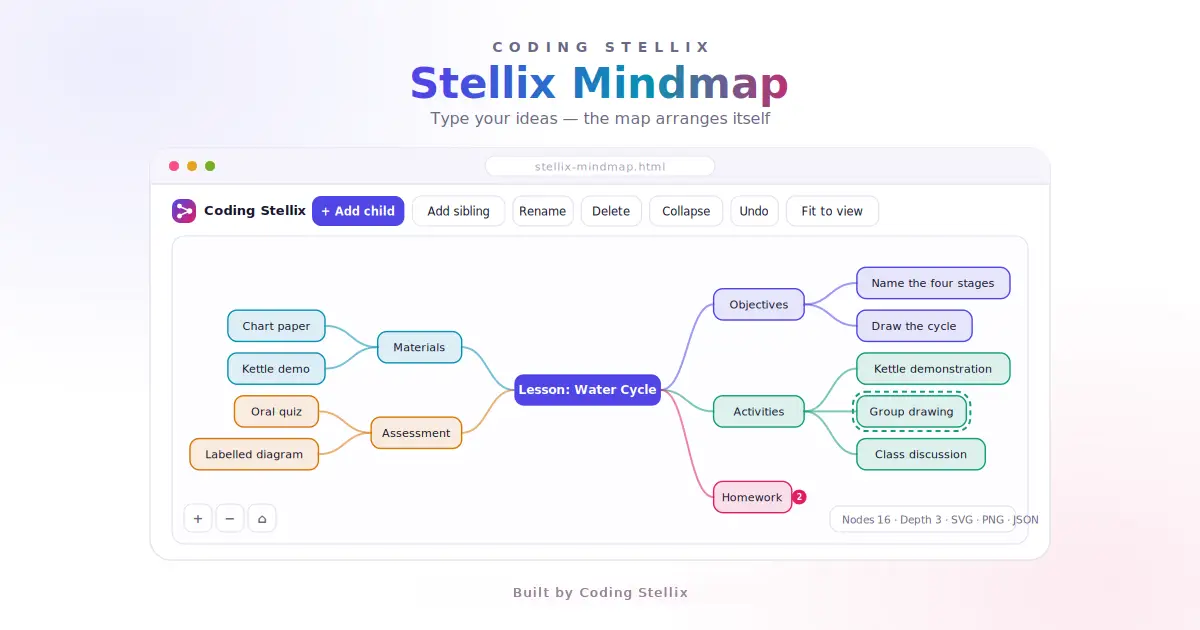
Most mind map tools people build as a learning project turn into drag-and-drop toys. You add a box, drag it somewhere, add another, drag that too, and within ten nodes the thing looks like spilled rice. The map stops being about thinking and starts being about tidying.
Stellix Mindmap takes the opposite position: you never position anything. You type, and the map arranges itself. That one decision changes the whole build, and it is much less code than dragging would have been.
Here is how it comes together.
The data is a tree, and nothing else
Every node holds four things: an id, its text, an optional colour, and a list of children. There is no x, no y, no width. Positions are not data — they are something you calculate fresh every time you draw, which means the map can never drift out of sync with itself.
This also makes saving trivial. Strip the temporary layout fields, and the whole map is a small piece of JSON you can download, email to yourself, and load back tomorrow. If you keep positions in your data instead, every save carries coordinates that were only ever true for one screen size.
The layout algorithm is the whole project
This is the part worth getting right, and it is genuinely simple once you see it.
Work in two passes. First, for any node, calculate the height its subtree needs. A node with no visible children needs one node height. A node with children needs the sum of all its children’s subtree heights, plus a gap between each one. That is a short recursive function, and it gives you the vertical space every branch demands before you place anything.
Second, place the nodes. Give a node a position, then stack its children vertically in the space you just measured: start at the top of that block, place each child at the centre of its own subtree height, and move the cursor down by that height plus a gap. The child’s horizontal position is simply the parent’s right edge plus a fixed gap.
The pleasing side effect is that every parent lands exactly opposite the middle of its children, because you centred the whole block on the parent’s own vertical position. You never write a rule saying “centre the parent” — it falls out of the maths.
For the root, split the top-level branches into two lists — even indexes to the right, odd to the left — and run the same placement in both directions. Now the map grows sideways instead of trailing off one edge, which matters a lot when someone adds a tenth branch.
Node width comes from the text length, clamped between a minimum and a maximum so short labels do not look like stamps and long ones do not turn into a paragraph. Truncate the displayed text at that maximum with an ellipsis.
Test it by looking for overlaps
There is one bug this layout can have, and it is the one that matters: two nodes occupying the same space. It is also easy to test automatically, which is rare for anything visual.
Lay out a tree, then check every pair of nodes for rectangle intersection. Run that against a wide tree, a deep one, a single node, a tree with a dozen branches, and a deliberately lopsided one where a single branch holds nine children. If none of them produce an overlapping pair, the algorithm is sound. I found two placement mistakes this way that I would not have caught by eye.
Make the keyboard the main interface
Watch anyone brainstorm and you will notice they never want to reach for the mouse. So the keyboard drives everything: Tab makes a child, Enter makes a sibling, F2 renames, Delete removes, Space collapses a branch, and Control-Z undoes.
Two details make this feel professional rather than fiddly. First, when a new node appears, put it straight into edit mode with the text selected, so typing replaces the placeholder immediately. Second, guard your global key handler — if the event target is an input or textarea, return early, otherwise pressing Enter while renaming will create a sibling instead of confirming the name.
For editing itself, do not build a text editor inside the SVG. Position a normal HTML input on top of the node using the same transform you use for drawing, and remove it when the person is done. It gives you selection, cursor keys, autocorrect and everything else for free.
Colour that inherits
Assigning a colour to every node by hand is tedious. Assigning it to a branch is natural.
When you draw, pass the current colour down the recursion. A node uses its own colour if it has one, otherwise the one handed down from its parent. Set the colour on a top-level branch and the entire branch takes it, including nodes added later. Give each node a soft tinted fill of that colour with a solid border, and draw its incoming connector in the same colour, so branches read as units at a glance.
Collapse, undo, pan and zoom
Collapsing is one flag. If a node is collapsed, treat its children as if they do not exist during layout — the rest of the map closes the gap automatically. Draw a small badge on the collapsed node showing how many nodes are hidden inside, so nothing is silently lost.
Undo is the cheapest useful feature in the whole project. Before every change that modifies the tree, push a JSON copy of the map onto a stack. Undo pops it back; redo works the same in the other direction. Cap the stack at a few dozen entries. For a document this small, snapshots beat tracking individual operations, and the code is a fraction of the size.
Pan and zoom are just three numbers — an x offset, a y offset, and a scale — applied when converting map coordinates to screen coordinates. Dragging the background changes the offsets, the wheel changes the scale. Add a fit-to-view button that measures the map’s bounding box and picks the offset and scale that centres it. Everyone reaches for that button constantly.
One thing to guard: when a press starts on a node, do not also start a background drag. Check what was pressed first and let the node handle it.
Export three ways, for three different reasons
SVG is the honest export. You already build the map as shapes and text, so writing it out as a standalone file is mostly the same drawing code without the pan and zoom transform, using the map’s own bounding box plus a margin as the canvas size.
PNG is the practical export, because people paste images into slides and chat. Serialise the SVG, load it into an image, draw that image onto a canvas at twice the size, and export it. Double resolution costs nothing and keeps text crisp on high-density screens.
JSON is the one that respects the person’s work. Without it, closing the tab loses the map. With it, the file belongs to them.
What makes it feel finished
Show a small live count of nodes, depth and branches — it makes the map feel like a document rather than a drawing. Draw a dashed ring around the selected node so keyboard commands never feel ambiguous. Ship two or three starter maps, because an empty canvas is intimidating and a filled one teaches the shortcuts in seconds.
Build it in an afternoon and you will have written a recursive layout algorithm, a snapshot-based undo system, a coordinate transform, and three export paths — in one HTML file that runs offline and never sends anyone’s ideas to a server.
<!DOCTYPE html>
<html lang="en" data-theme="light">
<head>
<meta charset="UTF-8" />
<meta name="viewport" content="width=device-width, initial-scale=1" />
<title>Stellix Mindmap — Coding Stellix</title>
<meta name="description" content="Stellix Mindmap by Coding Stellix — build tidy mind maps that lay themselves out, then export to SVG, PNG or JSON. No libraries, works offline in one HTML file." />
<link rel="preconnect" href="https://fonts.googleapis.com">
<link rel="preconnect" href="https://fonts.gstatic.com" crossorigin>
<link href="https://fonts.googleapis.com/css2?family=Jost:wght@300;400;500;600;700&family=Space+Mono:wght@400;700&display=swap" rel="stylesheet">
<style>
:root{
--bg:#f6f6fb;
--panel:#ffffff;
--stroke:#e3e2ef;
--soft:#f0effa;
--ink:#16162a;
--muted:#6a6885;
--faint:#a3a1ba;
--indigo:#4f46e5;
--lime:#5f9e0b;
--rose:#e11d63;
--canvas:#ffffff;
--shadow:0 18px 44px rgba(30,25,80,.10);
}
html[data-theme="dark"]{
--bg:#0c0c16;
--panel:#14142a;
--stroke:rgba(255,255,255,.11);
--soft:rgba(255,255,255,.05);
--ink:#eceafd;
--muted:#9b98bd;
--faint:#6f6c92;
--indigo:#8b83ff;
--lime:#a3e635;
--rose:#fb7185;
--canvas:#101024;
--shadow:0 22px 60px rgba(0,0,0,.55);
}
*{margin:0;padding:0;box-sizing:border-box}
body{font-family:'Jost',sans-serif;background:var(--bg);color:var(--ink);min-height:100vh;
padding:16px 14px 30px;transition:background .3s,color .3s;overflow-x:hidden}
.wrap{max-width:1240px;margin:0 auto;display:flex;flex-direction:column;gap:14px}
header{display:flex;align-items:center;justify-content:space-between;gap:12px;flex-wrap:wrap}
.brand{display:flex;align-items:center;gap:11px}
.mark{width:40px;height:40px;border-radius:12px;flex:none;display:grid;place-items:center;
background:linear-gradient(140deg,var(--indigo),var(--rose));box-shadow:0 8px 24px rgba(79,70,229,.32)}
.mark svg{width:21px;height:21px}
.brand b{display:block;font-size:.97rem;font-weight:600;line-height:1.15}
.brand small{display:block;font-size:.66rem;letter-spacing:.22em;text-transform:uppercase;color:var(--muted)}
.icon-btn{width:42px;height:42px;border-radius:12px;border:1px solid var(--stroke);background:var(--panel);
color:var(--ink);cursor:pointer;display:grid;place-items:center;transition:transform .16s,border-color .16s}
.icon-btn:hover{transform:translateY(-2px);border-color:var(--indigo)}
.icon-btn:focus-visible{outline:2px solid var(--indigo);outline-offset:3px}
.icon-btn svg{width:19px;height:19px}
h1.page{font-size:clamp(1.55rem,5vw,2.05rem);font-weight:700;letter-spacing:-.03em}
.sub{color:var(--muted);font-size:.88rem;font-weight:300;margin-top:2px}
.bar{display:flex;gap:8px;flex-wrap:wrap;align-items:center}
.btn{font-family:'Jost',sans-serif;font-size:.84rem;font-weight:500;min-height:40px;padding:8px 14px;border-radius:11px;
border:1px solid var(--stroke);background:var(--panel);color:var(--ink);cursor:pointer;
display:inline-flex;align-items:center;gap:7px;transition:transform .16s,border-color .16s}
.btn:hover{transform:translateY(-2px);border-color:var(--indigo)}
.btn:focus-visible{outline:2px solid var(--indigo);outline-offset:3px}
.btn:disabled{opacity:.4;cursor:not-allowed;transform:none}
.btn.primary{background:var(--indigo);border-color:var(--indigo);color:#fff;font-weight:600}
.btn.danger:hover{border-color:var(--rose);color:var(--rose)}
.btn svg{width:15px;height:15px}
.sep{width:1px;height:26px;background:var(--stroke)}
.spacer{flex:1}
.stage{position:relative;border:1px solid var(--stroke);border-radius:16px;overflow:hidden;
background:var(--canvas);box-shadow:var(--shadow);height:min(66vh,620px);touch-action:none;cursor:grab}
.stage.dragging{cursor:grabbing}
#map{display:block;width:100%;height:100%;user-select:none}
#editor{position:absolute;display:none;z-index:5;font-family:'Jost',sans-serif;font-size:14px;
border:2px solid var(--indigo);border-radius:8px;padding:5px 9px;background:var(--panel);color:var(--ink);outline:none}
.hud{position:absolute;left:12px;bottom:12px;display:flex;gap:6px;z-index:4}
.hud button{width:34px;height:34px;border-radius:9px;border:1px solid var(--stroke);background:var(--panel);
color:var(--ink);cursor:pointer;display:grid;place-items:center;font-size:.9rem}
.hud button:hover{border-color:var(--indigo)}
.tipbox{position:absolute;right:12px;bottom:12px;z-index:4;background:var(--panel);border:1px solid var(--stroke);
border-radius:11px;padding:8px 11px;font-size:.72rem;color:var(--muted);max-width:260px;line-height:1.55}
.tipbox b{color:var(--ink);font-family:'Space Mono',monospace;font-size:.68rem}
.cards{display:grid;grid-template-columns:repeat(3,1fr);gap:12px}
.card{background:var(--panel);border:1px solid var(--stroke);border-radius:14px;padding:13px}
.card h2{font-size:.65rem;letter-spacing:.2em;text-transform:uppercase;color:var(--muted);font-weight:600;margin-bottom:9px}
.swatches{display:flex;gap:6px;flex-wrap:wrap}
.sw{width:26px;height:26px;border-radius:8px;border:2px solid transparent;cursor:pointer;transition:transform .14s}
.sw:hover{transform:scale(1.12)}
.sw.on{border-color:var(--ink)}
.meta{font-size:.78rem;color:var(--muted);line-height:1.7}
.meta b{color:var(--ink);font-family:'Space Mono',monospace}
.chips{display:flex;gap:6px;flex-wrap:wrap}
.chip{font-size:.72rem;border:1px solid var(--stroke);border-radius:9px;padding:5px 9px;color:var(--muted);cursor:pointer}
.chip:hover{border-color:var(--indigo);color:var(--ink)}
footer{text-align:center;font-size:.76rem;color:var(--muted);font-weight:300;border-top:1px solid var(--stroke);padding-top:13px}
footer b{color:var(--ink);font-weight:600}
.hidden{display:none!important}
@media (max-width:820px){
.cards{grid-template-columns:1fr}
.stage{height:min(56vh,460px)}
.tipbox{display:none}
}
</style>
</head>
<body>
<div class="wrap">
<header>
<div class="brand">
<div class="mark">
<svg viewBox="0 0 24 24" fill="none" stroke="#fff" stroke-width="2" stroke-linecap="round" stroke-linejoin="round">
<circle cx="5" cy="6" r="2.4"/><circle cx="5" cy="18" r="2.4"/><circle cx="18" cy="12" r="2.6"/>
<path d="M7.4 6.9c4 1.2 5.4 2.6 8 4.2M7.4 17.1c4-1.2 5.4-2.6 8-4.2"/>
</svg>
</div>
<div><b>Coding Stellix</b><small>Mindmap</small></div>
</div>
<button class="icon-btn" id="themeBtn" aria-label="Switch to dark mode" title="Switch theme">
<svg id="themeIcon" viewBox="0 0 24 24" fill="none" stroke="currentColor" stroke-width="2" stroke-linecap="round" stroke-linejoin="round">
<path d="M21 12.8A9 9 0 1 1 11.2 3a7 7 0 0 0 9.8 9.8z"/>
</svg>
</button>
</header>
<div>
<h1 class="page">Mind Map</h1>
<p class="sub">Type your ideas — the map arranges itself. Nothing to drag into place, nothing uploaded anywhere.</p>
</div>
<div class="bar">
<button class="btn primary" id="addChild">
<svg viewBox="0 0 24 24" fill="none" stroke="currentColor" stroke-width="2" stroke-linecap="round"><path d="M12 5v14M5 12h14"/></svg>
Add child <span style="opacity:.7;font-size:.72rem">Tab</span>
</button>
<button class="btn" id="addSib">Add sibling <span style="opacity:.6;font-size:.72rem">Enter</span></button>
<button class="btn" id="renameBtn">Rename <span style="opacity:.6;font-size:.72rem">F2</span></button>
<button class="btn danger" id="delBtn">Delete <span style="opacity:.6;font-size:.72rem">Del</span></button>
<div class="sep"></div>
<button class="btn" id="upBtn" title="Move up">↑</button>
<button class="btn" id="downBtn" title="Move down">↓</button>
<button class="btn" id="foldBtn">Collapse</button>
<div class="sep"></div>
<button class="btn" id="undoBtn" title="Undo">↶ Undo</button>
<button class="btn" id="redoBtn" title="Redo">↷ Redo</button>
<div class="spacer"></div>
<button class="btn" id="fitBtn">Fit to view</button>
</div>
<div class="stage" id="stage">
<svg id="map"></svg>
<input id="editor" spellcheck="false">
<div class="hud">
<button id="zoomIn" aria-label="Zoom in">+</button>
<button id="zoomOut" aria-label="Zoom out">−</button>
<button id="zoomReset" aria-label="Reset zoom">⌂</button>
</div>
<div class="tipbox">
<b>Tab</b> child · <b>Enter</b> sibling · <b>F2</b> rename · <b>Del</b> remove<br>
Drag the background to pan, scroll to zoom, double-click a node to edit.
</div>
</div>
<div class="cards">
<div class="card">
<h2>Branch colour</h2>
<div class="swatches" id="swatchBox"></div>
<p class="meta" style="margin-top:9px">A colour applies to the whole branch under the selected node.</p>
</div>
<div class="card">
<h2>Export & import</h2>
<div class="bar">
<button class="btn" id="pngBtn">PNG</button>
<button class="btn" id="svgBtn">SVG</button>
<button class="btn" id="jsonBtn">JSON</button>
<button class="btn" id="loadBtn">Load JSON</button>
<input type="file" id="loadFile" accept=".json,application/json" class="hidden">
</div>
<p class="meta" id="exportMsg" style="margin-top:9px">PNG exports at twice the size for slides and thumbnails.</p>
</div>
<div class="card">
<h2>Map</h2>
<p class="meta" id="statsBox"></p>
<div class="chips" style="margin-top:8px">
<span class="chip" data-sample="lesson">Lesson plan</span>
<span class="chip" data-sample="video">Video outline</span>
<span class="chip" data-sample="blank">Blank map</span>
</div>
</div>
</div>
<footer>Built by <b>Coding Stellix</b></footer>
</div>
<script>
(function(){
"use strict";
/* =========================================================
PURE HELPERS START — no DOM, so the logic can be tested
========================================================= */
const NODE_H=38, GAP_Y=14, GAP_X=64, PAD_X=17, CHAR_W=7.6, MIN_W=74, MAX_W=230;
function nodeWidth(text){
const w=String(text||'').length*CHAR_W+PAD_X*2;
return Math.max(MIN_W,Math.min(MAX_W,Math.round(w)));
}
function visibleKids(n){ return n.collapsed?[]:(n.children||[]); }
/* height of a subtree once laid out */
function subtreeHeight(n){
const kids=visibleKids(n);
if(!kids.length) return NODE_H;
let h=0;
kids.forEach((k,i)=>{ h+=subtreeHeight(k); if(i) h+=GAP_Y; });
return Math.max(NODE_H,h);
}
/* place a subtree: x is the left edge, y the vertical centre */
function layoutSide(node,x,y,dir,out){
const w=nodeWidth(node.text);
node._w=w; node._h=NODE_H;
node._x=dir>0?x:x-w;
node._y=y-NODE_H/2;
out.push(node);
const kids=visibleKids(node);
if(!kids.length) return;
const total=subtreeHeight(node);
let cursor=y-total/2;
kids.forEach(k=>{
const kh=subtreeHeight(k);
const kx=dir>0 ? node._x+w+GAP_X : node._x-GAP_X;
layoutSide(k,kx,cursor+kh/2,dir,out);
cursor+=kh+GAP_Y;
});
}
/* root in the middle, top-level branches split left and right */
function layoutTree(root){
const flat=[];
const kids=visibleKids(root);
const rw=nodeWidth(root.text);
root._w=rw; root._h=NODE_H; root._x=-rw/2; root._y=-NODE_H/2;
flat.push(root);
const right=[], left=[];
kids.forEach((k,i)=>{ (i%2===0?right:left).push(k); });
[[right,1],[left,-1]].forEach(([list,dir])=>{
let total=0;
list.forEach((k,i)=>{ total+=subtreeHeight(k); if(i) total+=GAP_Y; });
let cursor=-total/2;
list.forEach(k=>{
const kh=subtreeHeight(k);
const x=dir>0 ? rw/2+GAP_X : -rw/2-GAP_X;
layoutSide(k,x,cursor+kh/2,dir,flat);
cursor+=kh+GAP_Y;
});
});
return flat;
}
function bounds(flat){
if(!flat.length) return {x:0,y:0,w:1,h:1};
let x1=Infinity,y1=Infinity,x2=-Infinity,y2=-Infinity;
flat.forEach(n=>{
x1=Math.min(x1,n._x); y1=Math.min(y1,n._y);
x2=Math.max(x2,n._x+n._w); y2=Math.max(y2,n._y+n._h);
});
return {x:x1,y:y1,w:x2-x1,h:y2-y1};
}
/* smooth connector between a parent edge and a child edge */
function edgePath(px,py,cx,cy){
const mx=(px+cx)/2;
return 'M'+px.toFixed(1)+' '+py.toFixed(1)+
' C'+mx.toFixed(1)+' '+py.toFixed(1)+', '+mx.toFixed(1)+' '+cy.toFixed(1)+', '+
cx.toFixed(1)+' '+cy.toFixed(1);
}
function countNodes(n){
let c=1;
(n.children||[]).forEach(k=>c+=countNodes(k));
return c;
}
function depthOf(n){
if(!n.children||!n.children.length) return 1;
return 1+Math.max.apply(null,n.children.map(depthOf));
}
function findParent(root,id,parent){
if(root.id===id) return parent||null;
for(const k of (root.children||[])){
const r=findParent(k,id,root);
if(r!==undefined&&r!==null) return r;
if(k.id===id) return root;
}
return null;
}
function findNode(root,id){
if(root.id===id) return root;
for(const k of (root.children||[])){
const r=findNode(k,id);
if(r) return r;
}
return null;
}
/* strip layout fields so saved files stay clean */
function cleanTree(n){
return { id:n.id, text:n.text, color:n.color||null,
collapsed:!!n.collapsed,
children:(n.children||[]).map(cleanTree) };
}
/* ========================= PURE HELPERS END ========================= */
const $=id=>document.getElementById(id);
const COLORS=['#4f46e5','#0891b2','#0f9d76','#65a30d','#d97706','#e11d63','#7c3aed','#475569'];
let uid=1;
const nid=()=>'n'+(uid++);
function node(text,color,children){
return {id:nid(),text:text,color:color||null,collapsed:false,children:children||[]};
}
const SAMPLES={
lesson:()=>node('Lesson: Water Cycle',null,[
node('Objectives','#4f46e5',[node('Name the four stages'),node('Draw the cycle'),node('Give local examples')]),
node('Materials','#0891b2',[node('Chart paper'),node('Kettle demo'),node('Worksheet')]),
node('Activities','#0f9d76',[node('Warm-up questions'),node('Kettle demonstration'),node('Group drawing'),node('Class discussion')]),
node('Assessment','#d97706',[node('Oral quiz'),node('Labelled diagram')]),
node('Homework','#e11d63',[node('Five sentences'),node('Find one example at home')])
]),
video:()=>node('Video: CSS Grid in 10 min',null,[
node('Hook','#e11d63',[node('Show the finished layout'),node('Promise: no framework')]),
node('Setup','#4f46e5',[node('HTML skeleton'),node('Why grid over float')]),
node('Core','#0f9d76',[node('Columns and rows'),node('Gap and areas'),node('Responsive with minmax')]),
node('Demo','#0891b2',[node('Build a dashboard'),node('Mobile check')]),
node('Outro','#d97706',[node('Recap the three rules'),node('Ask for a comment'),node('Next video teaser')])
]),
blank:()=>node('Central idea',null,[node('Branch one'),node('Branch two'),node('Branch three')])
};
let root=SAMPLES.lesson();
let selected=root.id;
let view={x:0,y:0,z:1};
let history=[], future=[];
/* ---------- history ---------- */
function snapshot(){
history.push(JSON.stringify(cleanTree(root)));
if(history.length>60) history.shift();
future.length=0;
updateButtons();
}
function restore(json){
root=JSON.parse(json);
// keep the id counter ahead of anything loaded
let max=0;
(function walk(n){ const m=/^n(\d+)$/.exec(n.id||''); if(m) max=Math.max(max,+m[1]); (n.children||[]).forEach(walk); })(root);
uid=max+1;
if(!findNode(root,selected)) selected=root.id;
render();
}
$('undoBtn').onclick=()=>{
if(!history.length) return;
future.push(JSON.stringify(cleanTree(root)));
restore(history.pop());
updateButtons();
};
$('redoBtn').onclick=()=>{
if(!future.length) return;
history.push(JSON.stringify(cleanTree(root)));
restore(future.pop());
updateButtons();
};
function updateButtons(){
$('undoBtn').disabled=!history.length;
$('redoBtn').disabled=!future.length;
const sel=findNode(root,selected);
const isRoot=sel&&sel.id===root.id;
$('delBtn').disabled=!!isRoot;
$('upBtn').disabled=!!isRoot;
$('downBtn').disabled=!!isRoot;
$('foldBtn').disabled=!sel||!(sel.children&&sel.children.length);
$('foldBtn').textContent=(sel&&sel.collapsed)?'Expand':'Collapse';
}
/* ---------- colour inheritance ---------- */
function colorFor(n,inherited){
return n.color||inherited||null;
}
/* ---------- rendering ---------- */
function render(){
const svg=$('map');
const flat=layoutTree(root);
const rect=$('stage').getBoundingClientRect();
const w=Math.max(200,rect.width), h=Math.max(200,rect.height);
svg.setAttribute('viewBox','0 0 '+w+' '+h);
svg.setAttribute('width',w); svg.setAttribute('height',h);
const T=(x,y)=>({x:(x*view.z)+view.x+w/2, y:(y*view.z)+view.y+h/2});
let out='';
// edges first, so nodes sit on top
(function drawEdges(n,inherited){
const col=colorFor(n,inherited);
visibleKids(n).forEach(k=>{
const kcol=colorFor(k,col)||'#94a3b8';
const right=k._x>n._x;
const p=T(right?n._x+n._w:n._x, n._y+n._h/2);
const c=T(right?k._x:k._x+k._w, k._y+k._h/2);
out+='<path d="'+edgePath(p.x,p.y,c.x,c.y)+'" fill="none" stroke="'+kcol+
'" stroke-opacity="0.55" stroke-width="'+Math.max(1.2,2.4*view.z)+'" stroke-linecap="round"/>';
drawEdges(k,kcol);
});
})(root,null);
// nodes
(function drawNodes(n,inherited,depth){
const col=colorFor(n,inherited);
const p=T(n._x,n._y);
const w2=n._w*view.z, h2=n._h*view.z;
const isRoot=n.id===root.id;
const fill=isRoot?(col||'#4f46e5'):(col?hexA(col,0.13):'rgba(120,120,150,.10)');
const stroke=isRoot?'none':(col||'#94a3b8');
const textCol=isRoot?'#ffffff':'currentColor';
const sel=n.id===selected;
if(sel) out+='<rect x="'+(p.x-4)+'" y="'+(p.y-4)+'" width="'+(w2+8)+'" height="'+(h2+8)+
'" rx="'+(12*view.z+4)+'" fill="none" stroke="'+(col||'#4f46e5')+'" stroke-width="2" stroke-dasharray="5 4"/>';
out+='<g class="node" data-id="'+n.id+'" style="cursor:pointer">';
out+='<rect x="'+p.x.toFixed(1)+'" y="'+p.y.toFixed(1)+'" width="'+w2.toFixed(1)+'" height="'+h2.toFixed(1)+
'" rx="'+(11*view.z).toFixed(1)+'" fill="'+fill+'" stroke="'+stroke+'" stroke-width="1.4"/>';
out+='<text x="'+(p.x+w2/2).toFixed(1)+'" y="'+(p.y+h2/2+ (isRoot?5.5:5)*view.z).toFixed(1)+
'" text-anchor="middle" font-size="'+((isRoot?15:13.5)*view.z).toFixed(1)+
'" font-weight="'+(isRoot?'700':'500')+'" fill="'+textCol+'">'+esc(clip(n.text,26))+'</text>';
out+='</g>';
if(n.collapsed && (n.children||[]).length){
const badge=T(n._x+n._w+9,n._y+n._h/2);
out+='<circle cx="'+badge.x.toFixed(1)+'" cy="'+badge.y.toFixed(1)+'" r="'+(9*view.z).toFixed(1)+
'" fill="'+(col||'#94a3b8')+'"/>';
out+='<text x="'+badge.x.toFixed(1)+'" y="'+(badge.y+3.5*view.z).toFixed(1)+'" text-anchor="middle" font-size="'+
(9.5*view.z).toFixed(1)+'" fill="#fff" font-weight="700">'+(countNodes(n)-1)+'</text>';
}
visibleKids(n).forEach(k=>drawNodes(k,col,depth+1));
})(root,null,0);
svg.innerHTML=out;
svg.querySelectorAll('.node').forEach(g=>{
g.addEventListener('pointerdown',e=>{ e.stopPropagation(); selected=g.dataset.id; render(); });
g.addEventListener('dblclick',e=>{ e.stopPropagation(); selected=g.dataset.id; startEdit(); });
});
$('statsBox').innerHTML='Nodes: <b>'+countNodes(root)+'</b> · Depth: <b>'+depthOf(root)+
'</b> · Branches: <b>'+(root.children||[]).length+'</b>';
updateButtons();
renderSwatches();
}
function clip(s,n){ s=String(s||''); return s.length>n?s.slice(0,n-1)+'…':s; }
function esc(s){ return String(s).replace(/[&<>"]/g,c=>({'&':'&','<':'<','>':'>','"':'"'}[c])); }
function hexA(hex,a){
const h=hex.replace('#','');
const n=parseInt(h.length===3?h.split('').map(c=>c+c).join(''):h,16);
return 'rgba('+((n>>16)&255)+','+((n>>8)&255)+','+(n&255)+','+a+')';
}
function renderSwatches(){
const sel=findNode(root,selected);
$('swatchBox').innerHTML=COLORS.map(c=>
'<span class="sw'+(sel&&sel.color===c?' on':'')+'" data-c="'+c+'" style="background:'+c+'" tabindex="0"></span>').join('')+
'<span class="sw'+(sel&&!sel.color?' on':'')+'" data-c="" style="background:var(--soft);border:2px dashed var(--stroke)" tabindex="0" title="Inherit"></span>';
$('swatchBox').querySelectorAll('.sw').forEach(el=>{
const pick=()=>{
const s=findNode(root,selected); if(!s) return;
snapshot(); s.color=el.dataset.c||null; render();
};
el.onclick=pick;
el.onkeydown=e=>{ if(e.key==='Enter'||e.key===' '){ e.preventDefault(); pick(); } };
});
}
/* ---------- editing ---------- */
function startEdit(){
const n=findNode(root,selected); if(!n) return;
const rect=$('stage').getBoundingClientRect();
const w=rect.width,h=rect.height;
const x=(n._x*view.z)+view.x+w/2, y=(n._y*view.z)+view.y+h/2;
const ed=$('editor');
ed.value=n.text;
ed.style.display='block';
ed.style.left=Math.max(4,x)+'px';
ed.style.top=Math.max(4,y)+'px';
ed.style.width=Math.max(120,n._w*view.z)+'px';
ed.focus(); ed.select();
ed.onblur=commit;
ed.onkeydown=e=>{
if(e.key==='Enter'){ e.preventDefault(); commit(); }
else if(e.key==='Escape'){ ed.onblur=null; ed.style.display='none'; $('map').focus(); }
e.stopPropagation();
};
function commit(){
ed.onblur=null;
const v=ed.value.trim();
ed.style.display='none';
if(v && v!==n.text){ snapshot(); n.text=v; }
render();
}
}
/* ---------- tree operations ---------- */
function addChild(){
const n=findNode(root,selected); if(!n) return;
snapshot();
n.collapsed=false;
const kid=node('New idea');
n.children=n.children||[];
n.children.push(kid);
selected=kid.id;
render(); startEdit();
}
function addSibling(){
const p=findParent(root,selected);
if(!p){ addChild(); return; }
snapshot();
const i=p.children.findIndex(k=>k.id===selected);
const kid=node('New idea');
p.children.splice(i+1,0,kid);
selected=kid.id;
render(); startEdit();
}
function removeNode(){
const p=findParent(root,selected);
if(!p) return;
snapshot();
const i=p.children.findIndex(k=>k.id===selected);
p.children.splice(i,1);
selected=p.id;
render();
}
function move(dir){
const p=findParent(root,selected);
if(!p) return;
const i=p.children.findIndex(k=>k.id===selected);
const j=i+dir;
if(j<0||j>=p.children.length) return;
snapshot();
const t=p.children[i]; p.children[i]=p.children[j]; p.children[j]=t;
render();
}
function toggleFold(){
const n=findNode(root,selected);
if(!n||!(n.children&&n.children.length)) return;
snapshot(); n.collapsed=!n.collapsed; render();
}
$('addChild').onclick=addChild;
$('addSib').onclick=addSibling;
$('renameBtn').onclick=startEdit;
$('delBtn').onclick=removeNode;
$('upBtn').onclick=()=>move(-1);
$('downBtn').onclick=()=>move(1);
$('foldBtn').onclick=toggleFold;
/* ---------- keyboard ---------- */
window.addEventListener('keydown',e=>{
const t=e.target;
if(t && (t.tagName==='INPUT'||t.tagName==='TEXTAREA')) return;
if(e.key==='Tab'){ e.preventDefault(); addChild(); }
else if(e.key==='Enter'){ e.preventDefault(); addSibling(); }
else if(e.key==='F2'){ e.preventDefault(); startEdit(); }
else if(e.key==='Delete'||e.key==='Backspace'){ e.preventDefault(); removeNode(); }
else if(e.key===' '){ e.preventDefault(); toggleFold(); }
else if((e.ctrlKey||e.metaKey)&&e.key.toLowerCase()==='z'){ e.preventDefault(); e.shiftKey?$('redoBtn').click():$('undoBtn').click(); }
});
/* ---------- pan and zoom ---------- */
const stage=$('stage');
let panning=false,px=0,py=0;
stage.addEventListener('pointerdown',e=>{
if(e.target.closest && e.target.closest('.node,.hud,#editor')) return;
panning=true; px=e.clientX; py=e.clientY;
stage.classList.add('dragging');
if(stage.setPointerCapture){ try{ stage.setPointerCapture(e.pointerId); }catch(err){} }
});
window.addEventListener('pointermove',e=>{
if(!panning) return;
view.x+=e.clientX-px; view.y+=e.clientY-py;
px=e.clientX; py=e.clientY;
render();
});
window.addEventListener('pointerup',()=>{ panning=false; stage.classList.remove('dragging'); });
stage.addEventListener('wheel',e=>{
e.preventDefault();
const f=e.deltaY<0?1.12:1/1.12;
view.z=Math.max(0.3,Math.min(2.6,view.z*f));
render();
},{passive:false});
$('zoomIn').onclick=()=>{ view.z=Math.min(2.6,view.z*1.18); render(); };
$('zoomOut').onclick=()=>{ view.z=Math.max(0.3,view.z/1.18); render(); };
$('zoomReset').onclick=()=>{ view={x:0,y:0,z:1}; render(); };
$('fitBtn').onclick=fit;
function fit(){
const flat=layoutTree(root);
const b=bounds(flat);
const rect=stage.getBoundingClientRect();
const z=Math.max(0.3,Math.min(1.6,Math.min((rect.width-60)/b.w,(rect.height-60)/b.h)));
view.z=z;
view.x=-((b.x+b.w/2)*z);
view.y=-((b.y+b.h/2)*z);
render();
}
/* ---------- export ---------- */
function exportSVG(){
const flat=layoutTree(root);
const b=bounds(flat);
const M=40;
const W=Math.round(b.w+M*2), H=Math.round(b.h+M*2);
const ox=-b.x+M, oy=-b.y+M;
const dark=document.documentElement.getAttribute('data-theme')==='dark';
const ink=dark?'#eceafd':'#16162a';
const bg=dark?'#101024':'#ffffff';
let s='<svg xmlns="http://www.w3.org/2000/svg" width="'+W+'" height="'+H+'" viewBox="0 0 '+W+' '+H+
'" font-family="Jost, Segoe UI, Helvetica, Arial, sans-serif">';
s+='<rect width="'+W+'" height="'+H+'" fill="'+bg+'"/>';
(function edges(n,inh){
const col=colorFor(n,inh);
visibleKids(n).forEach(k=>{
const kcol=colorFor(k,col)||'#94a3b8';
const right=k._x>n._x;
const p1x=(right?n._x+n._w:n._x)+ox, p1y=n._y+n._h/2+oy;
const p2x=(right?k._x:k._x+k._w)+ox, p2y=k._y+k._h/2+oy;
s+='<path d="'+edgePath(p1x,p1y,p2x,p2y)+'" fill="none" stroke="'+kcol+'" stroke-opacity="0.55" stroke-width="2.4" stroke-linecap="round"/>';
edges(k,kcol);
});
})(root,null);
(function nodes(n,inh){
const col=colorFor(n,inh);
const isRoot=n.id===root.id;
const fill=isRoot?(col||'#4f46e5'):(col?hexA(col,0.13):'rgba(120,120,150,.10)');
const stroke=isRoot?'none':(col||'#94a3b8');
s+='<rect x="'+(n._x+ox)+'" y="'+(n._y+oy)+'" width="'+n._w+'" height="'+n._h+
'" rx="11" fill="'+fill+'" stroke="'+stroke+'" stroke-width="1.4"/>';
s+='<text x="'+(n._x+ox+n._w/2)+'" y="'+(n._y+oy+n._h/2+5)+'" text-anchor="middle" font-size="'+
(isRoot?15:13.5)+'" font-weight="'+(isRoot?'700':'500')+'" fill="'+(isRoot?'#ffffff':ink)+'">'+
esc(clip(n.text,26))+'</text>';
visibleKids(n).forEach(k=>nodes(k,col));
})(root,null);
s+='</svg>';
return {svg:s,W:W,H:H};
}
function fname(ext){
const t=String(root.text||'mindmap').toLowerCase().replace(/[^a-z0-9]+/g,'-').replace(/^-|-$/g,'');
return (t||'stellix-mindmap')+'.'+ext;
}
function downloadBlob(blob,name){
const url=URL.createObjectURL(blob);
const a=document.createElement('a');
a.href=url; a.download=name; document.body.appendChild(a); a.click();
setTimeout(()=>{ URL.revokeObjectURL(url); a.remove(); },500);
}
$('svgBtn').onclick=()=>{
downloadBlob(new Blob([exportSVG().svg],{type:'image/svg+xml;charset=utf-8'}),fname('svg'));
$('exportMsg').textContent='SVG saved — sharp at any size.';
};
$('pngBtn').onclick=()=>{
const {svg,W,H}=exportSVG();
const url=URL.createObjectURL(new Blob([svg],{type:'image/svg+xml;charset=utf-8'}));
const img=new Image();
img.onload=()=>{
const c=document.createElement('canvas');
c.width=W*2; c.height=H*2;
const cx=c.getContext('2d');
cx.drawImage(img,0,0,c.width,c.height);
URL.revokeObjectURL(url);
c.toBlob(b=>{
if(!b){ $('exportMsg').textContent='PNG blocked here — the SVG download still works.'; return; }
downloadBlob(b,fname('png'));
$('exportMsg').textContent='PNG saved at '+c.width+' x '+c.height+'.';
},'image/png');
};
img.onerror=()=>{ URL.revokeObjectURL(url); $('exportMsg').textContent='Could not rasterise here — use SVG instead.'; };
img.src=url;
};
$('jsonBtn').onclick=()=>{
downloadBlob(new Blob([JSON.stringify(cleanTree(root),null,2)],{type:'application/json'}),fname('json'));
$('exportMsg').textContent='JSON saved — load it back any time.';
};
$('loadBtn').onclick=()=>$('loadFile').click();
$('loadFile').addEventListener('change',e=>{
const f=e.target.files&&e.target.files[0];
if(!f) return;
const fr=new FileReader();
fr.onload=()=>{
try{
const data=JSON.parse(String(fr.result));
if(!data||typeof data.text!=='string') throw new Error('shape');
snapshot();
restore(JSON.stringify(data));
selected=root.id;
fit();
$('exportMsg').textContent='Loaded '+countNodes(root)+' nodes.';
}catch(err){
$('exportMsg').textContent='That file is not a Stellix Mindmap JSON.';
}
};
fr.readAsText(f);
e.target.value='';
});
document.querySelectorAll('[data-sample]').forEach(el=>{
el.onclick=()=>{
snapshot();
root=SAMPLES[el.dataset.sample]();
selected=root.id;
fit();
};
});
/* ---------- theme ---------- */
const themeBtn=$('themeBtn'), themeIcon=$('themeIcon');
const MOON='<path d="M21 12.8A9 9 0 1 1 11.2 3a7 7 0 0 0 9.8 9.8z"/>';
const SUN='<circle cx="12" cy="12" r="4"/><path d="M12 2v2M12 20v2M2 12h2M20 12h2M4.9 4.9l1.4 1.4M17.7 17.7l1.4 1.4M19.1 4.9l-1.4 1.4M6.3 17.7l-1.4 1.4"/>';
themeBtn.onclick=()=>{
const dark=document.documentElement.getAttribute('data-theme')==='dark';
document.documentElement.setAttribute('data-theme',dark?'light':'dark');
themeIcon.innerHTML=dark?MOON:SUN;
themeBtn.setAttribute('aria-label',dark?'Switch to dark mode':'Switch to light mode');
render();
};
window.addEventListener('resize',render);
if(window.ResizeObserver){ try{ new ResizeObserver(render).observe(stage); }catch(e){} }
/* ---------- boot ---------- */
render();
setTimeout(fit,60);
window.__stellixMindmap={layoutTree:layoutTree,subtreeHeight:subtreeHeight,bounds:bounds,
nodeWidth:nodeWidth,countNodes:countNodes,depthOf:depthOf,findNode:findNode,findParent:findParent,
cleanTree:cleanTree,edgePath:edgePath};
})();
</script>
</body>
</html>