
Give a child a blank page and a pencil and something interesting happens: they hesitate. A blank page is intimidating, because whatever you draw first is probably going to look wrong. Most of us carry that hesitation into adulthood, which is why so many people say they “can’t draw.”
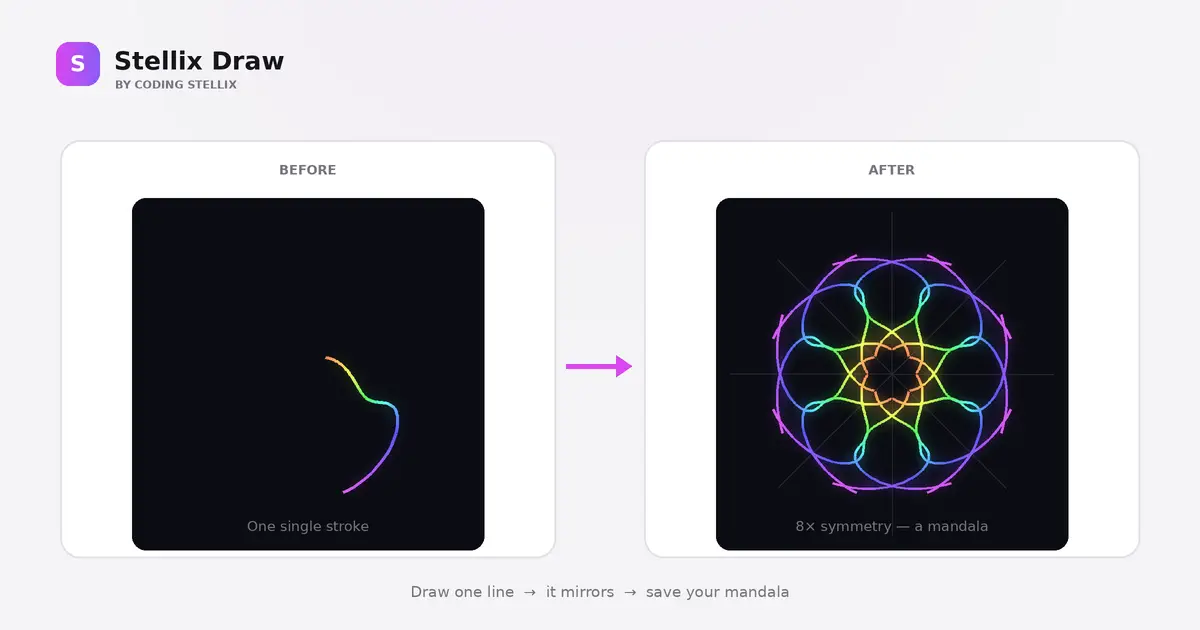
Stellix Draw was built to remove that hesitation entirely. It is a drawing pad with one twist — whatever line you draw is instantly mirrored around the centre, eight times over. A shaky, uncertain squiggle becomes a symmetrical mandala the moment you lift your finger. You cannot really make something ugly, because symmetry does the heavy lifting for you.
In this post I want to walk you through how a tool like this actually comes together, in plain language. No code, no jargon — just the reasoning, so you understand what makes the difference between a rough sketch of an idea and something people actually want to play with.
Start with the trick, not the tool
Before writing anything, it helps to identify the one thing that makes your idea worth building. For a drawing app, that could have been layers, or brushes, or filters. Here it is exactly one thing: the mirroring.
Everything else exists to serve it. If a feature makes the mirroring more fun, it stays. If it just adds buttons, it goes. That single rule kept the whole thing focused, and it is the reason the app is easy to understand within about three seconds of opening it.
The maths is simpler than it looks
The mirroring effect sounds complicated but rests on one very old idea: rotating a point around a centre.
Imagine the canvas as a clock face with your drawing hand somewhere on it. If you want eight-fold symmetry, you divide the full circle into eight equal slices — one every forty-five degrees. Every time your finger moves a tiny distance, the app does not draw that little line once. It draws it eight times, each copy rotated a little further around the middle. Your hand makes one mark; the canvas receives eight.
Then there is the mirror option, which doubles it again. Alongside each rotated copy, the app draws a flipped version, as though a mirror ran down the centre of every slice. Now one small movement produces sixteen marks arranged in perfect balance. That is the entire kaleidoscope effect, and once the maths is in place, changing from four segments to twelve is just changing one number.
Why the drawing has to be stored, not just painted
There is a beginner’s mistake worth avoiding here. The easy approach is to paint each line onto the canvas and forget about it. It works — until someone resizes their browser window, and the whole artwork stretches into a smeared mess. It also makes undo impossible, because you have no record of what was drawn.
So instead of only painting, Stellix Draw remembers. Every stroke is stored as a list of points, and here is the important part: those points are stored in relative terms rather than fixed pixels. A point is not recorded as “412 pixels across.” It is recorded as a proportion of the distance from the centre to the edge.
That one decision solves several problems at once. Resize the window and the artwork simply redraws at the new size, perfectly intact. Undo becomes trivial — throw away the last stroke and redraw everything else. And exporting a large, print-quality version is easy, because the same stored strokes can be redrawn at any size you like without any loss of quality.
The details that make it feel alive
A working symmetry tool is satisfying. A delightful one comes from a handful of small touches.
Rainbow colour. Rather than picking one colour and sticking with it, the brush can shift its hue gradually as you draw. The colour flows from pink through orange into green and blue across a single stroke, and because that stroke is mirrored many times, the finished mandala carries the whole spectrum in a balanced way. You get a professional-looking colour scheme without choosing a single colour yourself.
Neon glow. Each line is drawn twice — once soft and wide underneath, once sharp and bright on top. The soft version acts like light spilling onto the dark canvas. It costs almost nothing to add and makes the artwork look like it is genuinely emitting light.
Brush styles. The same stored strokes can be painted in different ways. A tapered brush swells in the middle and thins at the ends, which reads as elegant and calligraphic. A dotted brush places small circles instead of a continuous line. A spray brush scatters tiny specks around the path for an airbrush texture. One important catch here: the spray’s randomness has to be repeatable. If it used ordinary randomness, every undo or background change would rearrange the specks. So the scatter is derived from the stroke’s own position, which means it looks random but redraws identically every single time.
Faint guide lines. Thin radial lines show where the symmetry axes sit, so you can aim your strokes deliberately once you get the hang of it. They can be switched off when you just want to play.
The feature that turned it into content
The addition that changed the character of the app most was replay — a button that clears the canvas and redraws your entire mandala from scratch, stroke by stroke, in about two seconds.
Because every stroke was already stored, replay needed almost no new machinery. It simply walks through the saved points and paints them back in order, spreading the work evenly across the animation so a huge drawing and a tiny one both finish in the same satisfying couple of seconds.
Technically it is a small feature. Emotionally it is the biggest one in the app. Watching a mandala bloom outward from nothing is genuinely hypnotic, and it turns a private doodle into something people want to record and share. That is worth remembering as a general lesson: sometimes the most valuable feature is not new capability at all, but a better way of showing what you already have.
Rounding it out
Beyond that come the practical things that make a tool feel finished rather than experimental. Undo and redo, so mistakes cost nothing. An opacity slider, so faint layered strokes can build up depth. A choice of canvas backgrounds, including a paper-white option for printing. A distraction-free mode that hides every control. Keyboard shortcuts for anyone who ends up spending real time in it. And a high-resolution export, so a mandala can become a phone wallpaper or a printed poster rather than a screenshot.
None of those are exciting on their own. Together they are the difference between a demo and something you keep coming back to.
The lesson under the hood
Building this reinforced something I keep relearning: constraints create creativity. Symmetry is a restriction. It takes away your freedom to draw whatever you want wherever you want. And yet it is precisely that restriction that makes everyone who touches the app produce something beautiful within seconds.
The same is true of the build itself. One clear idea, protected carefully, then a small number of thoughtful details layered on top. That is usually all a good tool ever is.
Stellix Draw is one of a growing set of small, free tools I build under Coding Stellix — each designed to do one job well and get out of your way. Open it, draw one wobbly line, and see what happens.
<!DOCTYPE html>
<html lang="en">
<head>
<meta charset="UTF-8">
<meta name="viewport" content="width=device-width, initial-scale=1.0, viewport-fit=cover, user-scalable=no">
<title>Stellix Draw — Symmetry Mandala Drawing Pad by Coding Stellix</title>
<meta name="description" content="Stellix Draw by Coding Stellix — draw one line and watch it mirror into a symmetric mandala. Choose 2 to 12 segments, rainbow colours, neon glow, undo and download your art as a PNG.">
<link rel="preconnect" href="https://fonts.googleapis.com">
<link rel="preconnect" href="https://fonts.gstatic.com" crossorigin>
<link href="https://fonts.googleapis.com/css2?family=Unbounded:wght@400;600;700;800&family=Jost:wght@400;500;600;700&display=swap" rel="stylesheet">
<style>
:root{
--bg:#f4f4f6;
--chrome:#ffffff;
--panel:#f0eff3;
--line:#e2e0e8;
--text:#17161c;
--muted:#77747f;
--brand:#d946ef;
--brand-2:#8b5cf6;
--canvas:#0b0d14;
--r:13px;
}
*{margin:0;padding:0;box-sizing:border-box;-webkit-tap-highlight-color:transparent;user-select:none}
html,body{height:100%}
body{
font-family:'Jost',sans-serif;background:var(--bg);color:var(--text);
height:100dvh;display:flex;flex-direction:column;overflow:hidden;
}
header{
display:flex;align-items:center;gap:12px;padding:11px 18px;
background:var(--chrome);border-bottom:1px solid var(--line);z-index:10;flex-wrap:wrap;
}
.logo{display:flex;align-items:center;gap:11px}
.logo-mark{
width:35px;height:35px;border-radius:10px;flex:none;
background:linear-gradient(135deg,var(--brand),var(--brand-2));
display:grid;place-items:center;font-family:'Unbounded',sans-serif;font-weight:800;font-size:14px;color:#fff;
box-shadow:0 4px 16px rgba(217,70,239,.30);
}
.logo-text b{font-family:'Unbounded',sans-serif;font-weight:700;font-size:15px;display:block;line-height:1.05}
.logo-text span{font-size:10.5px;color:var(--muted);letter-spacing:.15em;text-transform:uppercase}
.spacer{flex:1}
.hchip{font-size:12.5px;color:var(--muted);border:1px solid var(--line);border-radius:99px;padding:6px 13px}
@media (max-width:820px){ .hchip{display:none} .logo-text span{display:none} }
.btn{
font-family:'Jost',sans-serif;font-size:13.5px;font-weight:600;
border:1px solid var(--line);background:var(--panel);color:var(--text);
border-radius:11px;padding:9px 14px;cursor:pointer;display:inline-flex;align-items:center;gap:7px;
transition:background .14s,transform .12s;
}
.btn:hover{background:#e6e4ec}
.btn:active{transform:scale(.96)}
.btn svg{width:15px;height:15px}
.btn:disabled{opacity:.4;cursor:default}
.btn-primary{background:linear-gradient(135deg,var(--brand),var(--brand-2));border:none;color:#fff;box-shadow:0 4px 16px rgba(217,70,239,.26)}
.btn-primary:hover{filter:brightness(1.05)}
main{flex:1;display:flex;min-height:0}
@media (max-width:820px){ main{flex-direction:column} }
/* stage */
.stage{
flex:1;min-height:0;display:grid;place-items:center;padding:18px;
background:
linear-gradient(var(--line) 1px,transparent 1px) 0 0/22px 22px,
linear-gradient(90deg,var(--line) 1px,transparent 1px) 0 0/22px 22px,
var(--bg);
}
.canvas-frame{
position:relative;width:100%;height:100%;max-width:min(100%,74vh);aspect-ratio:1;
border-radius:18px;overflow:hidden;box-shadow:0 18px 50px rgba(30,20,50,.20);
background:var(--canvas);
}
canvas{display:block;width:100%;height:100%;touch-action:none;cursor:crosshair}
.guides{position:absolute;inset:0;pointer-events:none;opacity:0;transition:opacity .2s}
.guides.on{opacity:1}
.guides line{stroke:rgba(255,255,255,.13);stroke-width:1}
/* panel */
.panel{
width:290px;flex:none;background:var(--chrome);border-left:1px solid var(--line);
padding:16px 18px;overflow-y:auto;display:flex;flex-direction:column;gap:18px;
}
@media (max-width:820px){
.panel{width:100%;border-left:none;border-top:1px solid var(--line);flex-direction:row;flex-wrap:wrap;gap:14px;padding:12px 14px;max-height:44dvh}
.block{flex:1;min-width:140px}
}
.block h3{font-size:10.5px;font-weight:600;letter-spacing:.16em;text-transform:uppercase;color:var(--muted);margin-bottom:10px;display:flex;justify-content:space-between;align-items:center}
.block h3 b{font-family:'Unbounded',sans-serif;font-size:11px;color:var(--brand)}
.chips{display:flex;flex-wrap:wrap;gap:7px}
.chip{
font-family:'Jost',sans-serif;font-size:13px;font-weight:600;color:var(--muted);
background:var(--panel);border:1px solid var(--line);border-radius:9px;
padding:8px 0;cursor:pointer;flex:1;min-width:42px;text-align:center;transition:.14s;
}
.chip:hover{background:#e6e4ec}
.chip.active{background:linear-gradient(135deg,var(--brand),var(--brand-2));color:#fff;border-color:transparent}
input[type=range]{
-webkit-appearance:none;appearance:none;width:100%;height:6px;border-radius:99px;
background:var(--panel);border:1px solid var(--line);cursor:pointer;outline-offset:4px;
}
input[type=range]::-webkit-slider-thumb{-webkit-appearance:none;width:19px;height:19px;border-radius:50%;background:var(--brand);border:3px solid #fff;box-shadow:0 1px 5px rgba(0,0,0,.25);cursor:pointer}
input[type=range]::-moz-range-thumb{width:15px;height:15px;border-radius:50%;background:var(--brand);border:2px solid #fff;cursor:pointer}
.swatches{display:flex;flex-wrap:wrap;gap:7px}
.sw{
width:30px;height:30px;border-radius:9px;cursor:pointer;border:2px solid transparent;
transition:transform .12s,border-color .12s;
}
.sw:hover{transform:translateY(-2px)}
.sw.active{border-color:var(--text)}
.sw.rainbow{background:conic-gradient(#ff004d,#ff9500,#ffe600,#22c55e,#22d3ee,#6366f1,#d946ef,#ff004d);position:relative}
.sw.rainbow::after{content:"";position:absolute;inset:7px;border-radius:3px;background:#fff;opacity:.0}
input[type=color]{
-webkit-appearance:none;appearance:none;width:30px;height:30px;border:1px solid var(--line);
border-radius:9px;background:none;cursor:pointer;padding:0;flex:none;
}
input[type=color]::-webkit-color-swatch-wrapper{padding:2px}
input[type=color]::-webkit-color-swatch{border:none;border-radius:7px}
.toggle{display:flex;align-items:center;justify-content:space-between;font-size:13.5px;font-weight:500;cursor:pointer;padding:5px 0}
.dot{width:42px;height:24px;border-radius:99px;background:var(--panel);border:1px solid var(--line);position:relative;flex:none;transition:background .2s}
.dot::after{content:"";position:absolute;top:2px;left:2px;width:18px;height:18px;border-radius:50%;background:#fff;box-shadow:0 1px 3px rgba(0,0,0,.2);transition:transform .2s}
.toggle.on .dot{background:var(--brand);border-color:var(--brand)}
.toggle.on .dot::after{transform:translateX(18px)}
.actions{display:flex;gap:8px;flex-wrap:wrap}
.actions .btn{flex:1;justify-content:center;min-width:82px}
footer{padding:9px;text-align:center;font-size:11.5px;color:var(--muted);background:var(--chrome);border-top:1px solid var(--line)}
footer b{color:var(--brand);font-weight:600}
.toast{
position:fixed;top:66px;left:50%;transform:translate(-50%,-12px);
background:var(--text);color:#fff;font-size:13.5px;font-weight:500;padding:10px 17px;border-radius:11px;
box-shadow:0 10px 30px rgba(0,0,0,.25);opacity:0;pointer-events:none;transition:opacity .25s,transform .25s;z-index:60;
}
.toast.show{opacity:1;transform:translate(-50%,0)}
/* zen mode */
body.zen header,body.zen .panel,body.zen footer{display:none}
body.zen .stage{padding:0}
body.zen .canvas-frame{border-radius:0;max-width:min(100%,100vh);box-shadow:none}
.zen-exit{
position:fixed;top:14px;right:14px;z-index:80;display:none;
background:rgba(255,255,255,.9);border:1px solid var(--line);border-radius:11px;
padding:9px 14px;font-family:'Jost',sans-serif;font-size:13px;font-weight:600;cursor:pointer;color:var(--text);
backdrop-filter:blur(8px);
}
body.zen .zen-exit{display:block}
.replaying canvas{cursor:progress}
.keys{font-size:11.5px;color:var(--muted);line-height:1.9}
.keys kbd{font-family:'Jost',sans-serif;font-weight:600;background:var(--panel);border:1px solid var(--line);border-radius:5px;padding:1px 6px;color:var(--text);font-size:11px}
@media (prefers-reduced-motion:reduce){ *{transition:none!important} }
</style>
</head>
<body>
<header>
<div class="logo">
<div class="logo-mark">S</div>
<div class="logo-text"><b>Stellix Draw</b><span>by Coding Stellix</span></div>
</div>
<div class="spacer"></div>
<div class="hchip">Symmetry mandala drawing pad</div>
<button class="btn" id="undoBtn" disabled>
<svg viewBox="0 0 24 24" fill="none" stroke="currentColor" stroke-width="2" stroke-linecap="round" stroke-linejoin="round"><path d="M3 7v6h6"/><path d="M21 17a9 9 0 0 0-9-9 9 9 0 0 0-6 2.3L3 13"/></svg>
Undo
</button>
<button class="btn" id="redoBtn" disabled>
<svg viewBox="0 0 24 24" fill="none" stroke="currentColor" stroke-width="2" stroke-linecap="round" stroke-linejoin="round"><path d="M21 7v6h-6"/><path d="M3 17a9 9 0 0 1 9-9 9 9 0 0 1 6 2.3l3 2.7"/></svg>
Redo
</button>
<button class="btn" id="replayBtn">
<svg viewBox="0 0 24 24" fill="none" stroke="currentColor" stroke-width="2" stroke-linecap="round" stroke-linejoin="round"><polygon points="5 3 19 12 5 21 5 3"/></svg>
Replay
</button>
<button class="btn btn-primary" id="saveBtn">
<svg viewBox="0 0 24 24" fill="none" stroke="currentColor" stroke-width="2" stroke-linecap="round" stroke-linejoin="round"><path d="M21 15v4a2 2 0 0 1-2 2H5a2 2 0 0 1-2-2v-4"/><path d="m7 10 5 5 5-5"/><path d="M12 15V3"/></svg>
Save PNG
</button>
</header>
<button class="zen-exit" id="zenExit">Exit zen (Esc)</button>
<main>
<div class="stage">
<div class="canvas-frame">
<canvas id="c"></canvas>
<svg class="guides on" id="guides" viewBox="0 0 100 100" preserveAspectRatio="none"></svg>
</div>
</div>
<div class="panel">
<div class="block">
<h3>Symmetry <b id="segVal">8×</b></h3>
<div class="chips" id="segs">
<button class="chip" data-s="1">1</button>
<button class="chip" data-s="2">2</button>
<button class="chip" data-s="4">4</button>
<button class="chip" data-s="6">6</button>
<button class="chip active" data-s="8">8</button>
<button class="chip" data-s="12">12</button>
</div>
<label class="toggle on" id="mirrorT" style="margin-top:10px"><span>Mirror</span><span class="dot"></span></label>
</div>
<div class="block">
<h3>Brush <b id="sizeVal">4px</b></h3>
<input type="range" id="size" min="1" max="26" value="4">
<div class="chips" id="styles" style="margin-top:10px">
<button class="chip active" data-st="solid">Solid</button>
<button class="chip" data-st="taper">Taper</button>
<button class="chip" data-st="dots">Dots</button>
<button class="chip" data-st="spray">Spray</button>
</div>
</div>
<div class="block">
<h3>Opacity <b id="alphaVal">100%</b></h3>
<input type="range" id="alpha" min="10" max="100" value="100">
</div>
<div class="block">
<h3>Colour</h3>
<div class="swatches" id="swatches">
<span class="sw rainbow active" data-c="rainbow" title="Rainbow"></span>
<span class="sw" data-c="#ffffff" style="background:#ffffff"></span>
<span class="sw" data-c="#ff2e63" style="background:#ff2e63"></span>
<span class="sw" data-c="#ff9500" style="background:#ff9500"></span>
<span class="sw" data-c="#ffe600" style="background:#ffe600"></span>
<span class="sw" data-c="#22c55e" style="background:#22c55e"></span>
<span class="sw" data-c="#22d3ee" style="background:#22d3ee"></span>
<span class="sw" data-c="#6366f1" style="background:#6366f1"></span>
<span class="sw" data-c="#d946ef" style="background:#d946ef"></span>
<input type="color" id="custom" value="#ff77aa" aria-label="Custom colour">
</div>
</div>
<div class="block">
<h3>Style</h3>
<label class="toggle on" id="glowT"><span>Neon glow</span><span class="dot"></span></label>
<label class="toggle on" id="guideT"><span>Show guides</span><span class="dot"></span></label>
</div>
<div class="block">
<h3>Background</h3>
<div class="swatches" id="bgs">
<span class="sw active" data-bg="#0b0d14" style="background:#0b0d14" title="Night"></span>
<span class="sw" data-bg="#000000" style="background:#000000" title="Black"></span>
<span class="sw" data-bg="#170a2e" style="background:#170a2e" title="Deep purple"></span>
<span class="sw" data-bg="#062024" style="background:#062024" title="Deep teal"></span>
<span class="sw" data-bg="#fdfaf4" style="background:#fdfaf4;border-color:var(--line)" title="Paper"></span>
</div>
</div>
<div class="block">
<h3>Canvas</h3>
<div class="actions">
<button class="btn" id="clearBtn">
<svg viewBox="0 0 24 24" fill="none" stroke="currentColor" stroke-width="2" stroke-linecap="round" stroke-linejoin="round"><path d="M3 6h18"/><path d="M19 6v14a2 2 0 0 1-2 2H7a2 2 0 0 1-2-2V6m3 0V4a2 2 0 0 1 2-2h4a2 2 0 0 1 2 2v2"/></svg>
Clear
</button>
<button class="btn" id="demoBtn">Surprise me</button>
<button class="btn" id="zenBtn">Zen mode</button>
</div>
</div>
<div class="block">
<h3>Shortcuts</h3>
<div class="keys">
<kbd>Ctrl</kbd>+<kbd>Z</kbd> undo <kbd>Ctrl</kbd>+<kbd>Y</kbd> redo<br>
<kbd>1</kbd>–<kbd>6</kbd> symmetry <kbd>[</kbd> <kbd>]</kbd> brush size<br>
<kbd>R</kbd> replay <kbd>G</kbd> glow <kbd>S</kbd> save <kbd>Esc</kbd> zen off
</div>
</div>
</div>
</main>
<footer>Draw one line — it mirrors into a mandala • Built with <b>Coding Stellix</b></footer>
<div class="toast" id="toast" role="status" aria-live="polite"></div>
<script>
(function(){
"use strict";
var $ = function(id){ return document.getElementById(id); };
var canvas = $('c'), ctx = canvas.getContext('2d');
var frame = canvas.parentElement;
var W=0, H=0, cx=0, cy=0, half=1, dpr=1;
var segments = 8, mirror = true, brush = 4, colorMode = "rainbow", customColor = "#ff77aa";
var glow = true, showGuides = true;
var hue = 0;
var style = "solid", alpha = 1, bgColor = "#0b0d14";
var strokes = []; // [{pts, w, color|null, hue0, seg, mirror, glow, style, alpha}]
var redoStack = [];
var current = null;
var drawing = false, replaying = false;
/* deterministic pseudo-random so spray redraws identically */
function prand(a,b){
var t = Math.sin(a*127.1 + b*311.7) * 43758.5453;
return t - Math.floor(t);
}
/* ---------- sizing ---------- */
function resize(){
var rect = frame.getBoundingClientRect();
dpr = Math.min(window.devicePixelRatio||1, 2);
W = Math.round(rect.width); H = Math.round(rect.height);
canvas.width = Math.round(W*dpr); canvas.height = Math.round(H*dpr);
ctx.setTransform(dpr,0,0,dpr,0,0);
cx = W/2; cy = H/2; half = Math.min(W,H)/2;
redraw();
drawGuides();
}
window.addEventListener('resize', resize);
/* ---------- guides ---------- */
function drawGuides(){
var svg = $('guides');
var n = segments;
var out = "";
if(n>1){
for(var i=0;i<n;i++){
var a = Math.PI*2*i/n - Math.PI/2;
var x = 50 + Math.cos(a)*80, y = 50 + Math.sin(a)*80;
out += '<line x1="50" y1="50" x2="'+x.toFixed(2)+'" y2="'+y.toFixed(2)+'"/>';
}
}
svg.innerHTML = out;
}
/* ---------- coords ---------- */
function toNorm(x,y){ return {x:(x-cx)/half, y:(y-cy)/half}; }
function toPix(p){ return {x:cx+p.x*half, y:cy+p.y*half}; }
/* ---------- stroke drawing ---------- */
function strokeSegment(a, b, opt, idx){
var pa = toPix(a), pb = toPix(b);
var n = opt.seg;
var st = opt.style || "solid";
var baseW = Math.max(0.6, opt.w*half/300);
ctx.lineCap = "round"; ctx.lineJoin = "round";
var col = opt.color || hslFor(opt.hue0 + idx*1.6);
ctx.strokeStyle = col; ctx.fillStyle = col;
ctx.globalAlpha = (opt.alpha===undefined?1:opt.alpha);
// taper: width swells toward the middle of the stroke
var w = baseW;
if(st==="taper"){
var total = opt._len || 1;
var t = idx/total;
w = baseW*(0.28 + 0.72*Math.sin(Math.PI*Math.min(1,Math.max(0,t))));
w = Math.max(0.5,w);
}
ctx.lineWidth = w;
if(opt.glow){ ctx.shadowBlur = w*3.2; ctx.shadowColor = col; }
else { ctx.shadowBlur = 0; }
for(var i=0;i<n;i++){
var ang = Math.PI*2*i/n;
paint(pa,pb,ang,false,st,w,idx);
if(opt.mirror) paint(pa,pb,ang,true,st,w,idx);
}
ctx.shadowBlur = 0;
ctx.globalAlpha = 1;
}
function paint(pa,pb,ang,flip,st,w,idx){
ctx.save();
ctx.translate(cx,cy);
ctx.rotate(ang);
if(flip) ctx.scale(-1,1);
var ax=pa.x-cx, ay=pa.y-cy, bx=pb.x-cx, by=pb.y-cy;
if(st==="dots"){
ctx.beginPath();
ctx.arc(bx,by,Math.max(0.6,w*0.75),0,Math.PI*2);
ctx.fill();
} else if(st==="spray"){
var count = 5;
for(var k=0;k<count;k++){
var r = w*2.4*Math.sqrt(prand(idx+k*7.3, k*3.1));
var a2 = prand(idx*1.7+k, k*5.9)*Math.PI*2;
ctx.beginPath();
ctx.arc(bx+Math.cos(a2)*r, by+Math.sin(a2)*r, Math.max(0.4,w*0.28), 0, Math.PI*2);
ctx.fill();
}
} else {
ctx.beginPath();
ctx.moveTo(ax,ay);
ctx.lineTo(bx,by);
ctx.stroke();
}
ctx.restore();
}
function hslFor(h){ return "hsl("+((h%360)+360)%360+",92%,62%)"; }
/* ---------- redraw all ---------- */
function clearSurface(){
ctx.setTransform(dpr,0,0,dpr,0,0);
ctx.globalAlpha = 1;
ctx.fillStyle = bgColor;
ctx.fillRect(0,0,W,H);
}
function redraw(){
clearSurface();
strokes.forEach(function(s){
s._len = s.pts.length;
for(var i=1;i<s.pts.length;i++) strokeSegment(s.pts[i-1], s.pts[i], s, i);
});
}
/* ---------- pointer input ---------- */
function pt(e){
var r = canvas.getBoundingClientRect();
return { x:e.clientX-r.left, y:e.clientY-r.top };
}
canvas.addEventListener('pointerdown', function(e){
if(replaying) return;
e.preventDefault();
canvas.setPointerCapture(e.pointerId);
drawing = true;
var p = pt(e);
redoStack = []; $('redoBtn').disabled = true;
current = {
pts:[toNorm(p.x,p.y)],
w:brush,
color: colorMode==="rainbow" ? null : colorMode,
hue0: hue,
seg: segments, mirror: mirror, glow: glow,
style: style, alpha: alpha, _len: 40
};
});
canvas.addEventListener('pointermove', function(e){
if(!drawing||!current) return;
e.preventDefault();
var p = pt(e);
var np = toNorm(p.x,p.y);
var last = current.pts[current.pts.length-1];
var dx=np.x-last.x, dy=np.y-last.y;
if(dx*dx+dy*dy < 0.00002) return; // skip micro-moves
current.pts.push(np);
strokeSegment(last, np, current, current.pts.length-1);
if(colorMode==="rainbow") hue = (hue+1.6)%360;
});
function endStroke(){
if(!drawing) return;
drawing = false;
if(current && current.pts.length>1){
strokes.push(current);
$('undoBtn').disabled = false;
}
current = null;
}
canvas.addEventListener('pointerup', endStroke);
canvas.addEventListener('pointercancel', endStroke);
canvas.addEventListener('pointerleave', endStroke);
/* ---------- controls ---------- */
$('segs').addEventListener('click', function(e){
var b=e.target.closest('.chip'); if(!b) return;
this.querySelectorAll('.chip').forEach(function(x){x.classList.remove('active');});
b.classList.add('active');
segments = +b.dataset.s;
$('segVal').textContent = segments+"×";
drawGuides();
});
$('size').addEventListener('input', function(){ brush=+this.value; $('sizeVal').textContent=brush+"px"; });
$('styles').addEventListener('click', function(e){
var b=e.target.closest('.chip'); if(!b) return;
this.querySelectorAll('.chip').forEach(function(x){x.classList.remove('active');});
b.classList.add('active'); style=b.dataset.st;
});
$('alpha').addEventListener('input', function(){
alpha=+this.value/100; $('alphaVal').textContent=this.value+"%";
});
$('bgs').addEventListener('click', function(e){
var s=e.target.closest('.sw'); if(!s) return;
this.querySelectorAll('.sw').forEach(function(x){x.classList.remove('active');});
s.classList.add('active');
bgColor=s.dataset.bg;
frame.style.background=bgColor;
redraw();
});
$('swatches').addEventListener('click', function(e){
var s=e.target.closest('.sw'); if(!s) return;
this.querySelectorAll('.sw').forEach(function(x){x.classList.remove('active');});
s.classList.add('active');
colorMode = s.dataset.c;
});
$('custom').addEventListener('input', function(){
customColor=this.value; colorMode=customColor;
document.querySelectorAll('.sw').forEach(function(x){x.classList.remove('active');});
});
function bindToggle(id, setter){
var el=$(id);
el.addEventListener('click', function(){
var on=!el.classList.contains('on');
el.classList.toggle('on',on);
setter(on);
});
}
bindToggle('mirrorT', function(on){ mirror=on; });
bindToggle('glowT', function(on){ glow=on; });
bindToggle('guideT', function(on){ showGuides=on; $('guides').classList.toggle('on',on); });
function undo(){
if(!strokes.length || replaying) return;
redoStack.push(strokes.pop());
$('redoBtn').disabled=false;
$('undoBtn').disabled = strokes.length===0;
redraw();
}
function redo(){
if(!redoStack.length || replaying) return;
strokes.push(redoStack.pop());
$('undoBtn').disabled=false;
$('redoBtn').disabled = redoStack.length===0;
redraw();
}
$('undoBtn').addEventListener('click', undo);
$('redoBtn').addEventListener('click', redo);
$('clearBtn').addEventListener('click', function(){
if(!strokes.length){ toast("Canvas is already empty"); return; }
strokes=[]; redoStack=[]; $('undoBtn').disabled=true; $('redoBtn').disabled=true; redraw(); toast("Cleared");
});
/* ---------- surprise me ---------- */
$('demoBtn').addEventListener('click', function(){
strokes=[]; redoStack=[]; $('redoBtn').disabled=true;
var loops = 3+Math.floor(Math.random()*3);
for(var L=0;L<loops;L++){
var pts=[], steps=90;
var a0=Math.random()*Math.PI*2;
var petals=2+Math.floor(Math.random()*5);
var rad=0.25+Math.random()*0.5;
for(var i=0;i<=steps;i++){
var t=i/steps*Math.PI*2;
var r=rad*(0.45+0.55*Math.abs(Math.sin(petals*t/2)));
pts.push({x:Math.cos(t+a0)*r, y:Math.sin(t+a0)*r});
}
strokes.push({pts:pts,w:2+Math.random()*4,color:null,hue0:Math.random()*360,seg:segments,mirror:mirror,glow:glow,style:style,alpha:alpha,_len:pts.length});
}
$('undoBtn').disabled=false;
redraw();
toast("Here's one for you");
});
/* ---------- replay ---------- */
function startReplay(){
if(replaying) { replaying=false; redraw(); updateReplayBtn(false); return; }
if(!strokes.length){ toast("Draw something first"); return; }
replaying = true;
document.body.classList.add('replaying');
updateReplayBtn(true);
clearSurface();
strokes.forEach(function(s){ s._len = s.pts.length; });
var si=0, pi=1;
var totalSegs = strokes.reduce(function(a,s){ return a+Math.max(0,s.pts.length-1); },0);
var perFrame = Math.max(1, Math.ceil(totalSegs/150)); // ~2.5s replay
function frame(){
if(!replaying){ document.body.classList.remove('replaying'); updateReplayBtn(false); return; }
var budget = perFrame;
while(budget>0 && si<strokes.length){
var s = strokes[si];
if(pi < s.pts.length){ strokeSegment(s.pts[pi-1], s.pts[pi], s, pi); pi++; budget--; }
else { si++; pi=1; }
}
if(si<strokes.length) requestAnimationFrame(frame);
else { replaying=false; document.body.classList.remove('replaying'); updateReplayBtn(false); }
}
requestAnimationFrame(frame);
}
function updateReplayBtn(on){
var b=$('replayBtn');
b.childNodes[2].textContent = on ? " Stop" : " Replay";
}
$('replayBtn').addEventListener('click', startReplay);
/* ---------- zen mode ---------- */
function setZen(on){
document.body.classList.toggle('zen', on);
setTimeout(resize, 60);
}
$('zenBtn').addEventListener('click', function(){ setZen(true); toast("Zen mode — press Esc to exit"); });
$('zenExit').addEventListener('click', function(){ setZen(false); });
/* ---------- keyboard shortcuts ---------- */
document.addEventListener('keydown', function(e){
if(e.target.tagName==='INPUT') return;
var k=e.key.toLowerCase();
if((e.ctrlKey||e.metaKey) && k==='z'){ e.preventDefault(); e.shiftKey?redo():undo(); return; }
if((e.ctrlKey||e.metaKey) && k==='y'){ e.preventDefault(); redo(); return; }
if(e.ctrlKey||e.metaKey) return;
if(k==='escape'){ setZen(false); return; }
if(k==='r'){ startReplay(); return; }
if(k==='s'){ e.preventDefault(); $('saveBtn').click(); return; }
if(k==='g'){ $('glowT').click(); return; }
if(k==='['){ $('size').value=Math.max(1,brush-1); $('size').dispatchEvent(new Event('input')); return; }
if(k===']'){ $('size').value=Math.min(26,brush+1); $('size').dispatchEvent(new Event('input')); return; }
var map={'1':'1','2':'2','3':'4','4':'6','5':'8','6':'12'};
if(map[k]){
var chip=document.querySelector('.chip[data-s="'+map[k]+'"]');
if(chip) chip.click();
}
});
/* ---------- save ---------- */
$('saveBtn').addEventListener('click', function(){
var out=document.createElement('canvas');
var SZ=1400;
out.width=SZ; out.height=SZ;
var octx=out.getContext('2d');
// temporarily retarget drawing to the export canvas
var savedCtx=ctx, sW=W,sH=H,sCx=cx,sCy=cy,sHalf=half,sDpr=dpr;
ctx=octx; W=SZ;H=SZ;cx=SZ/2;cy=SZ/2;half=SZ/2;dpr=1;
redraw();
ctx=savedCtx; W=sW;H=sH;cx=sCx;cy=sCy;half=sHalf;dpr=sDpr;
var a=document.createElement('a');
a.download="stellix-draw-"+Date.now()+".png";
a.href=out.toDataURL("image/png");
a.click();
toast("Saved as PNG");
});
/* ---------- toast ---------- */
var toastEl=$('toast'), toastTimer=null;
function toast(msg){ toastEl.textContent=msg;toastEl.classList.add('show');clearTimeout(toastTimer);toastTimer=setTimeout(function(){toastEl.classList.remove('show');},1500); }
/* ---------- boot ---------- */
frame.style.background = bgColor;
requestAnimationFrame(function(){ resize(); });
})();
</script>
</body>
</html>