
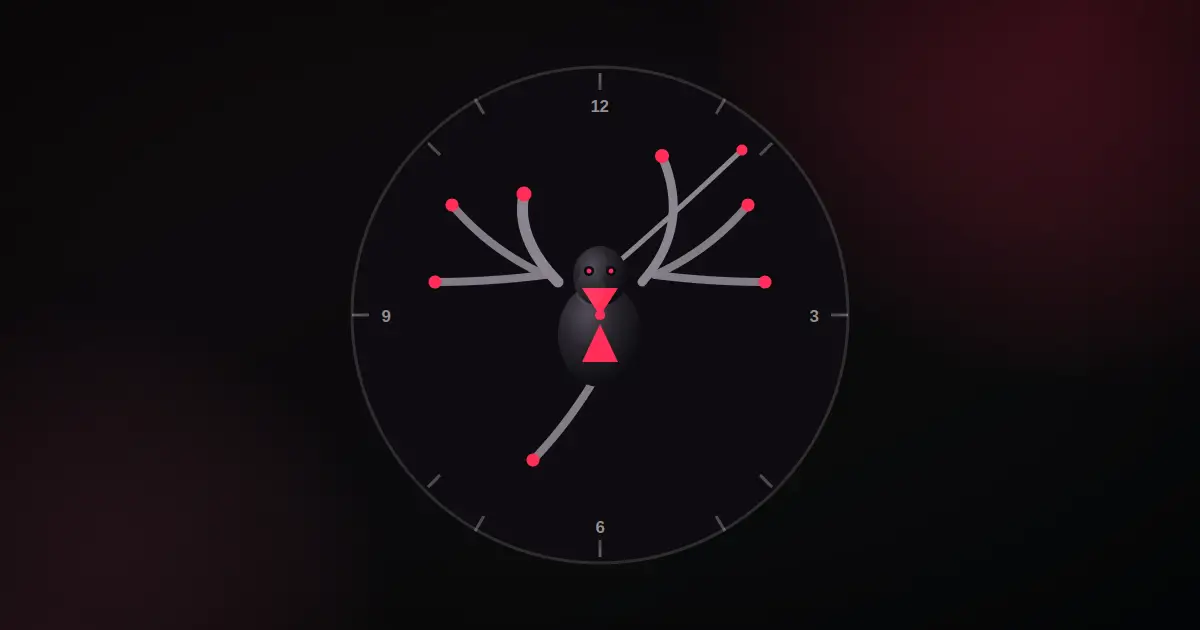
Every so often a project comes along that has no practical reason to exist and gets built anyway, purely because the idea will not leave you alone. Stellix Spider Clock is one of those. The concept is simple to say and stranger to actually build: a real, accurate, working clock where the hour, minute, and second hands are not hands at all — they are the legs of a spider.
Where the Idea Came From
Clock design has been reinvented a thousand times online — flip clocks, word clocks, particle clocks, clocks shaped like everything from cats to cars. Almost all of them keep the same underlying idea: three hands, one dial, rotate at the right speed. Stellix Spider Clock keeps that same underlying idea too. What changes is what the hands actually are.
Instead of three plain sticks pinned to the center of a dial, three of a spider’s eight legs stretch out and point to the correct hour, minute, and second, exactly like normal clock hands would. The other five legs are not decorative background — they are alive, constantly shifting weight and stepping in place with small, asynchronous movements, the way a real spider looks when it is sitting still but not quite motionless. The result is a clock face that is technically accurate to the second, sitting inside something that looks like it is breathing.
The Technical Problem: Making a Leg Bend Like a Leg
The hardest part of this build had nothing to do with telling time. Computers are very good at drawing a straight line from the center of a circle to any angle you want — that is a normal clock hand, and it takes one line of code. Making that line look like a jointed leg, bending naturally at a knee, reaching toward a target point without looking like a broken stick, is a completely different problem.
The solution is a small piece of robotics math called inverse kinematics, or IK for short. It is the same category of math used to animate robot arms and video game character limbs. The idea is: you know where the leg starts (the hip), you know where the leg needs to end up (the foot, pointing at the correct number on the dial), and you know how long the two leg segments are. IK works backward from those three facts to calculate exactly where the knee joint should sit so the whole leg reaches its target while looking like a real, hinged limb instead of a rigid rod.
Every single leg on Stellix Spider Clock — the three that tell time and the five that just idle — runs through this same calculation, every single frame, sixty times a second. The hour leg solves its knee position based on where the hour hand should point right now. The second leg does the same, recalculated every frame so the sweep looks smooth rather than ticking once per second. It is a lot of geometry happening quietly behind eight very simple-looking legs.
Designing an Actual Spider, Not a Stick Figure
Getting the joints to bend correctly was only step one. The next challenge was making the spider look like a spider instead of a diagram. Early versions used flat, single-width lines for legs and simple ovals for the body, and while the clock worked perfectly, it looked more like a technical schematic than a creature.
The final version tapers every leg segment — thick near the body, narrowing toward the foot, the way a real limb loses mass toward its tip. Each leg ends in a small extra claw segment, a detail borrowed directly from real spider anatomy. Fine hairline marks run along each segment for texture. The body itself uses layered gradients rather than flat color, giving it a glossy, slightly reflective look, and it is finished with the marking most people instantly recognize: a red hourglass shape across the abdomen, the same marking that identifies a black widow spider in the real world. Eight small eyes, two fangs, and a pair of gently swaying pedipalps near the head round out the anatomy.
Color mattered here too. The clock uses deep black for the body against a warm red accent — for the eyes, the leg joints, and the glowing ring that pulses around the dial once every second, in sync with the real-world clock tick. It is a small effect, but it ties the whole piece together: the ring pulse, the leg movement, and the digital time readout below the dial all update from the exact same real-time clock source, so nothing on screen is ever out of sync with the others.
A Clock That Never Stops Moving
Beyond just telling the correct time, the whole page leans into motion. The dial floats gently up and down. A soft glow rotates slowly behind it. The digital time readout underneath gives a small pulse every time the second changes. The five idle legs shift on their own schedule, each with a slightly different rhythm, so no two legs move in exact sync with each other — which, coincidentally, is also what makes it look alive rather than mechanical.
None of this is decoration for its own sake. Every moving part on the page ties back to the same idea: a clock that happens to look like a spider, or a spider that happens to be extremely good at telling time, depending on which way you want to look at it.
Built the Same Way as Everything Else at Coding Stellix
Like the rest of the free tools and experiments coming out of Coding Stellix, Stellix Spider Clock is a single self-contained file. No installation, no external animation libraries, no dependencies beyond a Google Font. Every leg, every joint calculation, and every gradient is drawn live on an HTML canvas using nothing but JavaScript math. Open the file in any browser and the spider starts moving immediately, reading the exact time from the device it is running on.
It also works on any screen size, from a small phone to a wide desktop monitor, with the layout, text, and dial all scaling cleanly rather than just shrinking awkwardly. A dark mode and light mode toggle sits in the corner, switching the whole palette without breaking the spider’s signature black-and-red look in either theme.
Why Build Something Like This At All
There is no practical need for a clock shaped like a spider. Nobody is going to replace their kitchen clock with this. But that was never really the point. Projects like this exist to push a bit further than the usual tutorial project — to take one genuinely strange idea and follow it all the way through, from the math of a bending joint to the small detail of a hairline texture on a leg, until the strange idea actually works exactly as imagined.
Stellix Spider Clock is free, runs entirely offline, and updates from the real clock on your device — one more experiment from Coding Stellix, built the same way as everything else in the collection: for the fun of seeing whether it could be done well.
<!DOCTYPE html>
<html lang="en" data-theme="dark">
<head>
<meta charset="UTF-8">
<meta name="viewport" content="width=device-width, initial-scale=1.0">
<title>Stellix Spider Clock — A Real-Time Clock on Spider Legs | Coding Stellix</title>
<link rel="preconnect" href="https://fonts.googleapis.com">
<link rel="preconnect" href="https://fonts.gstatic.com" crossorigin>
<link href="https://fonts.googleapis.com/css2?family=Jost:wght@300;400;500;600;700;800&display=swap" rel="stylesheet">
<style>
:root{
--bg:#07090a;
--bg-soft:#0e1213;
--card:rgba(255,255,255,.05);
--card-border:rgba(255,255,255,.1);
--text:#eef2f0;
--muted:#9a8f92;
--brand:#ff2d55;
--brand-soft:#ff6b8f;
--glow:rgba(255,45,85,.26);
--dial:#0e0c10;
--dial-line:rgba(255,255,255,.14);
--spider:#26232b;
--spider-dark:#0a090c;
--spider-sheen:#4a4550;
--leg:#8b8590;
--shadow:0 24px 70px rgba(0,0,0,.55);
}
[data-theme="light"]{
--bg:#f6f3f2;
--bg-soft:#ffffff;
--card:rgba(255,255,255,.8);
--card-border:rgba(30,10,15,.1);
--text:#171013;
--muted:#71646a;
--glow:rgba(255,45,85,.16);
--dial:#fdfbfa;
--dial-line:rgba(20,10,12,.16);
--spider:#26232b;
--spider-dark:#0a090c;
--spider-sheen:#4a4550;
--leg:#1c1a1f;
--shadow:0 20px 55px rgba(60,20,30,.14);
}
*{margin:0;padding:0;box-sizing:border-box;-webkit-tap-highlight-color:transparent}
body{
font-family:'Jost',sans-serif;
background:var(--bg);color:var(--text);
min-height:100vh;overflow-x:hidden;
transition:background .45s,color .45s;
}
body::before{
content:"";position:fixed;inset:0;pointer-events:none;z-index:0;
background:
radial-gradient(650px 450px at 92% -10%,var(--glow),transparent 65%),
radial-gradient(550px 420px at -12% 108%,var(--glow),transparent 60%);
}
.wrap{position:relative;z-index:1;max-width:600px;margin:0 auto;padding:0 18px}
header{display:flex;align-items:center;justify-content:space-between;padding:20px 0}
.logo{display:flex;align-items:center;gap:11px;user-select:none}
.logo-mark{
width:42px;height:42px;border-radius:13px;
background:linear-gradient(135deg,var(--brand),var(--brand-soft));
display:grid;place-items:center;color:#052018;font-size:1.15rem;font-weight:800;
box-shadow:0 6px 22px var(--glow);
}
.logo-name{font-weight:700;font-size:1.15rem}
.logo-name span{color:var(--brand)}
.logo small{display:block;font-size:.58rem;letter-spacing:2.4px;text-transform:uppercase;color:var(--muted);font-weight:500}
#themeBtn{
width:44px;height:44px;border-radius:50%;cursor:pointer;
border:1px solid var(--card-border);background:var(--card);color:var(--text);
font-size:1.12rem;backdrop-filter:blur(10px);
display:grid;place-items:center;transition:transform .3s,box-shadow .3s;
}
#themeBtn:hover{transform:rotate(18deg) scale(1.08);box-shadow:0 0 20px var(--glow)}
#themeBtn:focus-visible{outline:2px solid var(--brand);outline-offset:3px}
.hero{text-align:center;padding:10px 0 4px;animation:rise .7s ease both}
.hero h1{font-size:clamp(1.6rem,4.6vw,2.3rem);font-weight:800;letter-spacing:-.4px;line-height:1.2}
.hero h1 em{
font-style:normal;background:linear-gradient(120deg,var(--brand),var(--brand-soft));
-webkit-background-clip:text;background-clip:text;color:transparent;
}
.hero p{color:var(--muted);margin-top:6px;font-size:.92rem}
.panel{
background:var(--card);border:1px solid var(--card-border);
border-radius:28px;padding:26px 18px;margin-top:20px;
backdrop-filter:blur(14px);box-shadow:var(--shadow);
display:flex;flex-direction:column;align-items:center;
animation:rise .7s .1s ease both;
}
.canvas-wrap{
width:100%;max-width:440px;aspect-ratio:1/1;position:relative;
animation:floaty 6s ease-in-out infinite;
}
.canvas-wrap::before{
content:"";position:absolute;inset:-14px;border-radius:50%;
background:conic-gradient(from 0deg, var(--brand), transparent 30%, transparent 70%, var(--brand-soft));
opacity:.35;filter:blur(14px);
animation:spinGlow 8s linear infinite;
z-index:0;
}
canvas{width:100%;height:100%;display:block;cursor:default;position:relative;z-index:1}
.logo-mark{animation:logoPulse 2.6s ease-in-out infinite}
.digital{
margin-top:18px;font-size:1.9rem;font-weight:700;letter-spacing:1px;
font-variant-numeric:tabular-nums;
transition:transform .15s ease;
}
.digital.tick{animation:digitalPulse .4s ease}
.digital span{color:var(--brand)}
.date-line{color:var(--muted);font-size:.88rem;margin-top:2px;font-weight:500}
.legend{
display:flex;gap:16px;flex-wrap:wrap;justify-content:center;margin-top:18px;
}
.legend div{display:flex;align-items:center;gap:7px;font-size:.78rem;font-weight:600;color:var(--muted)}
.legend i{width:16px;height:4px;border-radius:3px;display:inline-block;animation:dotPulse 1.8s ease-in-out infinite}
.legend div:nth-child(1) i{animation-delay:0s}
.legend div:nth-child(2) i{animation-delay:.3s}
.legend div:nth-child(3) i{animation-delay:.6s}
footer{text-align:center;padding:26px 0 36px;color:var(--muted);font-size:.85rem}
footer b{color:var(--brand)}
@keyframes rise{from{opacity:0;transform:translateY(20px)}to{opacity:1;transform:none}}
@keyframes floaty{0%,100%{transform:translateY(0)}50%{transform:translateY(-9px)}}
@keyframes spinGlow{from{transform:rotate(0deg)}to{transform:rotate(360deg)}}
@keyframes logoPulse{
0%,100%{box-shadow:0 6px 22px var(--glow)}
50%{box-shadow:0 6px 34px var(--glow),0 0 0 6px rgba(255,45,85,.12)}
}
@keyframes digitalPulse{
0%{transform:scale(1)}
30%{transform:scale(1.06)}
100%{transform:scale(1)}
}
@keyframes dotPulse{
0%,100%{opacity:.55;transform:scaleX(1)}
50%{opacity:1;transform:scaleX(1.25)}
}
@media(max-width:480px){
header{padding:14px 0}
.logo-mark{width:36px;height:36px;border-radius:11px;font-size:1rem}
.logo-name{font-size:1rem}
.logo small{font-size:.54rem;letter-spacing:2px}
#themeBtn{width:38px;height:38px;font-size:1rem}
.hero p{font-size:.85rem;padding:0 4px}
.panel{padding:20px 14px;border-radius:22px}
.digital{font-size:1.55rem}
.date-line{font-size:.78rem}
.legend{gap:10px;margin-top:14px}
.legend div{font-size:.7rem;gap:5px}
.legend i{width:13px;height:3.5px}
footer{padding:20px 0 30px;font-size:.78rem}
}
@media(max-width:360px){
.hero h1{font-size:1.4rem}
.digital{font-size:1.35rem}
.canvas-wrap::before{filter:blur(10px)}
}
@media(min-width:900px){
.wrap{max-width:640px}
.panel{padding:34px 26px}
}
@media (prefers-reduced-motion: reduce){
*,*::before,*::after{animation-duration:.01ms!important;transition-duration:.01ms!important}
}
</style>
</head>
<body>
<div class="wrap">
<header>
<div class="logo">
<div class="logo-mark">🕷</div>
<div>
<div class="logo-name">Stellix <span>Spider Clock</span></div>
<small>by Coding Stellix</small>
</div>
</div>
<button id="themeBtn" aria-label="Toggle light and dark mode" title="Toggle theme">🌙</button>
</header>
<section class="hero">
<h1>A clock that tells time on <em>spider legs</em></h1>
<p>Three legs point the real hour, minute & second — the rest just live.</p>
</section>
<div class="panel">
<div class="canvas-wrap">
<canvas id="clockCanvas"></canvas>
</div>
<div class="digital" id="digitalTime">00:00:00 <span id="ampm">AM</span></div>
<div class="date-line" id="dateLine"></div>
<div class="legend">
<div><i style="background:var(--brand)"></i> Second leg</div>
<div><i style="background:var(--spider)"></i> Minute leg</div>
<div><i style="background:var(--spider-dark)"></i> Hour leg</div>
</div>
</div>
<footer>Crafted with 🧡 by <b>Coding Stellix</b> — Stellix Spider Clock v1.0</footer>
</div>
<script>
// ============================================================
// Stellix Spider Clock v1.0
// A real-time clock where 3 spider legs act as hour/minute/
// second hands (solved with 2-bone inverse kinematics), while
// the remaining legs idle-animate for a lifelike feel.
// Crafted by Coding Stellix (coding_stellix)
// ============================================================
(function(){
"use strict";
var $ = function(id){ return document.getElementById(id); };
var canvas = $("clockCanvas"), ctx = canvas.getContext("2d");
var wrap = document.querySelector(".canvas-wrap");
var DPR = Math.max(window.devicePixelRatio || 1, 1);
var SIZE = 440; // logical drawing size (CSS px), canvas is scaled by DPR
function resize(){
var cssSize = wrap.clientWidth;
SIZE = cssSize;
canvas.width = Math.round(cssSize * DPR);
canvas.height = Math.round(cssSize * DPR);
ctx.setTransform(DPR, 0, 0, DPR, 0, 0);
}
window.addEventListener("resize", resize);
resize();
function cssVar(name){
return getComputedStyle(document.documentElement).getPropertyValue(name).trim();
}
// ---------- geometry helpers ----------
function polar(cx, cy, angleDeg, r){
var rad = (angleDeg - 90) * Math.PI / 180; // 0deg = 12 o'clock, clockwise
return { x: cx + r * Math.cos(rad), y: cy + r * Math.sin(rad) };
}
// 2-bone IK: returns knee point given hip, target foot, segment lengths, bend sign
function solveKnee(hip, foot, l1, l2, bendSign){
var dx = foot.x - hip.x, dy = foot.y - hip.y;
var dist = Math.hypot(dx, dy);
dist = Math.min(dist, l1 + l2 - 0.01);
dist = Math.max(dist, Math.abs(l1 - l2) + 0.01);
var baseAngle = Math.atan2(dy, dx);
var a = (l1*l1 - l2*l2 + dist*dist) / (2 * l1 * dist);
a = Math.max(-1, Math.min(1, a));
var offset = Math.acos(a);
var kneeAngle = baseAngle + bendSign * offset;
return {
x: hip.x + l1 * Math.cos(kneeAngle),
y: hip.y + l1 * Math.sin(kneeAngle)
};
}
// draws one leg segment as a tapered (thick->thin) filled shape, like a real limb
function taperedSegment(p1, p2, w1, w2, color){
var dx = p2.x - p1.x, dy = p2.y - p1.y;
var len = Math.hypot(dx, dy) || 0.001;
var nx = -dy / len, ny = dx / len; // unit normal
ctx.beginPath();
ctx.moveTo(p1.x + nx*w1/2, p1.y + ny*w1/2);
ctx.lineTo(p2.x + nx*w2/2, p2.y + ny*w2/2);
ctx.lineTo(p2.x - nx*w2/2, p2.y - ny*w2/2);
ctx.lineTo(p1.x - nx*w1/2, p1.y - ny*w1/2);
ctx.closePath();
ctx.fillStyle = color;
ctx.fill();
}
// tiny perpendicular hair marks along a segment, for a fuzzy realistic look
function drawHairs(p1, p2, count, len, color){
var dx = p2.x - p1.x, dy = p2.y - p1.y;
var segLen = Math.hypot(dx, dy) || 0.001;
var ux = dx/segLen, uy = dy/segLen;
var nx = -uy, ny = ux;
ctx.strokeStyle = color;
ctx.lineWidth = Math.max(len*0.16, 0.6);
ctx.lineCap = "round";
for(var i = 1; i < count; i++){
var f = i / count;
var bx = p1.x + dx*f, by = p1.y + dy*f;
var side = i % 2 === 0 ? 1 : -1;
ctx.beginPath();
ctx.moveTo(bx, by);
ctx.lineTo(bx + nx*len*side + ux*len*0.5, by + ny*len*side + uy*len*0.5);
ctx.stroke();
}
}
function drawLeg(hip, foot, l1, l2, bendSign, color, jointColor, hairColor, width){
var knee = solveKnee(hip, foot, l1, l2, bendSign);
// femur (hip->knee): thicker; tibia (knee->foot): tapers to a fine point
taperedSegment(hip, knee, width, width*0.62, color);
taperedSegment(knee, foot, width*0.6, width*0.16, color);
// tarsus/claw — a tiny final segment continuing past the foot, like a real spider's claw tip
var dx = foot.x - knee.x, dy = foot.y - knee.y;
var dlen = Math.hypot(dx, dy) || 0.001;
var claw = { x: foot.x + (dx/dlen)*width*0.9, y: foot.y + (dy/dlen)*width*0.9 };
taperedSegment(foot, claw, width*0.16, 0.6, jointColor);
// fine hairs along both segments for a lifelike texture
drawHairs(hip, knee, 3, width*0.9, hairColor);
drawHairs(knee, foot, 4, width*0.7, hairColor);
// joint (knee) highlight
ctx.beginPath();
ctx.arc(knee.x, knee.y, width*0.32, 0, Math.PI*2);
ctx.fillStyle = jointColor;
ctx.fill();
// hip socket
ctx.beginPath();
ctx.arc(hip.x, hip.y, width*0.4, 0, Math.PI*2);
ctx.fillStyle = color;
ctx.fill();
}
// ---------- leg rig ----------
var ripples = []; // {start: performanceNow} — a new ring spawns each real second
var lastRippleSecond = -1;
function bodyHips(cx, cy, bodyR){
var rightAngles = [-58, -22, 18, 54]; // degrees, 0 = pointing right (3 o'clock)
var hips = [];
rightAngles.forEach(function(a){
var rad = a * Math.PI / 180;
hips.push({ side: "R", x: cx + bodyR * Math.cos(rad), y: cy + bodyR * Math.sin(rad) * 0.72, restAngle: a });
});
rightAngles.forEach(function(a){
var rad = (180 - a) * Math.PI / 180;
hips.push({ side: "L", x: cx + bodyR * Math.cos(rad), y: cy + bodyR * Math.sin(rad) * 0.72, restAngle: 180 - a });
});
return hips;
}
function draw(){
var cx = SIZE/2, cy = SIZE/2;
var R = SIZE * 0.46;
var now = new Date();
var h = now.getHours(), m = now.getMinutes(), s = now.getSeconds(), ms = now.getMilliseconds();
var t = performance.now() / 1000;
ctx.clearRect(0, 0, SIZE, SIZE);
// ---- per-second ripple pulse at the dial edge ----
if(s !== lastRippleSecond){
lastRippleSecond = s;
ripples.push({ start: t });
}
ripples = ripples.filter(function(rp){ return (t - rp.start) < 0.9; });
ripples.forEach(function(rp){
var age = t - rp.start;
var prog = age / 0.9;
ctx.beginPath();
ctx.arc(cx, cy, R * (1 + prog*0.09), 0, Math.PI*2);
ctx.strokeStyle = cssVar("--brand");
ctx.globalAlpha = Math.max(0, 1 - prog) * 0.5;
ctx.lineWidth = 2.5;
ctx.stroke();
ctx.globalAlpha = 1;
});
// ---- dial ----
ctx.beginPath();
ctx.arc(cx, cy, R, 0, Math.PI*2);
ctx.fillStyle = cssVar("--dial");
ctx.fill();
ctx.lineWidth = 2;
ctx.strokeStyle = cssVar("--card-border");
ctx.stroke();
// tick marks
for(var i = 0; i < 60; i++){
var isHour = i % 5 === 0;
var p1 = polar(cx, cy, i*6, R * (isHour ? 0.90 : 0.94));
var p2 = polar(cx, cy, i*6, R * 0.97);
ctx.beginPath();
ctx.moveTo(p1.x, p1.y);
ctx.lineTo(p2.x, p2.y);
ctx.strokeStyle = cssVar("--dial-line");
ctx.lineWidth = isHour ? 2.4 : 1;
ctx.stroke();
}
// hour numbers
ctx.font = "600 " + Math.round(R*0.11) + "px Jost, Arial, sans-serif";
ctx.fillStyle = cssVar("--muted");
ctx.textAlign = "center";
ctx.textBaseline = "middle";
for(var n = 1; n <= 12; n++){
var np = polar(cx, cy, n*30, R * 0.78);
ctx.fillText(String(n), np.x, np.y);
}
// ---- time angles ----
var secAngle = (s + ms/1000) * 6;
var minAngle = (m + s/60) * 6;
var hourAngle = ((h % 12) + m/60) * 30;
// ---- leg rig setup ----
var bodyR = R * 0.155;
var hips = bodyHips(cx, cy, bodyR);
// hip indices: 0,1,2,3 = right front->back ; 4,5,6,7 = left front->back
var secHip = hips[0]; // right-front
var minHip = hips[4]; // left-front
var hourHip = hips[3]; // right-back
var idleHips = [hips[1], hips[2], hips[5], hips[6], hips[7]];
// colors
var colSecond = cssVar("--brand");
var colSpider = cssVar("--spider");
var colSpiderDark = cssVar("--spider-dark");
var colSheen = cssVar("--spider-sheen");
var colLeg = cssVar("--leg");
// ---- shadow under body ----
ctx.beginPath();
ctx.ellipse(cx, cy + bodyR*0.9, bodyR*1.5, bodyR*0.5, 0, 0, Math.PI*2);
ctx.fillStyle = "rgba(0,0,0,0.18)";
ctx.fill();
// ---- idle legs (draw first, behind body) ----
idleHips.forEach(function(hip, idx){
var phase = idx * 1.7;
var speed = 1.1;
var restR = bodyR * 2.1;
var wobbleR = Math.sin(t*speed + phase) * bodyR * 0.35;
var wobbleA = Math.sin(t*speed*0.6 + phase*1.3) * 9;
var angle = hip.restAngle + wobbleA;
var reach = restR + wobbleR;
var rad = angle * Math.PI/180;
var foot = { x: cx + reach*Math.cos(rad), y: cy + reach*Math.sin(rad)*0.85 };
var l1 = bodyR*1.05, l2 = bodyR*1.5;
var bend = hip.side === "R" ? 1 : -1;
drawLeg(hip, foot, l1, l2, bend, colLeg, colSecond, colSheen, Math.max(SIZE*0.017,3));
});
// ---- hand legs (drawn after idle, in front) ----
var secFoot = polar(cx, cy, secAngle, R*0.80);
var minFoot = polar(cx, cy, minAngle, R*0.64);
var hourFoot = polar(cx, cy, hourAngle, R*0.42);
drawLeg(hourHip, hourFoot, bodyR*1.3, bodyR*2.1, 1, colLeg, colSecond, colSheen, Math.max(SIZE*0.026,5));
drawLeg(minHip, minFoot, bodyR*1.2, bodyR*2.6, -1, colLeg, colSecond, colSheen, Math.max(SIZE*0.02,4));
drawLeg(secHip, secFoot, bodyR*1.1, bodyR*3.2, 1, colLeg, colSecond, colSheen, Math.max(SIZE*0.013,3));
// ---- spider body ----
ctx.save();
ctx.shadowColor = "rgba(0,0,0,0.35)";
ctx.shadowBlur = bodyR*0.4;
ctx.shadowOffsetY = bodyR*0.15;
// pedipalps (small feelers near the head), gentle idle sway
var palpSway = Math.sin(t*1.4) * 6;
[-1,1].forEach(function(side){
var base = { x: cx + side*bodyR*0.4, y: cy - bodyR*1.05 };
var tip = { x: base.x + side*bodyR*0.55, y: base.y - bodyR*0.5 + palpSway*0.3 };
taperedSegment(base, tip, bodyR*0.18, bodyR*0.05, colSpiderDark);
});
// abdomen — radial gradient for a rounded, glossy black look
var abX = cx, abY = cy + bodyR*0.4;
var abGrad = ctx.createRadialGradient(abX - bodyR*0.32, abY - bodyR*0.5, bodyR*0.08, abX, abY, bodyR*1.35);
abGrad.addColorStop(0, colSheen);
abGrad.addColorStop(0.45, colSpider);
abGrad.addColorStop(1, colSpiderDark);
ctx.beginPath();
ctx.ellipse(abX, abY, bodyR*0.98, bodyR*1.2, 0, 0, Math.PI*2);
ctx.fillStyle = abGrad;
ctx.fill();
// glossy highlight streak
ctx.beginPath();
ctx.ellipse(abX - bodyR*0.32, abY - bodyR*0.5, bodyR*0.32, bodyR*0.5, -0.4, 0, Math.PI*2);
ctx.fillStyle = "rgba(255,255,255,0.08)";
ctx.fill();
// iconic red hourglass marking on the underside/back
ctx.save();
ctx.beginPath();
ctx.ellipse(abX, abY, bodyR*0.98, bodyR*1.2, 0, 0, Math.PI*2);
ctx.clip();
ctx.fillStyle = colSecond;
ctx.beginPath();
ctx.moveTo(abX, abY - bodyR*0.05);
ctx.lineTo(abX - bodyR*0.32, abY - bodyR*0.62);
ctx.lineTo(abX + bodyR*0.32, abY - bodyR*0.62);
ctx.closePath();
ctx.fill();
ctx.beginPath();
ctx.moveTo(abX, abY + bodyR*0.05);
ctx.lineTo(abX - bodyR*0.32, abY + bodyR*0.68);
ctx.lineTo(abX + bodyR*0.32, abY + bodyR*0.68);
ctx.closePath();
ctx.fill();
ctx.restore();
// cephalothorax (head/thorax segment) — glossy gradient too
var ceX = cx, ceY = cy - bodyR*0.62;
var ceGrad = ctx.createRadialGradient(ceX - bodyR*0.22, ceY - bodyR*0.28, bodyR*0.04, ceX, ceY, bodyR*0.9);
ceGrad.addColorStop(0, colSheen);
ceGrad.addColorStop(0.5, colSpider);
ceGrad.addColorStop(1, colSpiderDark);
ctx.beginPath();
ctx.ellipse(ceX, ceY, bodyR*0.6, bodyR*0.68, 0, 0, Math.PI*2);
ctx.fillStyle = ceGrad;
ctx.fill();
ctx.restore(); // end shadow
// fangs (chelicerae) — two small dark tapers under the head
[-1,1].forEach(function(side){
var base = { x: cx + side*bodyR*0.13, y: ceY + bodyR*0.55 };
var tip = { x: base.x + side*bodyR*0.07, y: base.y + bodyR*0.28 };
taperedSegment(base, tip, bodyR*0.1, bodyR*0.02, colSpiderDark);
});
// eye cluster — 2 large front eyes + 6 smaller ones, spiders have 8
var eyeY = ceY - bodyR*0.28;
ctx.fillStyle = "#0a0a0a";
[-1,1].forEach(function(side){
ctx.beginPath();
ctx.arc(cx + side*bodyR*0.24, eyeY, bodyR*0.12, 0, Math.PI*2);
ctx.fill();
});
ctx.fillStyle = colSecond;
[-1,1].forEach(function(side){
ctx.beginPath();
ctx.arc(cx + side*bodyR*0.24, eyeY, bodyR*0.065, 0, Math.PI*2);
ctx.fill();
});
ctx.fillStyle = "#0a0a0a";
[-1,1].forEach(function(side){
ctx.beginPath();
ctx.arc(cx + side*bodyR*0.44, eyeY + bodyR*0.06, bodyR*0.07, 0, Math.PI*2);
ctx.fill();
ctx.beginPath();
ctx.arc(cx + side*bodyR*0.36, eyeY - bodyR*0.16, bodyR*0.055, 0, Math.PI*2);
ctx.fill();
ctx.beginPath();
ctx.arc(cx + side*bodyR*0.12, eyeY - bodyR*0.22, bodyR*0.05, 0, Math.PI*2);
ctx.fill();
});
// ---- center pin ----
ctx.beginPath();
ctx.arc(cx, cy, Math.max(SIZE*0.012,3), 0, Math.PI*2);
ctx.fillStyle = colSecond;
ctx.fill();
}
// ---------- digital readout ----------
var lastSecondShown = -1;
function updateDigital(){
var now = new Date();
var h = now.getHours(), m = now.getMinutes(), s = now.getSeconds();
var ampm = h >= 12 ? "PM" : "AM";
var h12 = h % 12; if(h12 === 0) h12 = 12;
$("digitalTime").innerHTML =
String(h12).padStart(2,"0") + ":" + String(m).padStart(2,"0") + ":" + String(s).padStart(2,"0") +
' <span id="ampm">' + ampm + '</span>';
$("dateLine").textContent = now.toLocaleDateString(undefined, { weekday:"long", year:"numeric", month:"long", day:"numeric" });
if(s !== lastSecondShown){
lastSecondShown = s;
var dEl = $("digitalTime");
dEl.classList.remove("tick");
void dEl.offsetWidth; // restart animation
dEl.classList.add("tick");
}
}
// ---------- animation loop ----------
function loop(){
draw();
requestAnimationFrame(loop);
}
setInterval(updateDigital, 1000);
updateDigital();
loop();
// ---------- theme ----------
var themeBtn = $("themeBtn");
themeBtn.addEventListener("click", function(){
var html = document.documentElement;
var next = html.getAttribute("data-theme") === "dark" ? "light" : "dark";
html.setAttribute("data-theme", next);
themeBtn.textContent = next === "dark" ? "🌙" : "☀️";
});
})();
</script>
</body>
</html>